Brazil Visa Photo in the 2×2 Inch Size
A Brazilian consulate application filed from the United States needs a square colour photo of 2 × 2 inches. Send us a photo taken on your phone and we cut the photo to the visa photo size, turn the background white and measure the head and eye line online, so the print you glue to your application is right the first time.
| Size | 2 × 2 in |
|---|---|
| Head height | 1.29 in |
| Background | white |
| Resolution | 300 dpi |
| File size | up to 240 KB |
| Use |
Brazil visa photo size and basic rules
The photo is a square, 2 inches on each side, which equals about 51 × 51 mm. Inside that square the head, from the chin to the top of the hair, takes roughly 1.29 inches, and the eyes sit about 1.18 inches above the lower edge of the photo. Printed at 300 DPI, the face stays crisp at this small size. If you keep a digital copy of the visa photo, our file stays below 240 KB.
- Size of the photo: a 2 × 2 inch square, roughly 51 × 51 mm
- Head: close to 1.29 in tall, measured from the chin to the top of the hair
- Eyes: close to 1.18 in above the lower edge of the visa photo
- Background: plain white, even, without shadows
- Print quality: 300 DPI, in colour, on photo paper
A visa photo in any other size, such as a rectangular 35 × 45 mm passport photo from Europe, is not the square format the consulate asks for. Pick this document online and the photo size is set for you.
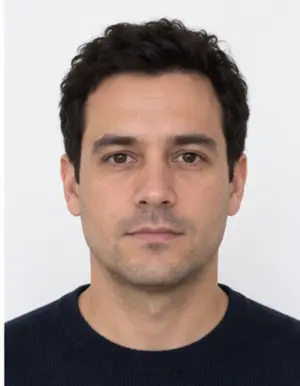
Framing the head in a Brazilian visa photo
Look straight at the lens with your head upright and centred. The whole face must fit inside the square, from the chin up to the hairline, with a little space above the hair. A head that is too small leaves too much empty background in the photo; a head that is too big gets cut at the top. Our crop places the face at the right height for the 2 × 2 inch size, so you never measure the visa photo with a ruler.
Background, light and what to wear
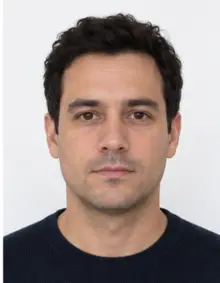
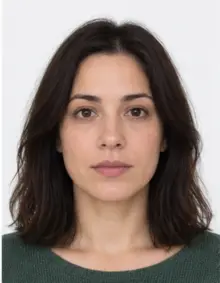
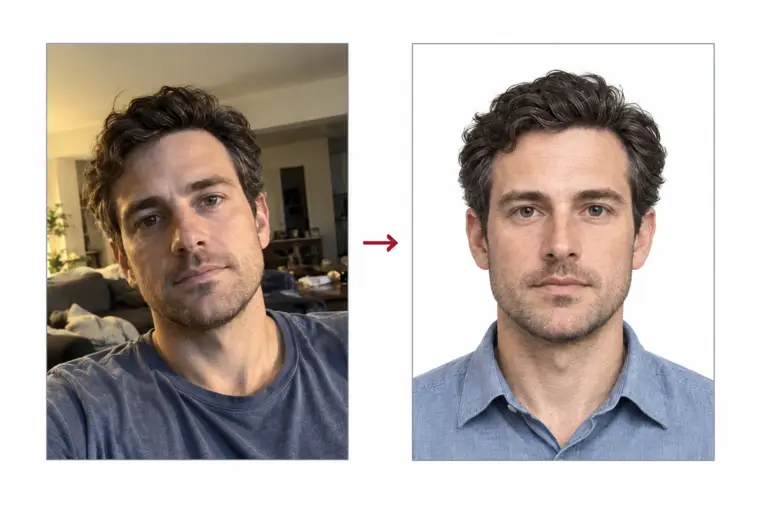
The visa photo needs a white background with no pattern and no shadow behind your head. Any plain wall will do at home: the tool swaps it for clean white. Light from the front, such as a window in daytime, keeps both sides of the face equally bright in the photo. Wear ordinary clothes in a darker colour so your shoulders stand out against the white. Remove hats, sunglasses and headphones, keep your mouth closed and your eyes open, and take off your glasses to avoid glare. A neutral expression is the safe choice for any visa photo.
-
 Accepted
-
 Accepted
-
 Smiling
-
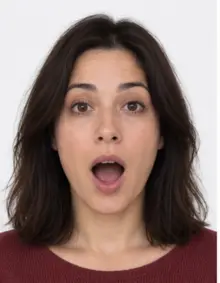 Mouth open
-
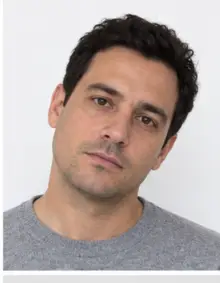 Head tilted
-
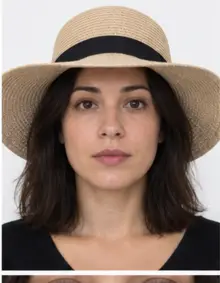 Fashion hat
-
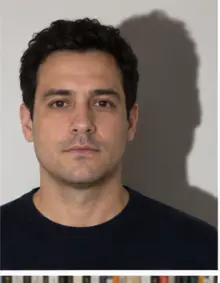 Shadow behind
-
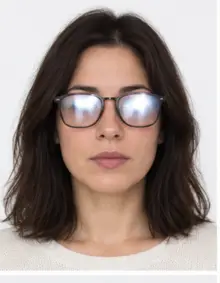 Glare on glasses
-
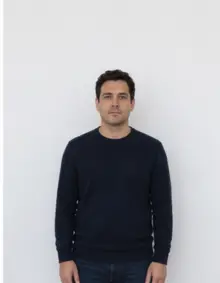 Too far away
-
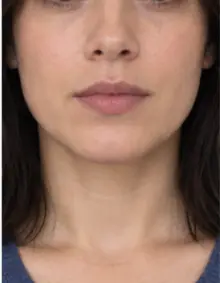 Head cut off
-
 Busy background
-
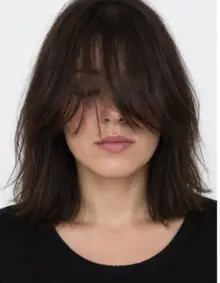 Hair over eyes
The people in these examples are AI-generated.
How to make a Brazil visa photo online
- Take a photo. Ask a friend to hold the phone camera at eye level about a metre and a half away, or use the self-timer.
- Upload the photo online. Pick this document in the form above and add the JPG, PNG, HEIC, PDF or other image file from your phone.
- Review the check. We crop your photo online to the 2 × 2 inch visa photo size, make the background white and run a compliance check on head size, eye line and lighting.
- Download or print. The digital Brazil visa photo is free to download. You can also order a print sheet with several copies of the photo and print it at 300 DPI.
Everything runs online in your browser. There is no app to install and no account needed to see the result, and the free visa photo is ready a few seconds after the upload.
Who needs a Brazil visa photo
Since April 10, 2025, citizens of the United States, Canada and Australia need a visa to travel to Brazil. Every applicant, including children, needs their own visa photo. Visitors from many other countries can make short trips to Brazil without a visa, and Brazil sets that list itself, so check the rules for your passport before you prepare a photo.
-
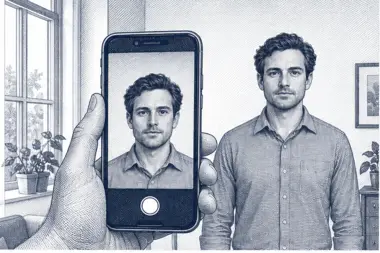 1. Take the picture
At home, against a plain wall, in daylight.
1. Take the picture
At home, against a plain wall, in daylight.
-
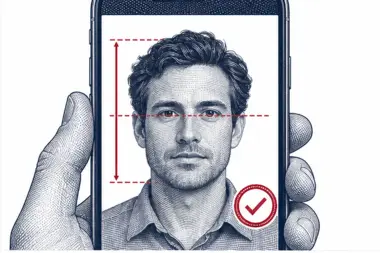 2. We check and crop
Head height, eye line and background are measured.
2. We check and crop
Head height, eye line and background are measured.
-
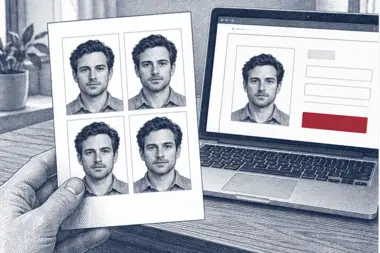 3. Download or print
A file for the upload form or a print sheet.
3. Download or print
A file for the upload form or a print sheet.
Where to submit the visa photo
Brazil runs two application routes. Most tourist and business visitors apply for the online visa, which takes a digital photo upload with its own pixel size and file limits; for that route open our online visa photo page listed under related documents. For the consulate route you complete the form online, print the receipt, glue one printed 2 × 2 photo onto it and upload a scan online through e-Consular. The Brazil visa photo on this page is the printed one for that consulate route. Brazil can change these rules, so confirm the details with the Brazilian consulate that covers your state before you submit the photo.
What the online photo check looks at
When you upload a photo online, the check measures the head size, the eye line and the photo size, looks at the background colour and flags blur, glare or closed eyes. Each photo gets a clear pass or a short list of fixes, so you know before printing whether the photo matches the size the Brazilian consulate expects. If a photo fails, take a new photo and upload it online again; the online check is free every time.
Common reasons a Brazil visa photo is refused
- The print is not a 2 × 2 inch square, for example a photo cut to another passport size.
- The background is grey, dark or shows a shadow.
- The head is tilted, too small or partly outside the frame of the photo.
- The face is blurred, too dark or edited with a filter.
- The visa photo is old and no longer looks like you.
Our online check covers the size, the head position and the background of every visa photo. It cannot tell when the photo was taken, so use a new photo for each application.
Visa photo examples
- Good visa photo: face centred, head about 1.29 in tall, plain white background, soft even light.
- Bad visa photo, wrong size: a rectangular print instead of the square 2 × 2 inch photo size.
- Bad visa photo, shadow: a ceiling lamp throws a dark line behind the neck.
- Bad visa photo, too far: the head fills less than half of the photo.
- Bad visa photo, filter: skin smoothing changes the shape of the face.
- Bad visa photo, cropped: the top of the hair is cut off at the edge of the photo.
Tips for a good visa photo at home
- For the photo, stand half a metre from a light wall and face a window.
- Switch off the flash; it creates glare and hard shadows in the photo.
- Keep the camera level with your eyes, not above or below, so the photo is not distorted.
- Leave space around the head and shoulders so the crop to the right photo size has room.
- Take several photos and upload the sharpest one online.
- Upload the original photo file, not a copy squeezed by a messenger app.
For a baby, lay the child on a white sheet and take the photo from above. No hands or toys may show in the visa photo, and the eyes should be open.
Visa photo size in inches, millimetres and pixels
The same photo size can be written three ways. In inches it is 2 × 2; in millimetres it is about 51 × 51; and at 300 DPI the photo file is 600 × 600 pixels. A photo shop may ask for the size in any of these units, so keep this photo size note at hand. Our online tool saves the photo in the right size for a sharp print, and the online preview shows the photo exactly as it will look on paper.
Printing the Brazil visa photo
Choose the print sheet if you want to print at home or in a photo shop. Print at 100% scale, with no "fit to page" option, so each photo keeps the exact 2 × 2 inch size. Cut along the edges, then check one copy with a ruler: it should measure 2 inches, or 51 mm, on every side.
Checklist before you print
- The photo is a 2 × 2 inch square in colour.
- The background is white and even.
- Your face is centred, straight and neutral, with both eyes open.
- The print is sharp at 300 DPI and has no marks or creases.
- You use a recent photo that looks like you today.
Free photo or premium processing
The free Brazil visa photo already has the correct size, a white background and a passed compliance check. Premium processing is optional and paid: we correct light and colour, and a member of our team reviews the visa photo by hand. If the reviewer finds a problem that a new photo would fix, you can upload another photo at no extra cost.
| Feature | Free photo | Premium photo |
|---|---|---|
| 2 × 2 inch photo size | Yes | Yes |
| White background | Yes | Yes |
| Online compliance check | Yes | Yes |
| Light and colour correction | No | Yes |
| Manual review of the visa photo | No | Yes |
Related documents
For the online visa upload, use the Brazil online visa photo page, which prepares a digital photo file in the online size instead of a print. Other countries use other photo sizes, so pick the exact document from the list of photo requirements.
Frequently asked questions
What is the Brazil visa photo size?
If you apply through a consulate from the US, the visa photo must be a 2 × 2 inch square, about 51 × 51 mm in size.
Can I take the photo with my phone?
Yes. Take it in daylight against a plain wall; we crop it to the right size and set a white background online.
Is the Brazil visa photo free?
Yes: the digital visa photo and its online photo check are free to use. Premium processing with a manual review is an optional paid extra.
Can I wear glasses in a visa photo?
It is safer to remove them, since glare on the lenses can hide the eyes.
Is this visa photo for the online visa?
No. Here you get the printed 2 × 2 inch photo for the consulate route. The online visa upload has its own photo size rules.
Can I order the printed Brazil photo online?
Yes. Upload your photo online, download the free file and choose the print sheet. Brazilian consulates accept a clear print; the online check confirms the head size and background first. Do not resize the file in another app.