US Passport Photo Online
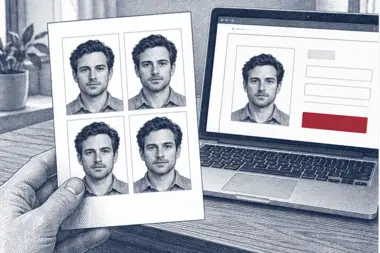
Every US passport application, a first passport or a renewal, needs one recent colour passport photo that meets the photo standard set by the State Department. Upload a photo from your phone and we turn it into a US passport photo online: a 2 × 2 inch square with a plain white background, your head scaled to the right height and your eyes at the right level. The digital passport photo is free, and you can print it or upload it to the online passport renewal form.
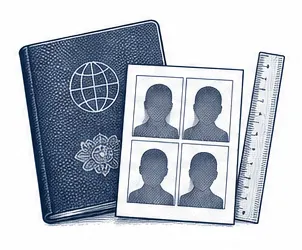
| Size | 2 × 2 in |
|---|---|
| Head height | 1.29 in |
| Background | white |
| Resolution | 300 dpi |
| File size | up to 240 KB |
| Use | digital upload and print |
US passport photo size and rules
The official US passport photo size is a 2 × 2 inch square, or 51 × 51 mm. Inside that square, the head must measure 1 to 1⅜ inches, counting from the lowest point of the chin up to the crown with the hair. The eye line must fall 1⅛ to 1⅜ inches above the lower edge of the photo. These two ranges are what set a passport photo for the United States apart from the passport photos of most other countries, so a photo made for a European or Asian passport rarely fits a US passport.
In our US passport photo template the head is about 1.29 inches tall and the eyes are roughly 1.18 inches up from the lower edge, well inside both ranges. Each passport photo is prepared at 300 DPI, so a print at 2 × 2 inches stays sharp, and the photo file you download weighs no more than 240 KB.
- Passport photo size: 2 × 2 inches (51 × 51 mm), square
- Head height in the photo: 1 to 1⅜ inches, chin to crown
- Eye height in the photo: 1⅛ to 1⅜ inches above the lower edge
- Photo background: plain white or off-white, without shadows or texture
- Colour photo taken in the last six months, with no filters or retouching
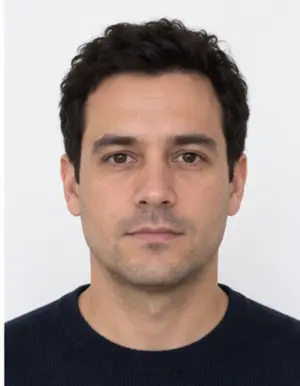
Framing: where your head and eyes go in the photo
Most passport photos that the State Department sends back fail on framing rather than on the background. In a good passport photo the face looks straight at the camera, centred in the frame, with the whole head visible from chin to crown and a little white space above the hair. Shoulders stay level and the head does not lean to one side.
For a digital US passport photo the same rule is written as proportions: the head fills 50 to 69 per cent of the photo height, and the eyes sit between 56 and 69 per cent of the height, counted upward from the lower edge. Stand too close to the camera and the head in the photo comes out too big; stand too far away and it shrinks below the minimum. Our online passport photo tool measures your face, scales the photo so both values land inside the allowed range, and shows you the finished passport photo before you download it.
Background, light and clothing in a passport photo
The background of a US passport photo must be white or off-white, flat, and free of shadows, lines or patterns. You do not need a white wall at home: our background step replaces whatever is behind you in the photo with even white and cleans up the shadow along the shoulders. What no tool can fix is a shadow on the face itself, so light matters. Stand facing a window in daylight, so the light falls evenly on both cheeks and there are no dark areas under the eyes in the photo.
Wear the clothes you normally wear. Uniforms, clothing that looks like a uniform and camouflage cannot appear in a passport photo. A dark or coloured top stands out better against the white photo background than a white shirt. Hats and head coverings are not allowed unless you wear one every day for religious reasons; then you sign a statement, your whole face must stay visible, and the covering must not throw a shadow on it. Headphones, earbuds and wireless devices come off before the photo is taken.
Keep a neutral expression with both eyes open and your mouth closed. A broad smile, squinting or a look to the side is a reason for the passport agency to ask for a new passport photo.
-
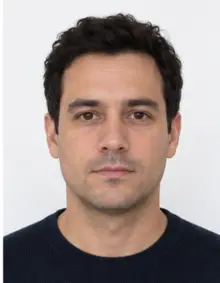 Accepted
-
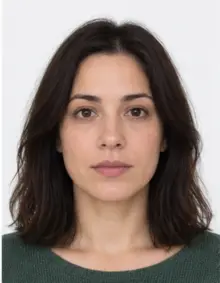 Accepted
-
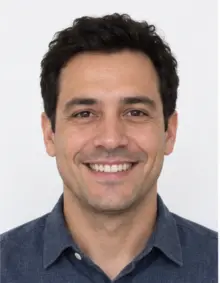 Smiling
-
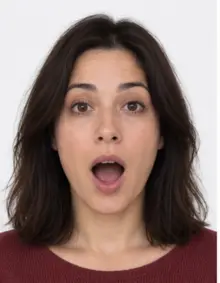 Mouth open
-
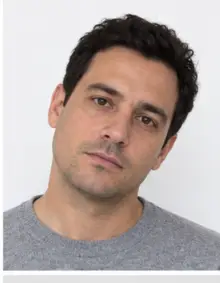 Head tilted
-
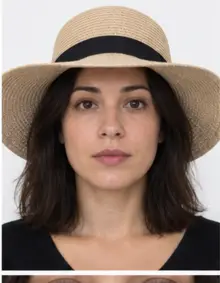 Fashion hat
-
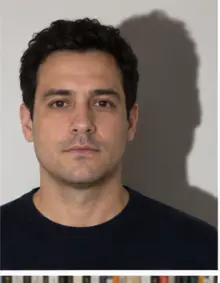 Shadow behind
-
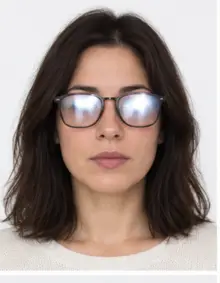 Glare on glasses
-
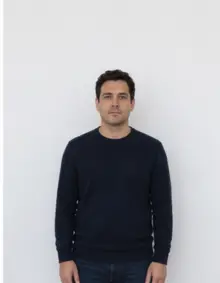 Too far away
-
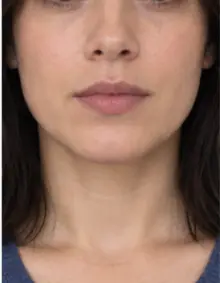 Head cut off
-
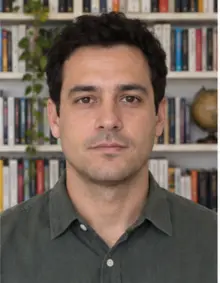 Busy background
-
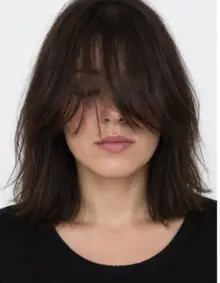 Hair over eyes
The people in these examples are AI-generated.
No glasses in a US passport photo
Since 2016 the State Department does not accept eyeglasses in a US passport photo. The ban covers prescription glasses, sunglasses and tinted lenses, so take them off before the photo is taken. The only exception is medical: if you cannot remove your glasses, a doctor writes and signs a note explaining why, and you include that note in your passport application. Without it, a passport photo with glasses is refused.
How to make a US passport photo online with our tool
- Take the photo. Ask a friend to hold the phone about four feet away, at the height of your eyes. A selfie at arm's length makes the nose look larger, so a second person or the phone's timer gives a better passport photo.
- Upload the photo. Select US Passport in the form above and upload the JPG, PNG, HEIC, PDF or other image file straight from your phone. Everything happens online in the browser; there is no app to install.
- Review the check. We crop the photo to the 2 × 2 inch US passport photo size, set a white background and run a compliance check on the head height, the eye line and the background.
- Download or print. The digital US passport photo is free to download. You can also order a print sheet with several 2 × 2 inch passport photos on one page, ready for a photo lab or a home printer.
If the check finds something it cannot correct, such as closed eyes, glasses or a tilted head, take a new photo and upload it again. A second passport photo takes about a minute, and every new photo you check is free. You pay nothing for the free passport photo, and you only pay if you choose premium processing for the photo.
-
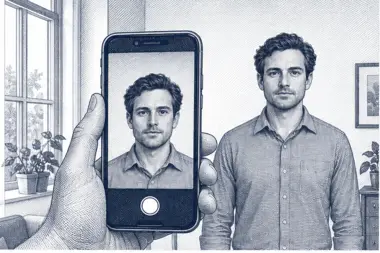 1. Take the picture
At home, against a plain wall, in daylight.
1. Take the picture
At home, against a plain wall, in daylight.
-
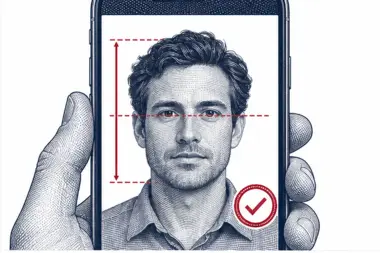 2. We check and crop
Head height, eye line and background are measured.
2. We check and crop
Head height, eye line and background are measured.
-
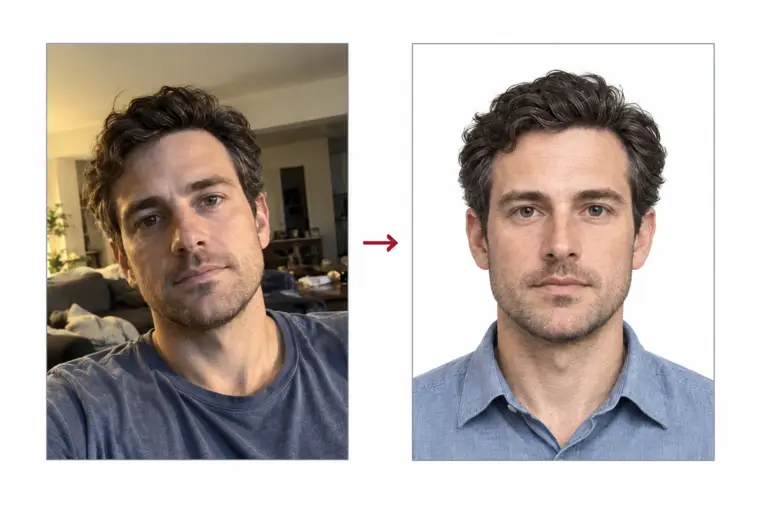
 3. Download or print
A file for the upload form or a print sheet.
3. Download or print
A file for the upload form or a print sheet.
Where the passport photo goes: DS-11, DS-82 or online renewal
The way the passport photo reaches the agency depends on the form you use for your American passport:
- Form DS-11 (in person). A first US passport, a passport for a child under 16 and any case that does not qualify for renewal by mail goes through a passport acceptance facility. You bring one printed passport photo to the appointment, along with the form and your documents.
- Form DS-82 (renewal by mail). Mail renewal is open to you when your latest US passport is undamaged, can be sent in with the form, was issued less than 15 years ago and was issued at age 16 or later. One printed passport photo is attached to the form.
- Online passport renewal. Eligible adults can renew a US passport online and upload a digital passport photo instead of a print. The passport agency looks at the photo again once the online application is in.
The passport photo rules are exactly the same in all three cases. There is no softer photo standard for a passport renewal, so one US passport photo made here works for every route, printed or online.
Digital passport photo for the online renewal
For a passport renewal online, the State Department asks for a colour photo file in JPG, PNG, HEIC or HEIF format, between 54 KB and 10 MB. The photo must be square, at least 600 × 600 pixels and at most 1200 × 1200 pixels. At 300 DPI a 2 × 2 inch passport photo is exactly 600 × 600 pixels, so our photo meets the minimum size. Do not scan an old printed passport photo: visible printer dots are a reason for refusal.
The online renewal portal runs basic checks on the photo when you upload it, but a photo that passes the upload can still be rejected later by the staff who review the application. That is why our free check looks at the framing and background of the photo, not only at the file size.
Upload the passport photo we give you as it is. If you open the photo in another app, crop it or save it again with heavy compression, the head may move out of the allowed range, or the file may fall outside the online limits.
Keep a copy of the passport photo file after you renew. If the passport agency asks for a new photo, you can check the reason, take a fresh photo and process it here again, then send the new photo the way the passport letter tells you to.
Printing a US passport photo
A paper passport application needs a real print of the passport photo on photo-quality paper, matte or glossy. A photocopy or a scan of a photo is not accepted, and a creased, smudged or punctured print of the passport photo will be refused. When you print at home or at a lab, keep the scale at 100 per cent: if the printer shrinks the page to fit, the photo is no longer 2 × 2 inches and the head size changes with it. Check each printed passport photo with a ruler, trim it along the cut line, touch only its borders, and avoid pens or labels on the photo.
Our print sheet places several copies of the same US passport photo on one standard page with cut lines, so you keep a spare passport photo in case one gets damaged.
US passport card photo
The US passport card is a wallet-size card for land and sea travel between the United States, Canada, Mexico, the Caribbean and Bermuda. It is not valid for international air travel. You can apply for the passport card alone or together with a passport book, and the photo rules are the same: one 2 × 2 inch passport photo with a white background. If you apply for both on one form, one passport photo covers the application.
Photo quality: sharpness, colour and resolution
A passport photo has to be sharp enough for an officer to compare the photo with your face. A blurred photo, a grainy photo taken in a dark room or a photo with visible pixels is refused even when the size and the background are right. Colour matters too: the photo must be in colour, with natural skin tones, and black and white photos are not accepted for an American passport.
Take the photo in daylight, with the lens wiped clean, and hold the phone still. Our online check flags a photo that looks too dark, too bright or out of focus, so you can take a better photo before you print or upload anything.
Online passport photo, pharmacy or studio
Americans usually get a passport photo in one of three ways: at a pharmacy or store photo counter, at a photo studio, or by making the photo at home and processing it online. A counter or studio takes the photo for you, but you travel there, and the result depends on the person behind the camera. An online passport photo lets you take as many photos as you like, at home and at any hour, and our tool checks each photo against the State Department rules before you download it.
The free online passport photo is a digital file. If you apply on paper, print it yourself, order our print sheet, or send the photo file to a photo lab for printing at 2 × 2 inches.
Applying for a passport from outside the United States
American citizens who live abroad apply for a passport or renew it through a U.S. embassy or consulate, and the photo rules do not change: a 2 × 2 inch passport photo with a white background. Photo shops in other countries often make 35 × 45 mm photos by default, which do not fit an American passport. Make the passport photo online here and print it at the correct size, wherever you are.
Common reasons a US passport photo is refused
- The head in the photo is under 1 inch or over 1⅜ inches, or the eyes are outside the allowed band.
- The photo background is grey, coloured, patterned or shows a shadow behind the head.
- The applicant wears glasses in the photo without a doctor's note.
- The photo is blurred, grainy, too dark or overexposed.
- The face is turned, tilted, smiling widely, or partly hidden by hair.
- A hat, headphones, a uniform or camouflage clothing is visible in the photo.
- The photo was altered with filters, beauty apps or AI in a way that changes your appearance.
- The passport photo is older than six months.
- The print is a photocopy, a scan, or is damaged.
Our check covers the photo size, head and eye position, the background and the most visible problems in each passport photo. It cannot know when the photo was taken, so always start from a new photo.
Examples of accepted and refused passport photos
Comparing your photo with typical cases before you upload it online saves a second attempt. Each example describes one passport photo and the decision it usually gets.
- Accepted photo: face centred and straight, head about 1.3 inches tall, even daylight, plain white background, no glasses. This is the US passport photo our tool is built to produce.
- Refused photo, head too small: the person stood across the room, so the face takes up less than half of the passport photo.
- Refused photo, glasses: thin frames and no glare, but a US passport photo may not show glasses at all.
- Refused photo, shadow: a ceiling lamp left a dark shape on the wall behind the head.
- Refused photo, smile: teeth visible and eyes half closed.
- Refused photo, filter: a beauty filter smoothed the skin and changed the shape of the face in the photo.
- Refused photo, cropped crown: the top of the hair is cut off by the edge of the passport photo.
- Refused photo, wrong size: a 35 × 45 mm photo made for a European passport, which does not match the 2 × 2 inch US passport photo size.
Tips for taking a passport photo at home
A good source photo gives a sharper passport photo. You do not need a studio or a pharmacy: a recent phone camera in daylight is enough for a US passport photo.
- Stand about two feet in front of a light, plain wall, so no shadow falls right behind you in the photo.
- Face a window. Switch the flash off, as it causes glare and hard shadows in a passport photo.
- Hold the phone straight at eye level, not tilted up or down.
- Leave room around the head and shoulders. We can crop a photo, but we cannot add hair or shoulders that are not in it.
- Take several photos and upload the sharpest one.
- Send the original photo, not a copy forwarded through a messenger that compresses photos.
Passport photos of babies and children
Every American child, including a newborn, needs a passport of their own and a passport photo of their own, and the photo rules are the same as for adults: white or off-white background, eyes open, no other person in the frame. Small children get some tolerance on expression. For a baby, the easiest passport photo is taken from directly above while the baby lies on a plain white sheet; our background step removes the folds of the sheet. Make sure no hand holding the child is visible in the photo.
Passport photo for a lost, stolen or damaged US passport
If your US passport was lost, stolen or badly damaged, you cannot renew it by mail. You apply in person with Form DS-11 and report the loss, and you need a new passport photo like any first-time applicant. The same 2 × 2 inch rules apply, so the US passport photo you make online here works for a replacement as well.
Passport photo after a name change or a big change in appearance
A passport photo has to show how you look today. If your appearance has changed a lot since your last American passport, for example after major facial surgery, a large weight change or a gender transition, the State Department may ask for a new passport, and with it a new passport photo. A legal name change is handled with a passport form as well, and that application also needs a recent passport photo of the same 2 × 2 inch size. In each case a free passport photo made online here is valid, as long as it is less than six months old.
Checklist before you submit the passport photo
- The passport photo is 2 × 2 inches, or a square photo file of 600 × 600 to 1200 × 1200 pixels for online renewal.
- Your head in the photo measures 1 to 1⅜ inches and your eyes sit 1⅛ to 1⅜ inches up from the lower edge.
- The photo background is plain white or off-white with no shadow.
- No glasses, hat, headphones or uniform in the photo.
- Neutral face, eyes open, mouth closed.
- The colour photo was taken within the last six months and has not been retouched.
- For paper forms, the passport photo is printed on photo paper, undamaged and at full size.
When every line is ticked, the US passport photo is ready to go with your passport application.
Free passport photo or premium processing
The free US passport photo covers what the photo rules measure: the 2 × 2 inch size, the head and eye position and a white background. Download the free passport photo, print the photo or upload the photo online, and you are done.
Premium processing is an optional paid step for people who want more certainty. We correct uneven light and colour in the photo, and a member of our team reviews the passport photo against the State Department rules before you receive it. If the reviewer finds a problem that only a new photo can solve, you upload another photo at no extra cost.
| Feature | Free photo | Premium photo |
|---|---|---|
| 2 × 2 inch US passport photo size | Yes | Yes |
| White photo background | Yes | Yes |
| Automatic passport photo check | Yes | Yes |
| Light and colour correction | No | Yes |
| Manual review of the photo by our team | No | Yes |
Who checks your passport photo
American passports are issued by the U.S. Department of State, and its passport staff decide whether a photo is accepted. An acceptance agent at a post office or library may look at the photo when you hand in a DS-11, but the final decision on the photo comes later, from the passport agency. If the agency refuses the photo, it writes to you and asks for a new photo, which delays the passport. A photo that already passed our check against the United States photo rules lowers that risk, though no photo service can promise the decision of a passport officer. The same is true for every American passport photo, whether it comes from a studio, a store counter or the online tool on this page.
Photos for other United States documents
A passport book and a passport card issued in the United States use the same photo standard, and a free passport photo from this page serves both. Other American documents have their own photo rules, for example a US visa, a green card, USCIS forms or the green card lottery, which accepts only a digital photo. Choose that document in our list of photo requirements rather than reusing a passport photo.
Frequently asked questions
How big is a US passport photo?
2 × 2 inches (51 × 51 mm), with the head 1 to 1⅜ inches tall and the eyes 1⅛ to 1⅜ inches above the lower edge of the photo.
Is the US passport photo free to make online?
Yes. Upload a photo, and the cropped, checked digital passport photo is free to download. Premium processing with a manual review is optional and paid.
Can I take my passport photo with a phone?
Yes. A phone photo taken in daylight, with the camera at eye level, works well. We crop the photo to size and make the background white.
Can I wear glasses in a US passport photo?
No. Glasses must come off unless a doctor's signed note explains why you cannot remove them.
What photo do I need to renew a US passport online?
A square colour JPG, PNG, HEIC or HEIF photo of 600 × 600 to 1200 × 1200 pixels, between 54 KB and 10 MB, taken in the last six months.
How recent must the passport photo be?
Within the last six months. A photo from last year is refused even when you have not changed much.
Can I smile in my passport photo?
A natural, closed-mouth expression is safest. A wide smile with teeth showing is a frequent reason for refusal.
Can I edit the passport photo after downloading it?
Please do not. Cropping or resizing the photo in another app can move your head outside the allowed range. Upload a new photo instead.
Do I need a printed photo if I renew online?
No. Online renewal uses a digital photo only. A printed passport photo is needed for the DS-11 and DS-82 paper forms.
Can I use the same photo for a passport book and a passport card?
Yes. Both use the same 2 × 2 inch passport photo, and one photo covers a single application for both.
What happens to my photo after processing?
Your photo is used only to make the passport photo you ordered. See our privacy policy for how long photos are kept.