China Visa Photo Online
The Chinese online visa application (COVA) accepts only a digital photo that matches a strict size and framing standard. Upload a photo taken on your phone and we resize it to the official China visa photo size, replace the background with plain white and check the head position before you download the file.
| Size | 354 × 472 px |
|---|---|
| Head height | 356 px |
| Background | white |
| File size | up to 120 KB |
| Use | digital upload |
China visa photo size for the online application
The online form asks for a JPEG file between 354 × 472 and 420 × 560 pixels. The ratio stays the same in that range: the photo is 3 units wide for every 4 units of height, so a file of 390 × 520 pixels is also accepted. A photo outside the range is refused at the upload step, before a consular officer ever sees it. The size of the file matters as much as the size of the image: the COVA system rejects anything heavier than 120 KB, and it does not compress the photo for you.
Our tool produces a China visa photo of exactly 354 × 472 pixels and saves it with the compression level that keeps the file under the limit while the face stays sharp. You do not need to resize anything by hand, and you do not need a photo editor on your computer.
- Image size: 354 × 472 px minimum, 420 × 560 px maximum
- File size: up to 120 KB, JPEG format
- Head height: about 356 px in a 354 × 472 px photo (measured chin to hair top)
- Space above the hair: about 25 px
- Background: plain white, no pattern or shadow
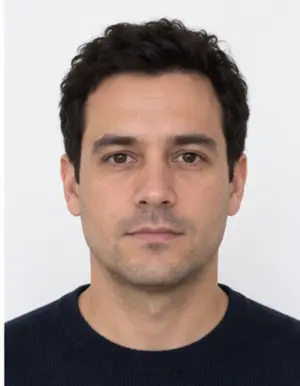
Head position and framing in a Chinese visa photo
Most refused Chinese visa photos fail on the framing, not on the size. The face must be centred and look straight into the camera, with the whole head in the frame, chin and hairline included. The head should fill most of the frame: in the standard China visa photo it takes up roughly three quarters of the height. A face that is too small, cut at the top or turned to the side is a common reason for a request to upload a new photo.
Keep both ears visible where possible, and keep the shoulders level. Hair must not cover the eyebrows or the eyes. If you wear glasses every day you may keep them, as long as there is no glare on the lenses and the frames do not cover the eyes, but the safest choice for a visa photo is to take the glasses off.
Background, light and clothing
The background of a China visa photo must be white or very close to white, with no shadow behind the head. You can take the photo against any wall: our background check replaces it with even white and removes the shadow line along the shoulders. Light should fall evenly on the face from the front, so there are no dark patches under the eyes or on one cheek.
Wear everyday clothes in a colour that stands out from the white background. A white shirt may merge with it, so a darker top works better. Hats, head coverings worn for fashion, headphones and large jewellery are not allowed; religious head coverings are accepted when the face is fully visible.
The expression should be neutral, with the mouth closed and the eyes open. A wide smile is a frequent reason for a Chinese visa photo to be refused.
-
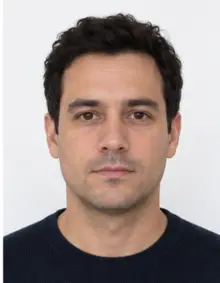 Accepted
-
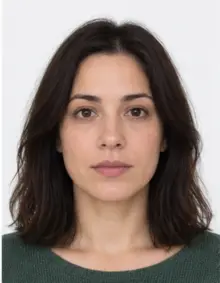 Accepted
-
 Smiling
-
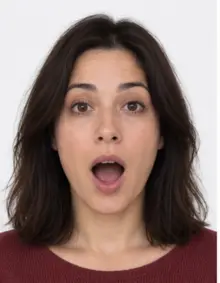 Mouth open
-
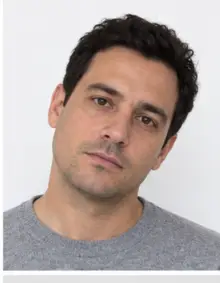 Head tilted
-
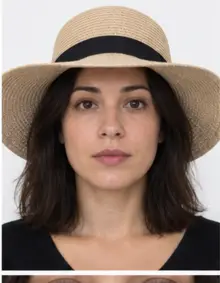 Fashion hat
-
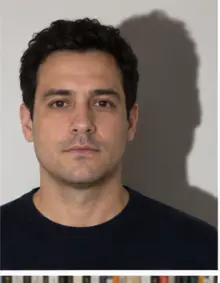 Shadow behind
-
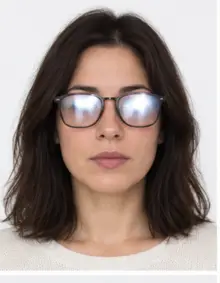 Glare on glasses
-
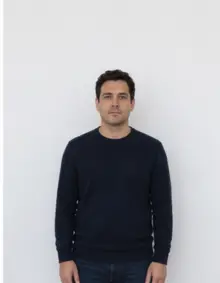 Too far away
-
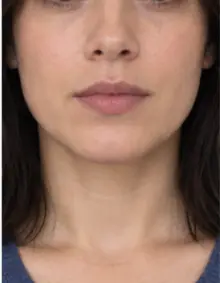 Head cut off
-
 Busy background
-
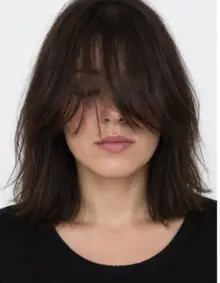 Hair over eyes
The people in these examples are AI-generated.
How to make a China visa photo online
- Take the photo. Ask someone to take it from about 1.5 metres away, at eye level, in daylight facing a window. A selfie at arm's length distorts the face, so a second person or a timer gives a better result.
- Upload it here. Choose China visa online in the form above and upload the JPG, PNG, HEIC, PDF or other image file from your phone.
- Review the check. We crop the photo to the China visa photo size, set the white background and show the result with the measurements we checked.
- Download the file. The digital photo is free to download and ready for the COVA upload. If the check finds a problem we cannot fix automatically, such as a closed eye or a tilted head, retake the photo and upload it again.
Premium processing is optional. It applies extra retouching to light and shadows and sends the photo for a manual check by our team before you submit it. The free version already meets the online size and file requirements.
Uploading the photo to the COVA form
The online visa application asks for the photo early in the form. After the upload, the system checks the pixel size, the file size and the format, and shows an error if any of them is off. Some applicants are also asked to bring a printed photo to the visa centre, so check the instructions for your country. Keep the original file we give you: if the online form crops the image in its own preview, do not crop it again yourself.
If the form rejects a photo that meets the size limits, the most likely cause is the file weight. Our file is always below 120 KB, so download it again from your result page rather than saving a screenshot.
-
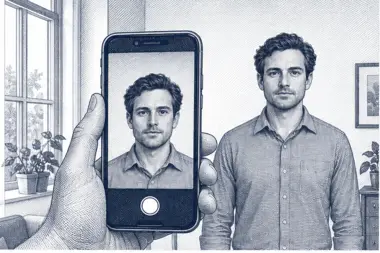 1. Take the picture
At home, against a plain wall, in daylight.
1. Take the picture
At home, against a plain wall, in daylight.
-
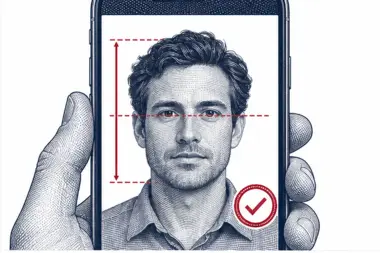 2. We check and crop
Head height, eye line and background are measured.
2. We check and crop
Head height, eye line and background are measured.
-
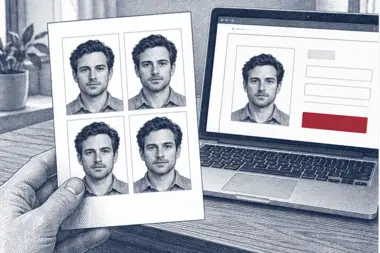 3. Download or print
A file for the upload form or a print sheet.
3. Download or print
A file for the upload form or a print sheet.
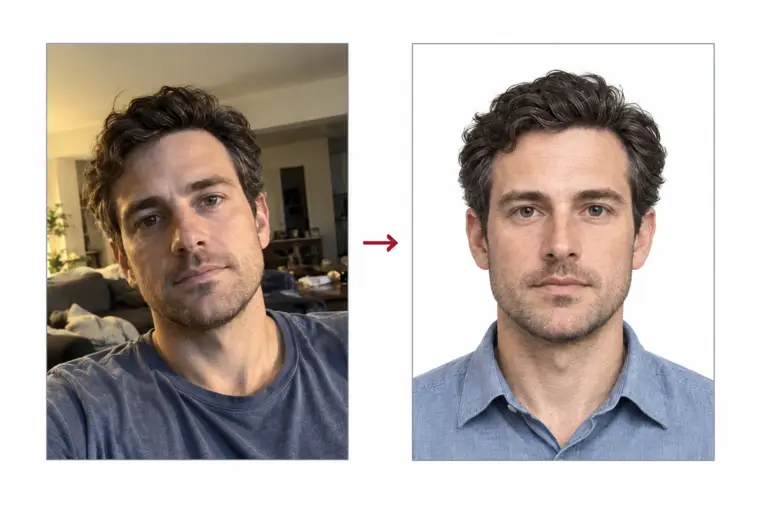
Online China visa photo vs printed photo
The digital photo for the online form and the printed Chinese visa photo use the same face proportions but a different size. A paper visa photo measures 33 × 48 mm, with the head between 28 and 33 mm tall. Visa centres that collect documents in person may ask for one printed photo in addition to the file uploaded online. If you need both, upload your photo once for the digital China visa photo and choose a print sheet for the paper copy.
Common reasons a Chinese visa photo is refused
- The image is smaller than 354 × 472 pixels or the file is over 120 KB.
- The head is too small, too large or not centred.
- The background is grey, patterned or has a visible shadow.
- The photo is blurred, too dark or overexposed.
- The face is turned, tilted, or partly covered by hair or glasses.
- The photo was edited with filters or beauty effects.
- The photo is older than six months and no longer looks like you.
Our check covers the size, the head position and the background of every China visa photo. It cannot judge whether the picture is recent, so use a new photo for each application.
Examples: accepted and refused visa photos
The same rules apply to every applicant, so it helps to compare your photo with typical examples before you upload it online. Each example below describes one visa photo and the decision it usually gets.
- Accepted photo: the face is centred, the head fills about 75% of the photo height, the background is white and the light is even. This is the visa photo our tool aims for.
- Refused photo, head too small: the applicant stood too far from the camera, so the face takes up less than half of the photo.
- Refused photo, shadow: a lamp behind the camera left a dark shadow on the wall. The visa photo background must be plain white.
- Refused photo, smile: the teeth are visible. A visa photo needs a neutral expression.
- Refused photo, glare: light reflects in the glasses and hides the eyes.
- Refused photo, wrong size: a screenshot of a photo saved at 300 × 400 pixels is below the minimum China visa photo size.
- Refused photo, filter: a beauty filter smoothed the skin and changed the face shape.
- Refused photo, cropped head: the top of the hair is cut off at the edge of the photo.
Tips for taking a visa photo at home
A good source photo makes the processing easier and the result sharper. You do not need a studio or a special camera: a phone camera in good light is enough for a digital China visa photo.
- Stand about half a metre in front of a light, plain wall. A white door or a sheet works too.
- Face a window in daylight. Avoid the flash, which creates glare and hard shadows in the photo.
- Keep the phone at eye level and hold it straight, not tilted up or down.
- Leave space around the head and shoulders. We crop the photo to the right size, but we cannot add hair or shoulders that are not in the picture.
- Take several photos and upload the sharpest one.
- Use the original photo file, not a copy sent through a messenger that compresses images.
Photos of children and babies for a Chinese visa
Every applicant needs their own visa photo, including babies. The rules are the same as for adults, with some tolerance: a baby does not have to look straight into the camera with a fully neutral face, but the eyes should be open and no other person or hand may appear in the photo. Lay the baby on a white sheet and take the photo from above; our background check removes the folds and shadows of the sheet.
Checklist before you upload the photo online
- The file is a JPEG of 354 × 472 pixels or larger, up to 420 × 560 pixels.
- The file size is below 120 KB.
- The photo is in colour and was taken in the last six months.
- The background is plain white with no shadows.
- Your face is centred, straight and fully visible, with a neutral expression.
- You downloaded the photo file itself, not a screenshot of it.
When every point is ticked, the visa photo is ready for the online China visa application.
One visa photo for every type of Chinese visa
The photo rules do not depend on the purpose of the trip. A tourist (L) visa, a business (M) visa, a student (X) visa, a work (Z) visa and a family visit (Q or S) visa all use the same visa photo standard and the same size. The Chinese consulates publish one set of photo requirements for all categories, so a single visa photo made here works for any of them. What changes between categories is the list of supporting documents, not the photo.
Chinese transit rules are a separate case: travellers using visa-free transit do not upload a visa photo at all. If you are not sure which visa you need, check the Chinese embassy or consulate that serves your place of residence before you start the online form.
Free photo or premium processing
The free visa photo covers what the Chinese online form checks: the size in pixels, the file size, the white background and the position of the head. Download it, upload it online, and you are done.
Premium processing is for applicants who want extra certainty. We correct uneven light and colour, remove small shadows, and a member of our team reviews the visa photo against the Chinese rules before you receive it. If the reviewer finds a problem that a new photo would solve, you can upload another photo at no extra cost.
| Feature | Free photo | Premium photo |
|---|---|---|
| Official China visa photo size | Yes | Yes |
| White background | Yes | Yes |
| File under 120 KB | Yes | Yes |
| Light and colour correction | No | Yes |
| Manual review of the visa photo | No | Yes |
Why China is strict about photo quality
China compares the visa photo with the face of the traveller at the border, and Chinese border control uses automatic face matching at many airports. A photo that is too small, too dark or edited makes that comparison harder, which is why the Chinese online system checks the photo size and file before it accepts the application. A clear photo with the right size and a white background passes both checks: the online upload and the face match on arrival in China.
The same logic explains the ban on filters. A retouched photo may look better, but if the photo no longer matches your face, the visa photo can be refused even after the online upload succeeded. Our processing changes only the background, the crop and the photo size; it never reshapes the face. Premium photo correction adjusts light and colour only.
Keep in mind that China may ask for a new photo at any stage. If a visa centre in your country flags the photo, upload the same source photo here again; the size and crop of a China visa photo do not change between attempts, so a second photo takes a minute.
Other Chinese photo sizes
A visa photo is not the same as the photo for a Chinese passport or a Chinese resident ID card. Those documents follow their own photo size and background rules, and a photo made for one of them is not accepted for the others. If you are a Chinese citizen renewing a passport abroad, or a resident applying for an ID card, choose that document in the list of our photo requirements instead of the visa photo.
Applicants who fill in a paper visa form rather than the online one need the printed 33 × 48 mm photo described above. The digital file and the printed photo come from the same upload, so you take the photo once.
Frequently asked questions
Which size does the online form accept for a China visa photo?
The online form accepts a JPEG file between 354 × 472 and 420 × 560 pixels, no heavier than 120 KB. Our photo is 354 × 472 pixels.
Can I take a China visa photo with my phone?
Yes. A phone photo taken in daylight against a plain wall works well. We crop it to the right size and make the background white.
Is the China visa photo free?
Making and downloading the digital China visa photo is free. Premium retouching with a manual check is an optional paid service.
Can I wear glasses in a Chinese visa photo?
Glasses are allowed when there is no glare and the frames do not cover the eyes, but removing them avoids the risk of a refusal.
Why does the online form reject my visa photo?
The most common causes are a file over 120 KB, an image outside the 354 × 472 to 420 × 560 pixel range, or a background that is not white.
Can I use my passport photo for the Chinese visa?
Only if it meets the China visa photo rules. A passport photo of another country often has a different size or background, so it is better to make a new China visa photo online.
Can I edit the visa photo after downloading it?
Please do not. Cropping, resizing or saving the visa photo again in another app can push it outside the limits. If you need a different visa photo, upload a new source photo instead.
How long does it take to get the photo?
The photo is processed in a few seconds after the upload. You can download the free China visa photo right away.
What happens to my photo after processing?
Your photo is used only to make the visa photo you ordered. See our privacy policy for how long photos are stored.
Does China accept photos taken at home?
Yes. China does not require a studio photo, as long as the file meets the size, background and framing rules above.
Do I also need a printed photo?
Some visa centres ask for one printed 33 × 48 mm photo when you submit your passport. Check the instructions you receive after the online application.