India PCC Photo Size and Requirements
An application for a police clearance certificate (PCC) through Passport Seva needs a colour digital picture of exactly 630 × 810 pixels. Take a picture with your phone, upload it here, and we cut it to that size, turn the background white, keep the file below 250 KB and test the face position before you save it.
| Size | 630 × 810 px |
|---|---|
| Head height | 540 px |
| Background | white |
| File size | up to 250 KB |
| Use | digital upload |
What the Indian police clearance certificate is for
The police clearance certificate confirms whether a person holding an Indian passport has a criminal record in India. Foreign governments, immigration offices and employers ask for it when you apply to live, study for a long period or work abroad. A PCC is requested for residence permits, work visas, long-stay visas and emigration, and Indian authorities do not issue it for an ordinary holiday. Every application for a PCC, whether it is made at home or at a mission abroad, starts with a web form, and that form will not accept the application without a correct photo.
Foreign nationals who once lived in India normally request a certificate through a different channel, often through their own embassy, and the documents they need are not the same. The photo rules on this page are the ones used by Passport Seva for Indian citizens.
PCC photo size and the basic rules
The Passport Seva portal is precise about dimensions. The file must be 630 pixels wide and 810 pixels tall, a portrait frame with a 7 : 9 ratio. A picture that is one pixel off, a square crop or an untouched phone shot is refused by the portal the moment you attach it, and the form cannot move on until you replace it. There is no range of accepted sizes as some other countries allow: for this certificate the size is fixed.
The weight of the file is a separate test. Even a perfectly cropped picture is blocked when the JPEG is heavier than 250 KB, which is common for a picture saved straight from a modern phone. Our maker exports the photo at 630 × 810 pixels and compresses it just enough to stay under that limit without blurring the face.
- Photo size: 630 × 810 px, portrait
- File size: 250 KB or less
- Head height: about 540 px, from the chin to the top of the head
- Gap between the hair and the top edge: about 55 px
- Background: plain white
- Colour photo, no retouching by software
Framing the face for the police clearance certificate
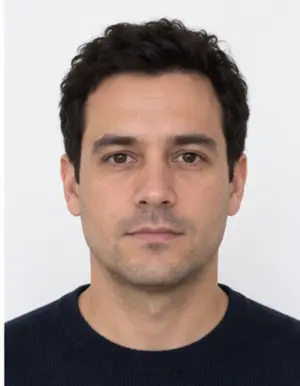
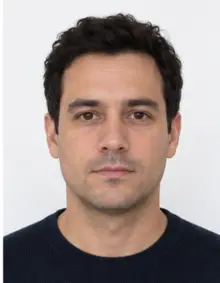
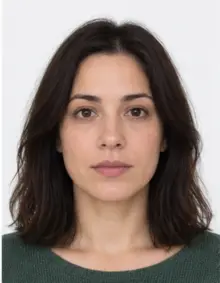
The head is large in this format. At about 540 pixels out of 810, it fills roughly two thirds of the height of the picture, and the face together with the hair takes up most of the frame. Keep the head straight and in the centre, with the chin and the crown both inside the picture. A head that leans to one side, a face that sits too low or a crop that cuts off the hair are among the faults the portal reports as an ICAO problem.
Look directly into the lens with both eyes open. Keep your mouth closed and your expression relaxed; a broad smile changes the shape of the face and is not accepted. Move hair away from the eyes and eyebrows so the whole face is clear.
-
 Accepted
-
 Accepted
-
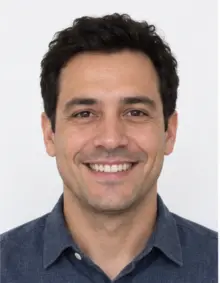 Smiling
-
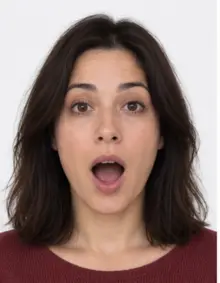 Mouth open
-
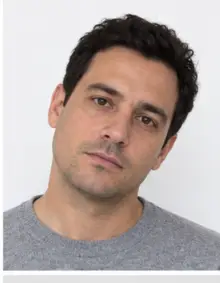 Head tilted
-
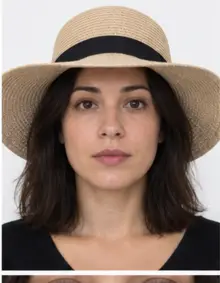 Fashion hat
-
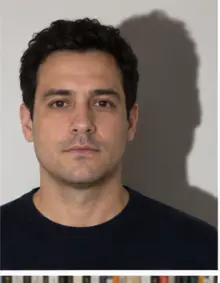 Shadow behind
-
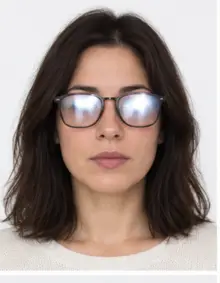 Glare on glasses
-
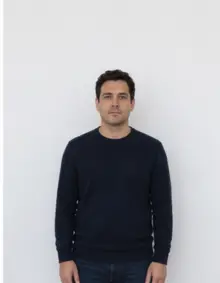 Too far away
-
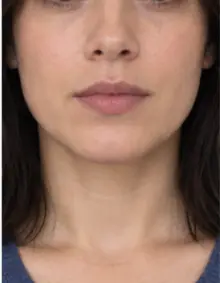 Head cut off
-
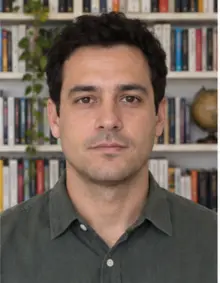 Busy background
-
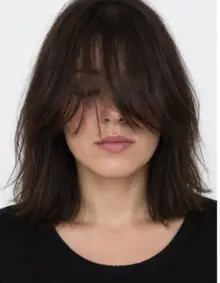 Hair over eyes
The people in these examples are AI-generated.
Background, light, glasses and clothing
The background of the photo must be plain white, with no shadow behind the head and no pattern or objects. You do not need a white wall at home: stand in front of any plain surface and our tool replaces it with a clean white background. What the software cannot fix is poor light on the face, so stand facing a window during the day. Light from above or from one side leaves dark areas under the eyes or on one cheek. Switch off the flash, which causes glare on the skin and red eyes.
Take your glasses off. The ICAO guidance that Indian missions publish asks for a photo without eyewear, including thin rims, because lenses reflect light. Hats and caps are not allowed; a head covering worn for religious reasons is fine when the face is fully visible from the chin to the forehead and from one side to the other. Wear a dark or coloured top so your shoulders do not merge with the white background.
How to make the photo with our tool
- Take the picture. Ask a friend to stand roughly 1.5 metres from you and hold the camera level with your eyes, or use the timer with the phone resting on a shelf. A selfie at arm's length makes the nose look bigger and often tilts the head.
- Upload it. Send the JPG, PNG, HEIC, PDF or other image file from your phone in the form at the top of this page.
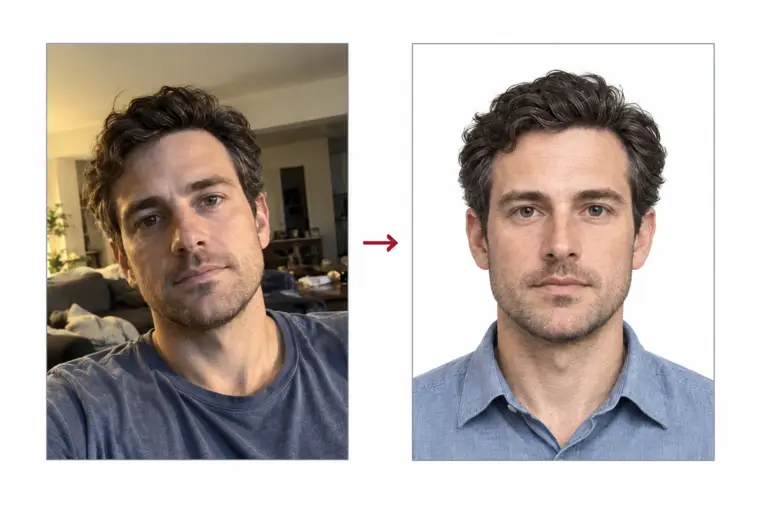
- Check the result. We crop to 630 × 810 pixels, set the white background and show the compliance check: head height, position, eyes and light.
- Download for free. Save the digital file at no cost and add it to the police clearance certificate form. If the check reports something we cannot correct, such as closed eyes, take a new picture and try again.
-
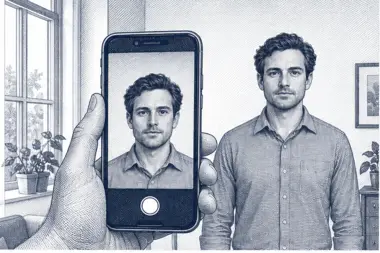 1. Take the picture
At home, against a plain wall, in daylight.
1. Take the picture
At home, against a plain wall, in daylight.
-
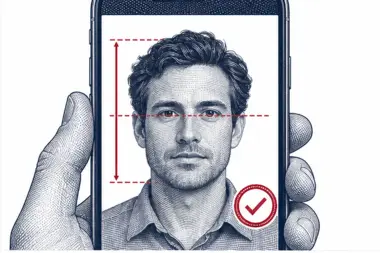 2. We check and crop
Head height, eye line and background are measured.
2. We check and crop
Head height, eye line and background are measured.
-
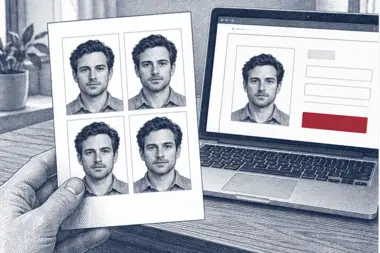 3. Download or print
A file for the upload form or a print sheet.
3. Download or print
A file for the upload form or a print sheet.
Where to submit the police clearance certificate photo
Residents of India fill in the PCC form on the Passport Seva portal, attach the photo and book a visit to a Passport Seva Kendra or a Mini PSK that belongs to their passport office. At the counter you show your original passport with a self-attested copy of the main pages, plus proof of your current address if it is different from the one printed in the passport. The fee in India is Rs. 500. When the existing police record for your address is clear, the certificate can be issued on the same day; if a new police verification is needed, it takes longer.
Indian citizens who live abroad apply through the Indian embassy, high commission or consulate that covers their area. Processing there depends on a reply from the police in India, so there is no fixed waiting time. Some missions also want a printed picture in the paper file, often in a different size, so read the page of your mission before you print anything.
Indian missions abroad accept the same 630 × 810 pixel photo through the portal. Apply early: a PCC can take several weeks when the local police must confirm your record, and some missions state plainly that there is no urgent service.
Why Passport Seva checks the photo automatically
Passport Seva compares every picture with the ICAO standard for travel document photos before an officer looks at the PCC application. That test is done by software, which is why it is strict: it measures the size in pixels, the share of the frame taken by the face, the colour of the background and the angle of the head. A picture that a person would happily accept can still fail the automatic check because the head is a little too small or the background is slightly grey.
The rules are the same across India and at Indian missions abroad that use the same portal, so a photo made once to the 630 × 810 pixel standard works for a PCC filed at home and for a request filed in another country. Our compliance check follows the same points, so the result you see after the upload is a good guide to what the portal will do.
Preparing the file yourself
You can also make the photo by hand. Open the picture in an editor, crop it to a 7 : 9 portrait frame with the head in the middle, and export it at exactly 630 × 810 pixels. Then look at the file weight. If it is above 250 KB, export it again at a lower JPEG quality instead of making the picture smaller in pixels, which would break the size rule. Do not smooth the skin or whiten the background with a brush; edits like these are easy for the portal to detect and make the photo invalid.
Doing this by hand takes time and it is easy to land a few pixels off. Our free tool does the crop, the white background and the compression in one step, and the free check tells you before you download whether the photo for your police clearance certificate passes.
Why the portal refuses a photo
- The image is not exactly 630 × 810 pixels.
- The file is heavier than 250 KB.
- The face is too small, off centre or tilted.
- The background is grey, coloured or shows a shadow.
- Glasses, glare from a flash, or hair over the eyes.
- The picture is blurred, too dark or overexposed.
- Beauty filters, skin smoothing or other edits.
The first two are caught by the Passport Seva portal right away. The others usually appear as a message that the photo does not meet the ICAO standard. Our compliance check looks at the same points, so you learn about a problem before you start the police clearance application, not halfway through it.
If the portal has already rejected your photo
A refused photo is not a refused application. You can replace the picture and carry on with the same form. Start with the original photo from your phone, not the file that was refused, because a picture that has been cropped and compressed several times loses detail. Upload the original here, let the tool rebuild the crop and the background, and read the result of the check. If it marks the light or the eyes, take a new photo instead of trying to repair the old one. Each new upload and check is free, so there is no cost to trying again.
When the error mentions dimensions, the fix is almost always the crop. When it mentions the ICAO standard, look at the face first: a photo with the head turned slightly, a shadow on the wall or a strand of hair over one eye is enough to fail. A fresh photo taken by a window, with the glasses off and the hair tied back, solves most of these cases at once. Premium processing helps too, because a person on our team looks at the photo before you send it.
Keep the final photo file somewhere safe. If the passport office or the mission asks you to upload it again later, you can reuse the same photo instead of starting over.
Examples of a good and a bad photo
A good photo for the police clearance certificate shows your face and upper shoulders, straight on, on pure white. The eyes are open and level, the light is even on both cheeks and the hair stays clear of the face. A bad one is easy to spot: a picture taken from too far away with a small face, a selfie angled from below, a photo with a lamp behind the head, or a portrait cut from a holiday shot with the sea in the background. Size alone does not save such a picture; it must also pass the face and light checks.
Tips for taking the photo with a phone
- Use the main camera, not the front one, if someone can help you; it gives a sharper image.
- Stand half a metre in front of the wall so your body does not cast a shadow on it.
- Clean the lens before you shoot; a greasy lens softens the whole picture.
- Take three or four photos and upload the one where your eyes are fully open.
- Do not zoom in. Our tool crops the picture to the correct size, so leave space around the head.
- Send the original file, not a screenshot or a copy shared through a chat app, which loses quality.
Timing matters as well. Take the photo shortly before you file the PCC form, so the picture shows how you look now. A photo from several years ago, or one taken before a big change such as a beard, a new hairstyle or a large change in weight, may not match your face when an officer compares it with your passport. The police clearance process relies on the photo to confirm who you are, so a recent picture is the safest choice.
The country that asked for the certificate may also want its own photo for the visa or residence permit, usually in a different format. Keep the original picture from your phone: you can upload it again and choose that document instead, and the free check runs once more against its rules.
Checklist before you attach the file
- The photo size is 630 × 810 pixels.
- The file is a JPEG of 250 KB or less.
- The background is white and even.
- The head is about 540 px tall with a small gap above the hair.
- No glasses, no hat, eyes open, mouth closed.
- The colours are natural and nothing has been retouched.
Do not crop or resize the downloaded file again. Every extra save in another app can change the size or the weight of the photo, and the portal will reject it.
Free photo or premium processing
The free option is enough for most people. It already gives you a photo at the right size, with a white background and a file under 250 KB. For many applicants that is all they need: download, attach to the police clearance certificate form, and continue. There is no fee to download the free file, and no account is needed to see the check.
Premium processing is an optional paid service. We correct uneven light and colour, and a member of our team reviews the photo against the Indian rules before you receive it. If the reviewer finds a problem that only a new picture can solve, you may upload another one at no extra cost. You can also order a print sheet if your mission asks for paper copies.
| Feature | Free | Premium |
|---|---|---|
| 630 × 810 px PCC photo size | Yes | Yes |
| White background | Yes | Yes |
| File under 250 KB | Yes | Yes |
| Automatic compliance check | Yes | Yes |
| Light and colour correction | No | Yes |
| Manual review by our team | No | Yes |
Other Indian documents and their photos
Every Indian document follows its own photo rules. The passport, the visa for foreign visitors, the PAN card and the voter ID card each use a different size, and a file made for the PCC is not automatically valid for any of them. State police portals can differ too: the Goa Police PCC service, for example, asks for a square 600 × 600 pixel picture, so a Passport Seva file does not fit there. Pick the exact document from our list of photo requirements before you upload.
Frequently asked questions
What is the photo size for an India PCC?
The Passport Seva portal accepts a colour picture of exactly 630 × 810 pixels on a white background, with a file size of up to 250 KB.
Can I take the PCC photo with my phone?
Yes. Take it in daylight in front of a plain wall. We crop it to 630 × 810 pixels and make the background white.
Is the photo free?
Yes. Making, checking and downloading the digital photo is free. Premium processing with a manual review is optional and paid.
Can I wear glasses in a police clearance certificate photo?
No. Remove all glasses, including thin or rimless ones, because lenses reflect light and the photo can be refused.
Why does the portal say my image size is not correct?
The picture is not exactly 630 × 810 pixels. A crop made by hand is often a few pixels off. Upload the original photo here and download the corrected file.
My photo is the right size but still rejected. Why?
Check the file weight first: it must not exceed 250 KB. If it is under the limit, the cause is usually the face position, the light or the background.
Can I use my Indian passport photo for the PCC?
Only if the file is exactly 630 × 810 pixels, under 250 KB and recent. It is simpler to make a new photo for the police clearance certificate.
Do I need a printed picture?
In India the form needs just the digital image. A few missions outside India want printed copies too; check their page and order a print sheet if needed.
What happens to my photo after processing?
We use it only to make the picture you ordered. Our privacy policy explains how long uploaded photos are kept.