Green Card Lottery Photo for the DV Entry
Every person listed in a Diversity Visa (DV) lottery entry needs a digital photo, and the United States Department of State disqualifies entries whose photo breaks its rules. Upload a picture from your phone and we turn it into a green card lottery photo: a square JPEG with a white background, the head placed to the official US template and a file small enough for the E-DV form.
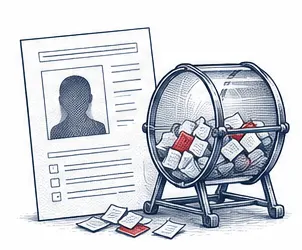
| Size | 2 × 2 in |
|---|---|
| Head height | 1.29 in |
| Background | white |
| Resolution | 300 dpi |
| File size | up to 240 KB |
| Use | digital upload and print |
DV lottery photo size and file rules
The E-DV system takes one digital image per person. A valid DV lottery photo is square and measures anywhere from 600 up to 1,200 pixels on each side. Any size between those two limits works, provided the width and the height are equal. A rectangular photo, even a sharp one, is not a DV lottery photo and should not be uploaded.
The file itself has limits too. The green card lottery photo must be saved as JPEG, weigh 240 KB or less, use 24-bit colour in the sRGB colour space and keep a compression ratio of 20:1 or lower. Black and white photos are not accepted. Our tool writes a DV lottery photo of 600 × 600 pixels that stays under the 240 KB limit, so you never have to work out the compression or the photo size yourself.
- Shape: square, width equal to height
- Pixel size: from 600 × 600 up to 1,200 × 1,200 px
- File: JPEG, no more than 240 KB, 24-bit sRGB colour
- Head size: 50% to 69% of the photo height, chin to top of hair
- Eyes: 56% to 69% of the photo height, counted up from the bottom edge
- Print size for the US interview: 2 × 2 inches (51 × 51 mm)
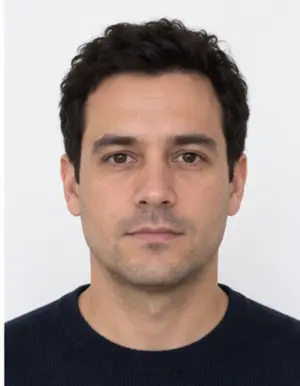
Framing the face in a DV photo
Photo size is checked by a machine; framing is where most people go wrong. In a correct DV photo the face looks straight at the lens and sits in the middle of the square. The head, measured from the chin to the top of the hair, fills half to a little over two thirds of the photo height. On a 2 × 2 inch print our template gives a head of about 1.29 inches with the eyes about 1.18 inches above the bottom edge, which falls inside both US limits.
Leave some room above the hair and do not tilt the head. A face shot from below or from the side, a chin cut off by the frame or a head so small that the shoulders dominate the photo will make the green card lottery photo fail, however good the light is. The DV lottery checks are the same for every entrant, whatever the country of birth, and they follow the US standard.
Background, light and clothing for the green card lottery photo
The US State Department asks for a plain white or off-white background with nothing behind you: no pattern, no furniture, no shadow. You can stand in front of any reasonably plain wall, because our tool replaces what is behind you with clean white when it builds your DV lottery photo. What it cannot replace is the light on your face, so take the photo facing a window in daylight and avoid a bright lamp or window behind your back.
Wear what you normally wear. Uniforms are not allowed, apart from religious clothing worn every day. Hats and head coverings must come off unless you wear them daily for religious reasons, and even then the whole face has to stay visible. Glasses are a firm no: since November 2016 American visa photos, the DV photo among them, must be taken without eyeglasses, apart from rare documented medical cases. Keep a neutral face with the mouth closed and both eyes open.
-
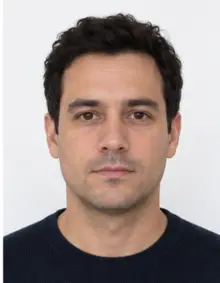 Accepted
-
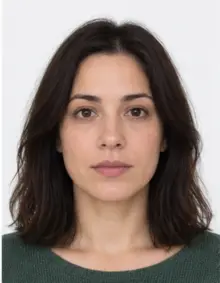 Accepted
-
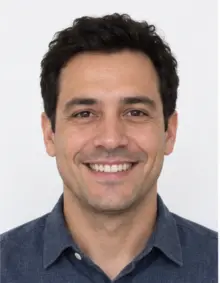 Smiling
-
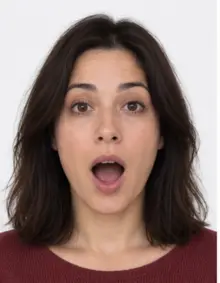 Mouth open
-
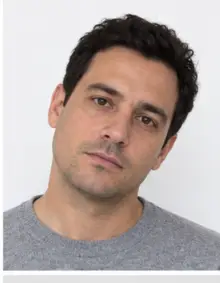 Head tilted
-
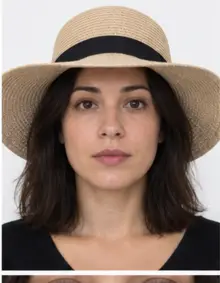 Fashion hat
-
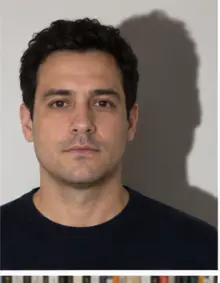 Shadow behind
-
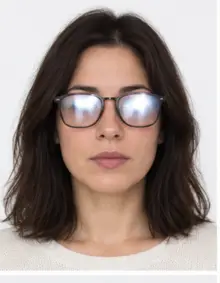 Glare on glasses
-
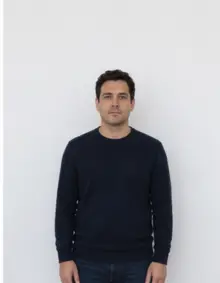 Too far away
-
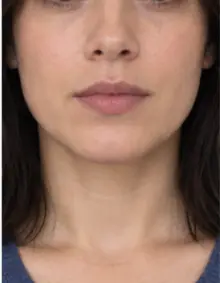 Head cut off
-
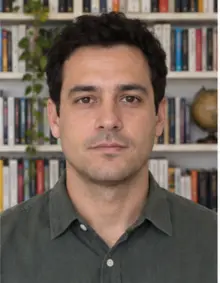 Busy background
-
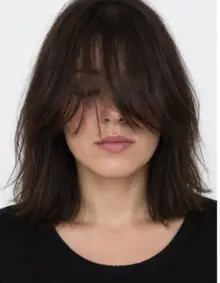 Hair over eyes
The people in these examples are AI-generated.
How to make a DV lottery photo online with our tool
- Take the picture. Ask a friend to hold the phone at your eye level about four to five feet away, or use a timer. Close selfies stretch the nose and shrink the ears in the photo.
- Upload it. Pick US Green Card Lottery in the form at the top of this page and send the JPG, PNG, HEIC, PDF or other image file straight from your phone.
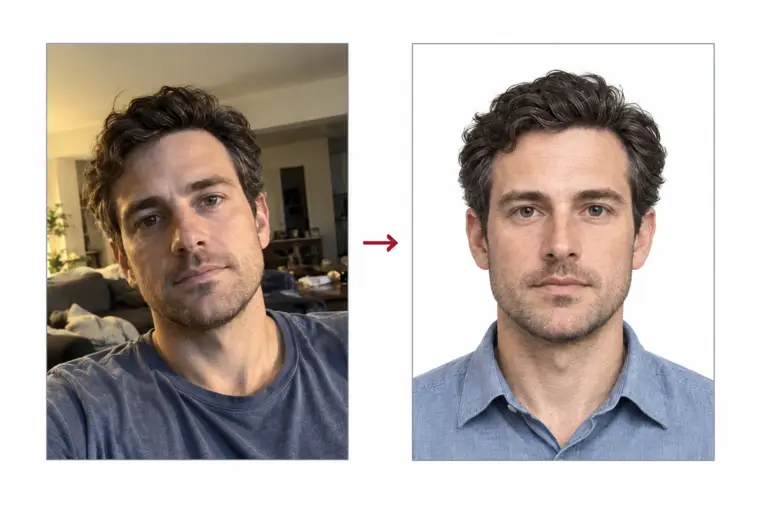
- Let the tool work. We crop the photo to a square, size the head to the US template, swap the background for white and run a compliance check on the result.
- Download. The digital DV lottery photo is free to download as a JPEG ready for the E-DV form. If the check reports something a crop cannot fix, such as closed eyes or glare, take a new photo and upload it again.
Repeat the steps for each family member who appears in your US entry. Every DV lottery photo is made separately, one person per photo, and each one goes through the same DV check.
Who needs a photo in the DV lottery entry
The main entrant is not the only person in a USA entry who needs a photo. The DV lottery form asks for a photo of the husband or wife and of every unmarried child under 21, and that applies even to relatives who never intend to move to the United States. A child who is a US citizen or a lawful permanent resident is the exception and is not listed. Leaving out an eligible family member, or adding someone who should not be there, can disqualify the whole DV entry, so count the photos before you start.
Each person appears alone in their own photo. A group photo cut into pieces is not accepted, and neither is a photo copied from a passport, a driving licence or another ID card.
-
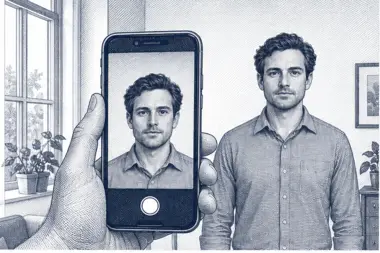 1. Take the picture
At home, against a plain wall, in daylight.
1. Take the picture
At home, against a plain wall, in daylight.
-
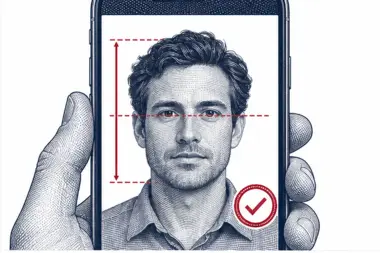 2. We check and crop
Head height, eye line and background are measured.
2. We check and crop
Head height, eye line and background are measured.
-
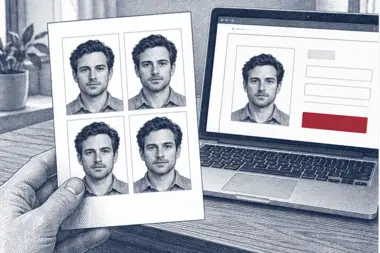 3. Download or print
A file for the upload form or a print sheet.
3. Download or print
A file for the upload form or a print sheet.
Photos of children and babies for the DV lottery
The DV lottery photo rules for a baby are the same as for an adult: square format, white background, eyes open and nobody else in the photo. The easiest way is to lay the baby on its back on a plain white sheet and take the photo from above, holding the phone parallel to the child. For a toddler, a car seat covered with a white cloth works well. A parent's hand, shoulder or knee at the edge of the photo is a reason for rejection, so crop or retake. Our tool sets the background and the photo size for the child's DV photo exactly as it does for yours.
Where to submit the green card lottery photo
The only place to enter the US Diversity Visa lottery is the official E-DV website run by the US Department of State, during the registration period announced for each DV year. The form asks for the photo of the main entrant first and then the photo of each family member. Upload the JPEG exactly as you downloaded it; opening it in another app and saving it again can change the photo size or push the file over 240 KB.
Entering the DV lottery has not cost anything on the official US site. A website that charges you to submit the entry, or promises better odds in the green card lottery, is not the government. Only one entry per person is allowed in each registration period, and a duplicate disqualifies you, so do not submit a second DV entry to swap a photo.
Printed photos if your DV entry is selected
Selected entrants go on to an immigrant visa interview at a US embassy or consulate, the last step before an American immigrant visa. For that step each applicant brings two identical printed photos of 2 × 2 inches (51 × 51 mm), made to the same rules as the digital DV photo. The digital file and the prints can come from one upload: download the green card lottery photo for the online entry and order a print sheet when you need paper copies. Remember that a photo must be recent, so a photo taken many months before the interview may need to be replaced.
How the US Diversity Visa program works
The Diversity Visa program is a US immigration route set up by Congress. Each DV year as many as 55,000 immigrant visas can be issued through it, and the State Department picks entries at random by computer. Whether you can take part depends on your country of birth, not on your nationality or where you live today, and the list of countries that are left out changes from one DV year to the next. Read the official DV instructions for the current year before you prepare any photo.
Being selected in the US lottery is not the same as receiving a visa. A selected entrant still has to qualify under US immigration law, send the visa application, pass a medical exam and attend the interview. A photo that broke the rules at the entry stage cannot be fixed later, which is why the DV photo deserves a few minutes of care at the start.
Digital DV photo vs printed US photo
The DV program uses the same face proportions on screen and on paper, but the two formats are measured in different units. The digital DV photo is described in pixels: a square from 600 to 1,200 pixels per side, in a JPEG file that stays within 240 KB. The printed photo for the US interview is described in inches: 2 × 2 inches, with the head from 1 to 1⅜ inches tall. Our 600 × 600 pixel file prints at exactly 2 × 2 inches at 300 DPI, so one photo covers both sizes.
A printed photo you already have for another US document is not a shortcut for the DV entry. Scanning a paper photo usually lowers the quality and changes the size, and the scan of a photo is a reason for rejection in its own right. Start from a new digital photo instead.
After you submit the DV entry
When the E-DV form accepts your entry it shows a confirmation number. Write it down and keep it with your DV photo files: the US State Department says this number is the only way to check later whether your entry was selected, and US officials will not send it to you again or notify you by email. Results are published on the official US E-DV site, months after the registration period ends.
If your entry is selected, follow the instructions on the E-DV site for the next DV steps. You will need fresh printed photos for the US interview if the original photo is more than six months old by then, and every family member who travels with you needs their own prints of the same size.
Common reasons a DV lottery photo is rejected
- The photo is not square, or is smaller than 600 pixels on a side.
- The JPEG is over 240 KB, or the photo is saved as PNG, HEIC or another format.
- The head is too small, too large or off centre.
- The background is grey, coloured, patterned or shows a shadow.
- The applicant wears glasses, or a hat that is not religious.
- The photo is older than six months, edited with filters, or scanned from another document.
- The same photo was already used in an entry for an earlier DV year.
- Two people appear in one photo, for example a parent holding a baby.
The trouble is timing: you only find out that a DV entry was disqualified when results come out months later, long after the registration period has closed. Checking the green card lottery photo before you submit is the cheapest insurance you can get in the DV lottery.
Photo size mistakes that cost US DV entries
Size problems are the easiest to avoid and still among the most frequent. A phone saves pictures at several thousand pixels per side, far above the US maximum of 1,200, and in a portrait shape rather than a square. Some entrants shrink the photo in a basic editor, keep the portrait shape, and the E-DV form refuses it. Others crop a square by hand but cut so tight that the head size goes over 69% of the height, or zoom out so far that it drops below 50%.
File weight is the other trap. A square photo of the right size can still be over 240 KB if it was saved at maximum quality, and some editors quietly convert the file to PNG or add a colour profile the US system does not read. Our tool handles each of these points in one pass: the right photo size, the right head size, sRGB colour and a JPEG under the limit. If you want to check a photo from another source, upload it here and look at the result of the DV check before you use it.
American consulates apply the same standard to every DV photo, so a file that passes for one family member will pass for the others only if each of them was framed with the same care. Treat every photo in the entry as a separate task.
DV photo examples: what passes and what fails
Picture these situations before you upload anything. Each one describes a typical green card lottery photo and the result it usually gets.
- Passes: square, white behind the head, even daylight on the face, head about two thirds of the height, eyes open, no glasses. This is the DV lottery photo our tool produces.
- Fails, too far away: the camera was across the room, so the head is a small dot above the chest in the photo.
- Fails, glasses: thin frames and no glare still break the US rule.
- Fails, warm room light: a ceiling bulb turned the skin orange and cast a shadow under the chin.
- Fails, old picture: a perfectly framed DV photo from two years ago that was also used in the previous DV entry.
- Fails, filter: a beauty app smoothed the skin and slimmed the face in the photo.
- Fails, child on a lap: the parent's arm shows at the edge of the baby's DV lottery photo.
- Fails, wrong size: a 480 × 640 pixel photo is neither square nor large enough.
Tips for a good green card lottery photo at home
- Shoot in the late morning or early afternoon next to a window, with no direct sun on the face.
- Hold the camera at eye height and keep it level, not tilted up or down.
- Pull long hair back from the face so the eyebrows, eyes and outline of the face are clear in the photo.
- Wear a dark or coloured top; a white shirt can blend into the white background.
- Take several photos and upload the sharpest one with the most natural expression.
- Turn off beauty mode and portrait blur on the phone camera before you take the DV photo.
- Make a new DV lottery photo for every new DV year instead of reusing last year's file.
Why the United States is strict about the DV lottery photo
The DV lottery photo does more than decorate the entry. US officials use it to confirm that the person who turns up at the interview is the same person who entered the green card lottery, and to spot duplicate entries submitted under different names. A photo that is old, edited or reused makes that comparison unreliable, which is why the rules on photo age and retouching are enforced so firmly.
The same reasoning explains the ban on filters and beauty effects. Our processing changes only the background, the crop and the photo size, and it never reshapes the face. Premium photo correction works on light and colour only, so the DV photo still looks like you.
Checklist before you submit the DV lottery entry
- A separate green card lottery photo for you, a husband or wife, and any unmarried children under 21.
- Square JPEG, 600 to 1,200 pixels per side, within the 240 KB file limit.
- White or off-white background without shadows.
- Head and eyes inside the US template, face centred and looking at the lens.
- No glasses, neutral expression, both eyes open.
- Photo taken in the last six months and not used in a previous DV entry.
- Entry made only on the official E-DV site, and only once per DV year.
- Confirmation number saved together with your DV photo files.
Free DV lottery photo or premium processing
The standard green card lottery photo is free. You get the square crop, the white background, the compliance check and a JPEG download sized for the E-DV form at no charge, and for most people taking the photo in daylight that is all they need.
Premium processing is an optional paid extra. It corrects uneven light and colour, and a person from our team reviews your DV lottery photo against the United States rules before it reaches you. If the reviewer spots a problem that only a different photo can solve, you can upload a new one at no extra cost.
| Feature | Free | Premium |
|---|---|---|
| Square DV lottery photo, 600 × 600 px | Yes | Yes |
| White background | Yes | Yes |
| JPEG under 240 KB | Yes | Yes |
| Light and colour correction | No | Yes |
| Manual review by our team | No | Yes |
| New upload if the reviewer finds a problem | No | Yes |
Other US photo requirements
The DV lottery photo uses the composition rules that the State Department also applies to the US visa photo and the US passport photo, but the E-DV upload has its own file limits, so make a dedicated file for the entry. If you already live in the United States as a permanent resident and a USCIS form or a US green card renewal asks you for a photo, choose the US green card or USCIS document in our list of photo requirements instead of the green card lottery photo.
Frequently asked questions
How big should a green card lottery photo be?
Square, from 600 to 1,200 pixels per side, in a JPEG of 240 KB or less. Printed copies for the US interview are 2 × 2 inches.
Can I make a DV lottery photo with my phone?
Yes. A phone photo taken in daylight works well; we crop it to a square and turn the background white.
Is the DV lottery photo free?
Yes, making and downloading the digital DV lottery photo is free. Premium processing with a manual review is optional and paid.
Can I wear glasses in a DV photo?
No. Glasses must come off for any American visa photo, the DV entry included, except in rare documented medical cases.
Can I reuse last year's green card lottery photo?
No. The photo must be recent, and a photo already used in an earlier DV entry can get the new entry disqualified. Take a fresh one.
Do my children need their own DV lottery photo?
Yes. The spouse and every unmarried child under 21 need a separate photo, even if they will not immigrate.
Can I smile in a green card lottery photo?
Keep a neutral expression with the mouth closed and both eyes open.
Is the entry submitted online?
Yes. The DV entry is submitted online only, on the State Department's E-DV site, where the photo is uploaded online as part of the form. Make the photo online here first, then keep the file ready before you open the online form, because the session can time out.
How long does it take?
Processing takes a few seconds after the upload, and the free file is ready to download straight away.