My Number Card Photo Size and Rules
Japan's My Number Card, the Individual Number Card, carries a portrait of its holder, and the application is only accepted when that portrait follows a fixed layout. Send us a picture taken on your phone: we crop it to the official size, give it a plain light background and measure where your head sits before you download the file, either for an upload or for a paper form.
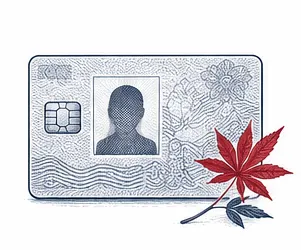
| Size | 35 × 45 mm |
|---|---|
| Head height | 34 mm |
| Background | light gray |
| Resolution | 600 dpi |
| Use | digital upload and print |
Official size of the picture for a My Number Card
On paper, the picture is 45 mm tall and 35 mm wide. Our spec table above lists the same size the other way round, width first, as 35 × 45 mm; both describe one and the same rectangle, roughly 1.77 inches high by 1.38 inches wide. The authority that runs the My Number Card scheme does not stop at the outer edges, though. Its face photo guide also fixes where the head goes inside that rectangle, and each value may vary by about 2 mm either way:
- Face, measured from the chin up to the crown of the head: about 34 mm.
- Gap between the crown and the upper edge of the picture: about 4 mm.
- Centre line of the face: about 17 mm in from either side, so the head is in the middle.
In practice this means the head fills most of the frame and leaves only a thin strip of background above the hair. A print with a tiny face in the middle of a wide background has the correct outer size and still fails. Our tool places the head on that grid automatically and saves the print version at 600 DPI, which keeps the face sharp when the 45 × 35 mm rectangle is cut out.
The picture must be recent: the official rules say it should be no older than six months. Colour is what most people send, and it is what we produce, but the My Number Card checkpoint page states that a black-and-white picture is accepted as well. What matters more than colour is focus, even light and a natural look.
Digital file rules for an online My Number Card application
Apply by smartphone or computer and nothing is printed at all. Instead, the form asks for an image file, and the photo checkpoint page of the official site sets these technical limits:
- JPEG is the only file type accepted.
- The colour space must be RGB; a CMYK image is refused.
- Both the width and the height must be between 480 and 6,000 pixels.
- The file itself must weigh at least 20 KB and no more than 7 MB.
- The picture must not be altered in image editing software. Shooting with the standard phone camera is fine.
- Visible noise, smudges, dots or blocky edges from heavy compression lead to a rejection.
There is no DPI requirement for the online route. The pixel limits and the face layout do the job, and the head should sit in the frame exactly as it would on a 45 × 35 mm print. The JPEG you download from us is RGB, falls inside the pixel range and stays well under the 7 MB ceiling, so the My Number Card form takes it as it is.
How to frame your face
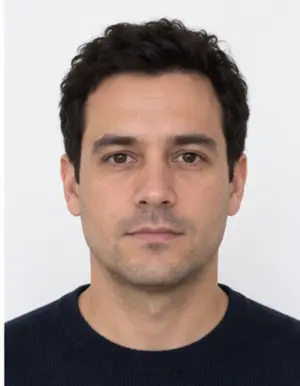
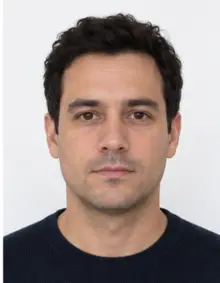
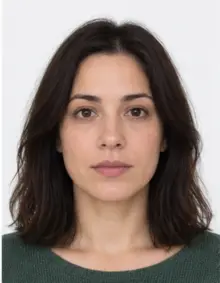
Keep your shoulders level and your eyes on the lens, with the camera directly in front of you. Turning the head to one side is one of the reasons the My Number Card office gives for sending a picture back, and so is an expression that does not look natural. Keep your mouth closed, both eyes open and your face relaxed, as if you were about to say hello.
The whole head must be in the frame, from the chin to the top of the hair, with your ears and the start of your shoulders visible. Hair should stay away from the eyes. Selfies taken with the phone too close to the face often lose the chin or the top of the head, and a cut-off face cannot be repaired afterwards. Leave plenty of room around you when you take the shot; cropping is our job.
-
 Accepted
-
 Accepted
-
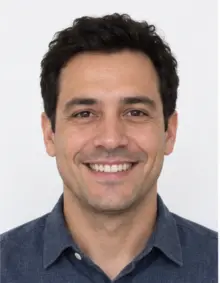 Smiling
-
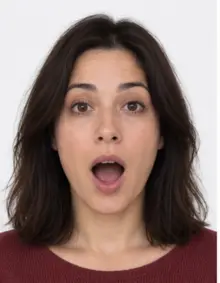 Mouth open
-
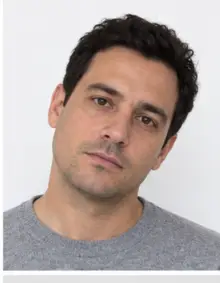 Head tilted
-
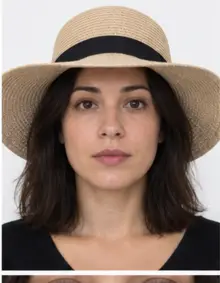 Fashion hat
-
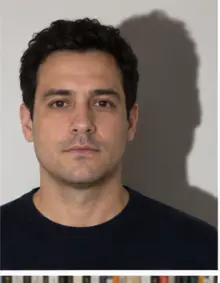 Shadow behind
-
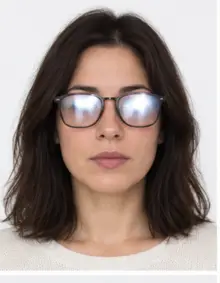 Glare on glasses
-
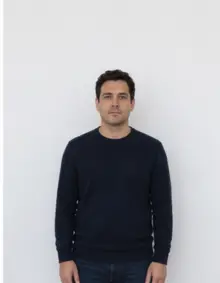 Too far away
-
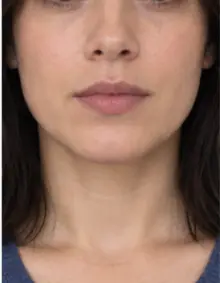 Head cut off
-
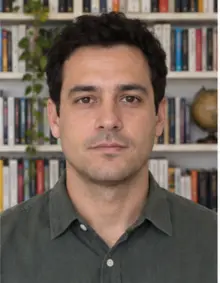 Busy background
-
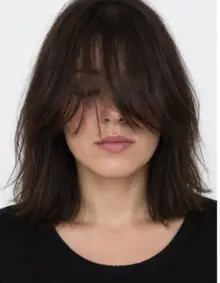 Hair over eyes
The people in these examples are AI-generated.
Background, light and what to wear
The rule for the background is about plainness rather than colour. No pattern, no objects, no furniture and no door frame may appear behind you, and the official checkpoint lists a shadow on the background as a reason for refusal too. White, off-white and pale grey are all acceptable. Our tool swaps whatever was behind you for an even light grey, so a cluttered room at home is not a problem.
Good light makes the biggest difference. Face a window during the day so the light reaches both sides of the face equally, and switch off the flash, which leaves a shiny spot on the forehead and a hard outline on the wall. A lamp straight overhead puts shadows under the eyes, and a bright window behind you turns the face dark.
Wear ordinary everyday clothes in a mid or dark tone, so your shoulders stand out against the light background. Hats and caps must come off. Glasses can stay on only when the frames do not cover any part of your eyes; if they do, or if the lenses reflect light, take them off for the picture.
Head coverings, medical needs and children
The official My Number Card checkpoint page allows exceptions. A turban, hijab or other covering worn for religious reasons is accepted when the whole face is visible, and there are also exceptions for medical wigs, eye patches, wheelchair users and people who are bedridden. Your municipal office can tell you which supporting documents it wants in such a case.
Children follow the same layout as adults, with one exception: since 2 December 2024, a child who is under one year old on the day of application does not need to submit a picture at all, according to the Digital Agency. For an older child, take the picture at the child's eye level, keep toys and hands out of view and shoot several frames, then keep the one where the eyes are open and the head is straight. Under-18s get a My Number Card that runs until their fifth birthday after issue, so expect to make a new picture for them more often.
-
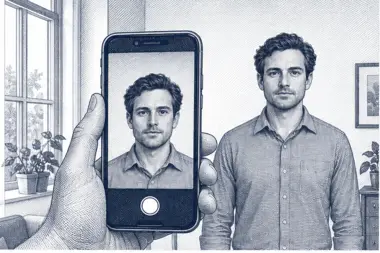 1. Take the picture
At home, against a plain wall, in daylight.
1. Take the picture
At home, against a plain wall, in daylight.
-
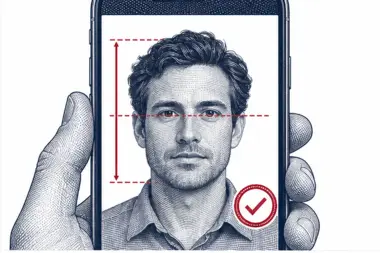 2. We check and crop
Head height, eye line and background are measured.
2. We check and crop
Head height, eye line and background are measured.
-
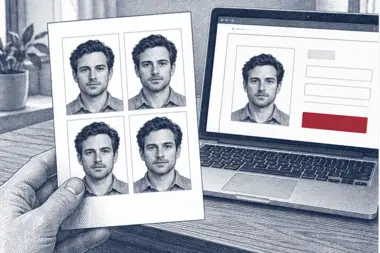 3. Download or print
A file for the upload form or a print sheet.
3. Download or print
A file for the upload form or a print sheet.
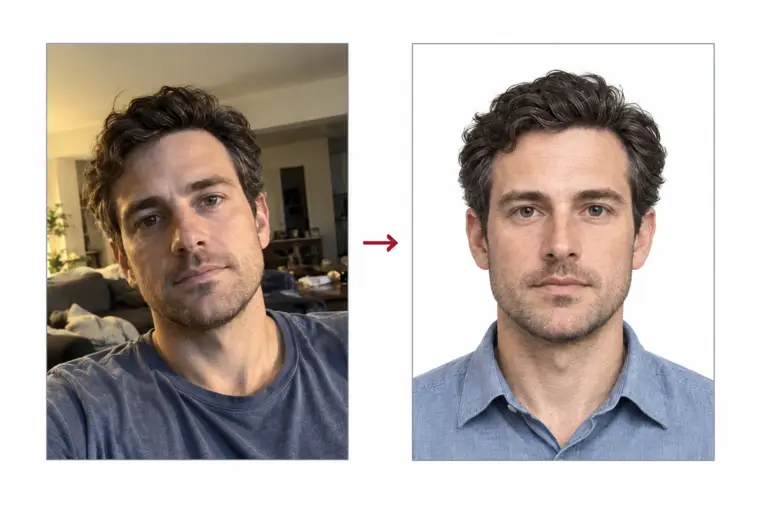
How to make the picture with our tool
- Take the shot. Ask someone to hold your phone at eye level about a metre and a half away, or rest it on a shelf and use the self-timer. A helper gives better proportions than an arm's-length selfie.
- Upload it. Choose Japan My Number Card in the list of documents and send the JPG, PNG, HEIC, PDF or other image file straight from the phone. Everything runs online in your browser; there is no app to install.
- Let the tool work. We crop the picture to the official 45 × 35 mm proportions, put the face on the official grid, replace the background with plain light grey and run the compliance check. The result page shows which rules passed.
- Download or print. Download the free digital file for an online application, or order a print sheet with several copies laid out at the correct size for a paper form.
When the check finds something it cannot fix by itself, such as closed eyes, a turned head or hair over the eyes, it tells you on the result page. Take another shot and upload it again; there is no limit on retries.
Where to submit the picture
The official pamphlet for foreign residents names four routes to a My Number Card, and the picture is handled differently on each of them.
- By smartphone. Scan the QR code printed on your application form, fill in the details and attach the digital picture. The official FAQ confirms that photos taken with a smartphone are accepted for this route.
- By computer. The steps are the same, except that you upload the JPEG saved on your computer instead of a file on the phone.
- At an ID photo booth. Some booths in Japan offer the My Number Card application directly, and the booth takes the picture for you.
- By mail. Glue a printed 45 × 35 mm picture into the box on the paper application form and post it. Before gluing, put your full name and your date of birth on the reverse side of the print; the official FAQ asks for both.
Whichever route you take, the picture you send is the one printed on the finished card, in a reduced size. First issue of the card is free of charge at present, so the picture is usually the only thing you need to prepare yourself.
Your My Number, the notice and the card
People often mix up three things. Your My Number is a 12-digit code, officially the Individual Number, that every registered resident of Japan receives, foreign residents included. The notice is the letter from your city that tells you what your My Number is. The My Number Card is a separate plastic photo ID that you have to apply for, and nothing except this card asks for a picture of you.
So a person who knows their My Number may still have no My Number Card in the wallet. If you are a new resident, you register your address at the municipal office first; the letter with your My Number follows by post a few weeks later. Keep it somewhere safe, because the application form that comes with it carries the QR code you scan to apply online. Your My Number stays the same for life in normal circumstances, while the card and its picture are renewed.
Why My Number Card applications are sent back
Most refusals at the photo stage come from a short list of problems named on the official checkpoint page:
- Part of the face is cut off, usually the chin or the top of the head in a close selfie.
- Furniture, a door, a pattern or other objects appear in the background.
- A shadow falls on the background behind the head.
- The head is turned sideways or tilted instead of facing the camera.
- The expression looks unnatural.
- The picture is out of focus or shaken.
- The file was retouched in an editor, is in CMYK, or is outside the pixel or file size limits.
- The face is too small or sits off-centre in the 45 × 35 mm frame.
A rejected picture means a new submission and more waiting before the My Number Card is issued. Our check looks at framing, background, head angle and sharpness before you download, which removes most of these risks at home.
The official FAQ adds one safety net: when a print is a little off but can be trimmed to the correct size without losing quality, it is not counted as a defect. Do not rely on it. A head that touches the edge, or a print smaller than required, cannot be saved by trimming.
Examples of good and bad pictures
- Good: head about 34 mm tall in a 45 mm high frame, a thin band of grey above the hair, face centred, eyes on the lens, soft daylight and nothing behind the person. This is the result our tool aims for.
- Bad, too close: an arm's-length selfie in which the chin and the top of the hair are missing.
- Bad, too far: the person stood across the room, so the face is small and the frame is mostly wall.
- Bad, busy room: a shelf and a door frame are visible behind the head.
- Bad, side light: one half of the face is bright, the other half dark, and a shadow sits on the wall.
- Bad, glasses: thick frames cross the eyes, or the lenses reflect the window.
- Bad, cap: a baseball cap shades the forehead.
- Bad, filter: a beauty app smoothed the skin, which counts as editing.
Tips for a good picture at home
- Stand about half a metre in front of a light wall, so no shadow lands right behind you.
- Choose daylight from a window in front of you and keep the flash off.
- Hold the camera level with your eyes, neither above nor below, so the proportions of the face stay natural.
- Leave space around your head and shoulders; the crop can remove extra background but cannot add what is missing.
- Take five or six frames and keep the sharpest one.
- Send the original file from the camera, not a copy that went through a messaging app, which lowers the quality.
Checklist before you upload or post
- Paper print: 45 mm tall by 35 mm across. Online form: JPEG, 480 to 6,000 pixels per side.
- Head roughly 34 mm tall, a gap of roughly 4 mm over the hair, centred left to right.
- A plain, light background without objects, pattern or shadow.
- Facing forward, eyes open, mouth closed, neutral expression.
- No hat; glasses only if the frames leave the eyes clear.
- Taken within the last six months and not retouched.
- Mail route: name and birth date written on the reverse of the print.
If every line is true, your picture is ready for the My Number Card application.
Free download or premium processing
The free version gives you a picture cropped to the official size, with a plain background, that has passed our automatic compliance check. You download the digital file right away, and for most applicants that is all the My Number Card needs.
Premium processing is an optional paid extra. We correct uneven light and colour, and a member of our team reviews the picture against the My Number Card rules by hand. If the reviewer finds a problem that only a new shot can solve, you upload another picture at no extra cost.
| Feature | Free | Premium |
|---|---|---|
| 45 × 35 mm crop and face position | Yes | Yes |
| Plain light background | Yes | Yes |
| Automatic compliance check | Yes | Yes |
| Light and colour correction | No | Yes |
| Manual review by our team | No | Yes |
Photo sizes of the My Number Card and other Japanese cards
Japan has no single ID photo size, and a print made for one card rarely suits another. This is how the My Number Card compares with other documents that people living in Japan often carry:
- My Number Card: 45 × 35 mm, height first, with a face of about 34 mm.
- Japanese passport: the same 45 × 35 mm outer size, but the passport office sets its own face and background rules, so read them before you reuse a print.
- Residence card: 40 × 30 mm, a smaller size. Trimming a 45 × 35 mm print down to it leaves the head far too big, so a residence card photo should be cropped from the original shot.
- Driving licence: 30 × 24 mm, the smallest of the group.
The easy way round this is to keep the original file. One shot can be cropped again for each document, and each card photo gets its own layout and check instead of a resized copy of another one.
What the My Number Card is used for
The My Number Card is accepted across Japan as official photo identification, so the picture on it is the one that bank staff, city offices and other services compare with your face. The My Number Card also holds electronic certificates for signing in to government services, lets you print certificates of residence at convenience stores, and can be registered for use as your health insurance card at clinics and hospitals.
All of that depends on a card that you have actually received, and the photo stage is where many applications slow down. A clear, well-lit picture taken within six months spares you a resubmission and keeps the face check simple every time the card is shown.
Think of the photo as part of a card you will carry for years. It sits beside your name, address and date of birth on the front of the card, and anyone who checks the card as ID looks from that portrait to your face. A dark or blurred photo on a card cannot be swapped later: you would have to apply for a replacement card and wait for it all over again.
Foreign residents and the My Number Card
Foreign nationals who have completed resident registration at a municipal office receive a My Number in the same way as Japanese citizens, and they can apply for a My Number Card. The card is optional, but many residents find it useful because it works as a second photo ID next to the residence card.
Keep the two cards apart when you prepare pictures, even though both are plastic cards with a photo on the front. Only the My Number Card shows your My Number. The residence card is issued by the immigration authorities, and its photo is a different size from the one for the My Number Card. Use our residence card photo page for that document and this page for the My Number Card. If your residence card has expired or its details have changed, sort that out first, because the information on your My Number Card has to match your resident record.
Validity, renewal and a new picture
An adult's My Number Card is valid until the tenth birthday after it is issued. For applicants under 18 it runs only until the fifth birthday after issue, because children's faces change quickly. The electronic certificates stored on the card have a separate, shorter life of five years, whatever your age, and are renewed at the municipal office.
When the card itself expires, you apply for a new one, and that application needs a new picture in the same 45 × 35 mm size. A change of name or address must be noted on the My Number Card by your city or ward office, but it does not by itself call for a new photo. Your My Number does not change when the My Number Card is replaced; only the plastic card and the portrait on it are new.
After you submit the application
Once the application is accepted, the My Number Card is produced and your municipal office sends you a notice when it is ready. You then collect the My Number Card in person, bringing that notice and the identification it lists, and you set the PIN codes at the counter. If the photo is refused, you are asked to send a new one, and the whole process starts again from that point, which is why a correct picture the first time saves weeks.
Keep the digital file of your picture after the My Number Card arrives. If you lose the card and need a replacement, or a family member needs a My Number Card photo in a hurry, a saved original that is less than six months old can be printed again without a new session.
Photo booth, studio or a picture at home
There are three usual ways to get a picture for the My Number Card in Japan. ID photo booths stand near stations and supermarkets all over the country; many have a My Number Card setting, and some let you send the application from the booth itself. They are quick, but you get one or two attempts and little say over the light. A photo studio that knows the My Number Card layout produces a reliable print, though it costs more and usually means a trip across town.
Taking the picture at home with your phone and our tool costs nothing for the digital file, and you can retake the shot as many times as you like before anything is submitted. Whichever option you pick, compare the result with the rules on this page before you send it: a booth set to a smaller ID size, or a studio print made for a residence card, will not match the My Number Card layout.
Other ID photos in Japan
The My Number Card is not the only Japanese document with a portrait on it, and the formats differ. The residence card has its own photo rules, and a visa for Japan follows the size set by the consulate that handles it. Choose the matching document in our list of photo requirements instead of reusing a file made for something else.
Frequently asked questions
What size is the picture for a My Number Card?
The paper print measures 45 × 35 mm, height first. The online form wants a JPEG of 20 KB to 7 MB whose sides are each 480 to 6,000 pixels long.
How large should my face be?
The guide asks for a face of roughly 34 mm, chin to crown, a gap of roughly 4 mm over the hair and a centred head, with a tolerance of about 2 mm on each value.
Can I use a picture taken with my phone?
Yes. Smartphone pictures are accepted for the online application, as long as they are not edited and the framing, background and light follow the rules.
Which background colour is required?
No particular colour. The background has to be plain, without objects, pattern or shadow. Our tool uses a light grey.
Does a baby need a picture?
Not if the child is under one year old on the day of application; that rule has applied since 2 December 2024. Older children need a picture like adults.
Is the picture free?
Yes. Making and downloading the digital picture is free. Premium processing with light correction and a manual review is optional and paid.
Can I print the picture for a mail application?
Yes. Order a print sheet, or print the 600 DPI file at its actual size. Your name and birth date go on the reverse of the print before it is glued to the form.
Is a black-and-white picture allowed?
The official checkpoint page says it is. Our tool produces a colour picture, which is what most applicants send.
Can I wear glasses?
Only if the frames do not cover your eyes and the lenses do not reflect light. Otherwise take them off.
How old can the picture be?
No more than six months, and it should still look like you.
Do I need a My Number Card to have a My Number?
No. Your My Number is assigned when you register as a resident, and the notice tells you what it is. The My Number Card is optional, and you apply for it separately with a picture.
Where is the QR code for a smartphone application?
On the application form that comes with your My Number notice. Scan it with the phone and the form opens with your details, ready for the picture.
Can I reuse my passport picture for the My Number Card?
Only if it is less than six months old and follows the My Number Card layout. The outer size matches, but the face position and background rules must be met as well.