Japan Visa Photo Online
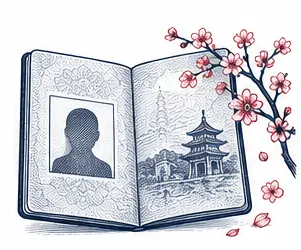
Every application for a visa to Japan needs one recent colour visa photo of the traveller. Upload a photo from your phone and we cut it to the 45 × 45 mm visa photo size, put a plain white background behind you and check the position of your head. You get a file that is ready to print for a paper form or to attach to an online application.
| Size | 45 × 45 mm |
|---|---|
| Head height | 34 mm |
| Background | white |
| Resolution | 300 dpi |
| Use | digital upload and print |
Japan visa photo size and basic rules
Our default template is a square of 45 × 45 mm. Inside it, your head measures about 34 mm from the chin up to the hairline's highest point, and roughly 4 mm of white space is left between the hair and the upper edge of the photo. The file is prepared at 300 DPI, the resolution a photo lab or a home printer needs for a sharp print at this size.
There is one important caveat. Japan does not use a single visa photo size worldwide. Each embassy or consulate of Japan publishes its own list of documents, and the photo size on that list can differ from ours. Look up the page of the Japanese mission that will handle your application before you print, and choose a different size in our tool if it asks for one. The rest of the rules for a Japanese visa photo are much more uniform: white background, colour, a recent photo and an unedited face.
- Default visa photo size: 45 × 45 mm, square
- Head height: roughly 34 mm, measured from the chin
- Gap above the hair: about 4 mm
- Background: plain white
- Colour photo, recent, at 300 DPI for printing
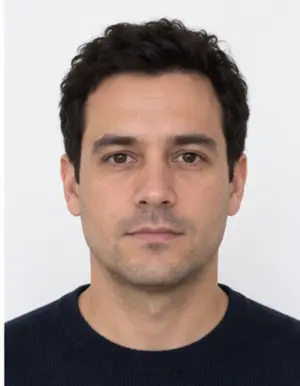
Photo sizes published by Japanese embassies and consulates
A few examples show how much the visa photo size varies between Japanese missions:
- Mumbai, India: the Japanese Consulate-General asks for a square colour photo of 45 × 45 mm on white.
- Denver, USA: 35 × 45 mm (width by height) or the 2 × 2 inch size used for US passport photos.
- San Francisco, USA: either 2 × 1.4 inches or the 2 × 2 inch size, printed on photo paper, without glasses.
- Melbourne, Australia: a 2 × 2 inch photo, or 4.5 × 3.5 cm.
- Manila, Philippines: the Embassy of Japan lists a visa photo of 4.5 × 3.5 cm.
Note that 2 × 2 inches is close to 51 mm on each side, so that size is a little larger than the 45 mm square, and 4.5 × 3.5 cm is a rectangle rather than a square. Printing a photo in one size and trimming it into another usually leaves the head too big or too small. It is quicker to make a new crop from the same upload, which our tool does in a few seconds for any Japanese consulate size. If your country is not on this list, the website of the Japanese embassy that serves your region gives the visa photo size for applicants in your area.
Framing the face
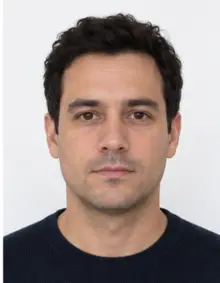
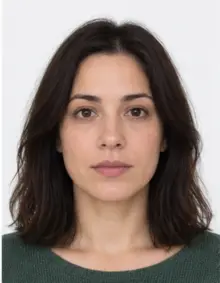
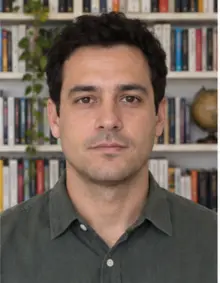
The Japanese consular officer should see your whole face, straight on. Look directly at the lens, keep your head level and let the visa photo show the top of your hair, your chin and the start of your shoulders. Both eyes must be open and clearly visible; hair should not fall over the eyes or the eyebrows.
Keep a neutral expression with your mouth closed. A relaxed face is fine, but a broad smile with teeth showing is not what Japanese missions expect in a visa photo. If the head is tilted, turned or too far from the camera, our check tells you before you download, so you can take another visa photo.
-
 Accepted
-
 Accepted
-
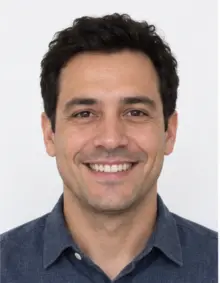 Smiling
-
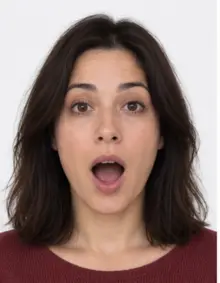 Mouth open
-
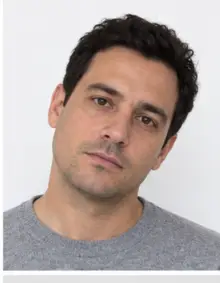 Head tilted
-
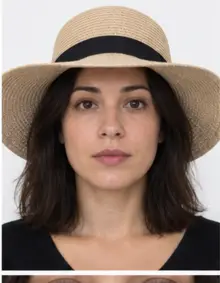 Fashion hat
-
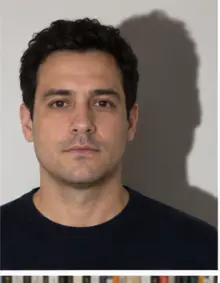 Shadow behind
-
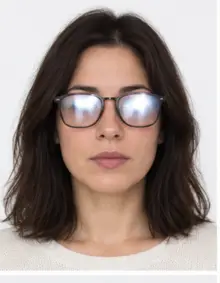 Glare on glasses
-
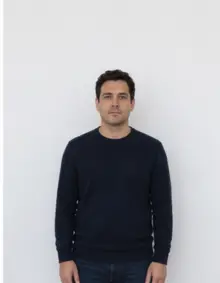 Too far away
-
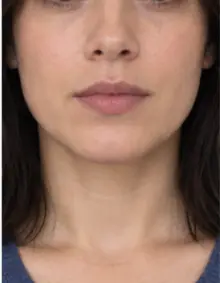 Head cut off
-
 Busy background
-
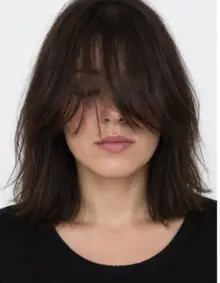 Hair over eyes
The people in these examples are AI-generated.
Background, light and what to wear
A white background is the one rule that every Japanese mission agrees on. The consulate in Mumbai, for example, says that a visa photo with a dark, busy or patterned backdrop is refused. You do not need a white wall at home: our tool replaces whatever is behind you with clean white and removes the grey shadow that often appears around the shoulders in a home photo.
Light matters more than the camera. For a good visa photo, stand facing a window in daylight so both sides of the face are lit evenly. A ceiling lamp directly above you leaves dark circles under the eyes, and a light behind you turns the face into a silhouette.
Choose a top with some colour, such as navy, grey or green, so your outline stays clear against the white. Leave hats, caps and headphones off for a Japanese visa application. A head covering worn for religious reasons is normally accepted when the whole face from the forehead to the chin stays visible, but ask your Japanese consulate if you are unsure.
Glasses, filters and recent photos
Japan's Consulate-General in San Francisco does not accept glasses in the visa photo at all. Other missions are less explicit, yet glare on lenses is a common reason for a retake, so it is simplest to remove them. Contact lenses do not show in a visa photo and are fine.
Do not use beauty filters or apps that smooth skin or reshape the face. In its eVisa checklist, Japan's Los Angeles consulate wants a visa photo that has not been altered by apps and is neither blurry nor pixelated. Several missions of Japan, including Denver and Manila, also require the visa photo to be no older than six months, so a print left over from a past trip to Japan will not do, even if its size is right.
-
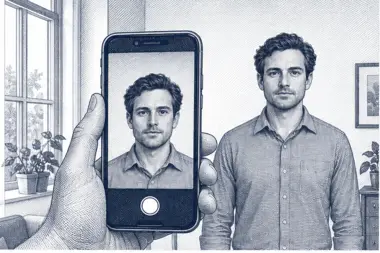 1. Take the picture
At home, against a plain wall, in daylight.
1. Take the picture
At home, against a plain wall, in daylight.
-
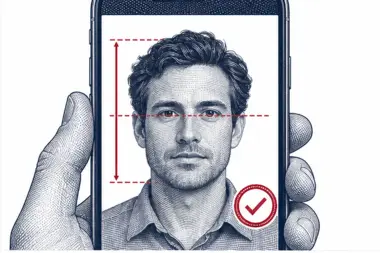 2. We check and crop
Head height, eye line and background are measured.
2. We check and crop
Head height, eye line and background are measured.
-
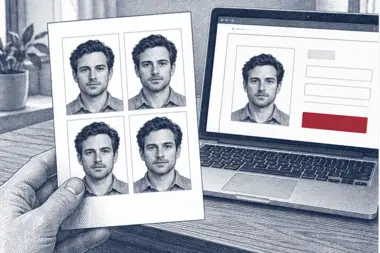 3. Download or print
A file for the upload form or a print sheet.
3. Download or print
A file for the upload form or a print sheet.
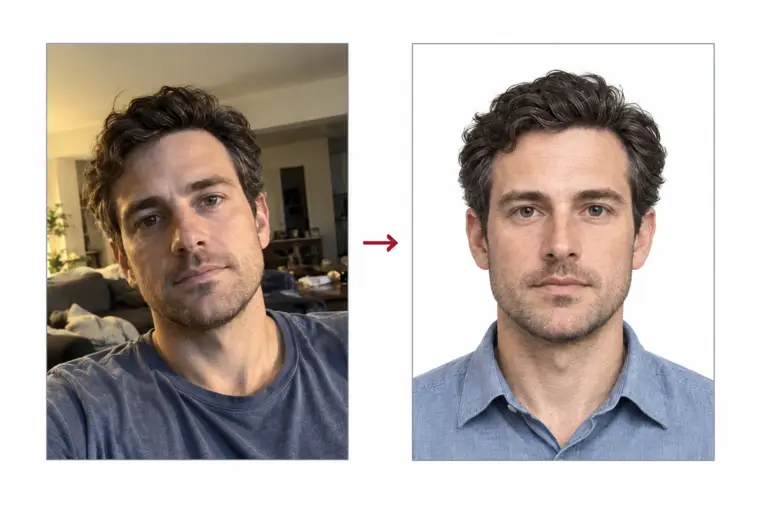
How to make your Japan visa photo with our tool
- Take the photo. Ask a friend to hold the phone at eye level about 1.5 metres away, or put it on a shelf and use the timer. Arm's-length selfies tend to enlarge the nose and the forehead.
- Upload the file. Pick Japan Visa in the document list and send the JPG, PNG, HEIC, PDF or other image file straight from your phone or computer. The whole process runs online in the browser.
- Check the result. We crop the photo to 45 × 45 mm, set the white background and show which measurements passed. If your Japanese consulate lists another size, change it and the same photo is cropped again.
- Download or print. The digital visa photo is free. You can also order a print sheet with several copies of the photo laid out at the right size, ready to cut.
If the automatic check spots something it cannot correct, such as closed eyes or hair across the face, it says so on the result page. Retake the visa photo and upload it again; you can try as many times as you need.
Where to submit the visa photo
The checklist of the Ministry of Foreign Affairs of Japan puts one photograph next to the passport and the filled-in application form. How you hand in the visa photo depends on the route you take.
Paper application at a consulate or visa centre. Print the visa photo on photo paper, cut it to size and glue it into the box on the form. The Japanese missions in Melbourne and Manila state that staples and tape are not allowed, and San Francisco wants real photo paper rather than plain office paper.
Japan eVisa. Citizens of eligible countries can apply online through the eVisa system run by the Ministry of Foreign Affairs and attach the visa photo as a file. The checklist from the Japanese consulate in Los Angeles describes what the photo must show (facing forward, white background, taken within six months) but gives no pixel or file size, so read the upload rules on the portal itself. Our download is a standard JPG that you can attach online without resizing it.
Some nationalities can enter Japan without a visa for short stays as tourists. The Ministry of Foreign Affairs keeps the list of exempt countries, and the entry rules for visitors are summarised by the Japan National Tourism Organization at japan.travel, so check both before you prepare a visa photo or any other document.
Online eVisa photo or printed photo?
The same upload gives you both. For an online application you download the digital visa photo and attach it; for a paper application you print it at 300 DPI. Japan is moving more applicants to the online route, but many consulates still accept paper forms, and a few ask for a printed photo even when part of the process is online. Keep the original file: if a Japanese consulate later asks for a second copy or a different size, you can crop it again instead of booking a new photo session.
When you print at home, set the printer to the actual size of the file and turn off any "fit to page" option, otherwise the photo size changes on paper. A photo lab or a print sheet ordered from us avoids that problem.
One visa photo for each traveller to Japan
The purpose of the trip changes the list of supporting documents a Japanese consulate asks for: a tourist shows travel plans, a business visitor brings a letter from the company in Japan, and a person visiting relatives adds papers about the family link. The visa photo line appears on each of these lists, and the size is set by the consulate, not by the purpose. If you are unsure, the visa page of your Japanese embassy shows the photo size next to the other documents.
Every traveller needs a separate visa photo, children and babies included, because each person files an application of their own. Families can upload one photo per person in a row; each visa photo is cropped to the same size and checked on its own. Keep the files after the trip: if you apply for a visa to Japan again within six months and still look the same, the visa photo can be printed once more.
Where the photo fits in a visa application for Japan
- Check whether you need a visa. Look up your nationality on the exemption list of the Japanese Ministry of Foreign Affairs.
- Find your route. See whether your country can use the online eVisa or must apply on paper at a Japanese embassy, consulate or authorised visa agency.
- Collect the documents. Passport, visa application form, the visa photo in the right size and the papers for your purpose of travel to Japan.
- Make the photo. Upload a phone photo here, download the free file and print it if your visa application is on paper.
- Submit and wait. The Japanese mission reviews the visa application; processing times vary, so apply well before your trip to Japan.
Most delays at the photo stage come from a wrong size or a background that is not white. Both are checked online before you download, and the free version already covers them.
Common reasons a Japanese visa photo is refused
- The photo size does not match the one your consulate lists, for example a 2 × 2 inch print where 45 × 45 mm is required.
- The background is cream, grey, patterned or has a shadow on it.
- The visa photo is older than six months or no longer looks like you.
- Light is uneven, the face is blurred, or the print came out of an office printer on plain paper.
- Glasses reflect the light or the face was edited in an app.
- The visa photo was stapled or taped to the paper form instead of glued.
The Japanese Consulate-General in Chicago notes that most selfies and home-printed photos it receives are rejected for poor quality. That does not mean a phone camera is useless: good daylight, a helper and a lab print on photo paper solve most of these problems, and our check catches the size and background issues before you download.
Examples of good and bad visa photos
- Good photo: face centred and looking at the lens, head about 34 mm tall in a 45 mm square, even daylight, pure white behind. This is the Japan visa photo our tool aims to produce.
- Bad photo, too far away: the person stood across the room, so the head fills less than half of the frame.
- Bad photo, cut-off hair: the top of the head touches or leaves the edge.
- Bad photo, harsh flash: a bright spot on the forehead and a hard shadow on the wall.
- Bad photo, wide smile: teeth showing and eyes half closed.
- Bad photo, glasses: reflections hide part of the eyes.
- Bad photo, wrong size: a 4.5 × 3.5 cm photo handed to a Japanese consulate that wants a square size.
- Bad photo, edited: a beauty app smoothed the skin and slimmed the face.
Tips for taking the photo at home
- Stand half a metre in front of a light wall or a door so the background has no strong pattern.
- Turn off the flash and face a window during the day.
- Hold the camera straight at the height of your eyes, not above or below, so the photo keeps natural proportions.
- Leave space around your head and shoulders; we can crop the photo, but we cannot add what is not in the frame.
- Take a few shots and keep the sharpest one as your visa photo.
- Send the original photo file, not a copy compressed by a messaging app; visa officers notice blurry photos.
For children the same rules apply: one visa photo per applicant, eyes open, no toys or hands in view. A baby can lie on a white sheet and be photographed from above; our background step removes the folds of the sheet.
Checklist before you print or upload
- The photo size matches what your embassy or consulate of Japan publishes (45 × 45 mm by default).
- The head is about 34 mm tall with a small gap above the hair.
- The background is plain white with no shadow.
- The visa photo is in colour and was taken in the last six months.
- You face the camera with a neutral expression, eyes open, no glasses.
- Prints are on photo paper and will be glued, not stapled.
If every line is true, your Japan visa photo is ready for the consulate or for the online form.
Visa photo online, in a studio or in a booth
You can get a photo for Japan in several ways. A studio that knows the Japanese consulate rules usually gets the visa photo right, but you pay more and may have to book a time. Photo booths and kiosks are fast, yet many offer only the local passport size and cannot produce a 45 × 45 mm visa photo. Making the visa photo online takes a few minutes at home, costs nothing for the digital file and lets you pick the exact size your Japanese consulate lists.
Whichever way you choose, compare the result with the visa photo size and background rules of the mission that receives your application. A passport photo made for another country is not automatically a valid visa photo for Japan.
Free download or premium processing
The free version, made online in a minute, gives you a correctly cropped visa photo with a white background that has passed the automatic compliance check. For most applicants that is all they need.
Premium processing is an optional paid extra. We correct uneven light and colour, and a person on our team reviews the visa photo against the rules for Japan before it reaches you. If the reviewer sees a problem that only a new photo can fix, you upload another one at no extra cost.
| Feature | Free photo | Premium photo |
|---|---|---|
| 45 × 45 mm or another consulate size | Yes | Yes |
| White background | Yes | Yes |
| Automatic compliance check | Yes | Yes |
| Light and colour correction | No | Yes |
| Manual review by our team | No | Yes |
Other photos for documents in Japan
Once you live in Japan you may need photos for other Japanese papers, and they do not share the visa photo format. The residence card and the certificate of eligibility have their own requirements, and so does the Japanese My Number Card. Pick the matching document in our list of photo requirements rather than reusing the visa file.
Frequently asked questions
What size is a Japan visa photo?
Our default is 45 × 45 mm with a head of about 34 mm. Japanese missions do not all use the same size, so confirm it on the website of your embassy or consulate.
Can I take the visa photo with my phone?
Yes. Use daylight from a window and ask someone to hold the phone at eye level. We handle the crop and the white background online.
Is the visa photo free?
Making and downloading the digital visa photo is free, with no account fee. Premium processing with a manual review is optional and paid.
Can I wear glasses in a Japanese visa photo?
The Japanese consulate in San Francisco does not allow them, and glare causes retakes elsewhere, so take them off.
How old can the photo be?
Several Japanese missions ask for a visa photo that is no more than six months old.
Do I glue or staple the print to the form?
Glue it. Japanese missions such as Melbourne and Manila say staples and tape are not permitted.
Which photo does the Japan eVisa need?
A recent, forward-facing colour photo on white, not edited by apps and not blurry. Check the portal for its current file rules before you upload it online.
Can I order prints of the visa photo?
Yes. Choose a print sheet after processing and you receive several copies of the visa photo laid out at the right size for your Japanese consulate.
Is a passport photo the same as a visa photo for Japan?
Not always. Passport photo sizes differ by country, and the visa photo must follow the size your Japanese consulate sets. Crop a new visa photo instead of reusing an old print.
Can I make the photo online and print it later?
Yes. Make the photo online, keep the file, and print it when your consulate asks for paper copies. The same online result works for an eVisa upload and for a print, so you only take the photo once and order prints online or at a local shop.
How big is 45 × 45 mm in inches?
About 1.77 × 1.77 inches. That size is smaller than a 2 × 2 inch photo, so the two are not interchangeable.
How long does the online visa photo take?
Processing takes a few seconds after the upload, and the free visa photo is ready to download right away.