Indian Passport Photo Online
The photo for an Indian passport is a square colour photo of 51 × 51 mm (2 × 2 inches), and the face sits centred on a plain white background. Send us a photo from your phone and we cut it to that square, whiten the background, measure the head and the eye line, and give you a passport photo you can upload online or print for your Indian passport application.
| Size | 2 × 2 in |
|---|---|
| Head height | 1.29 in |
| Background | white |
| Resolution | 300 dpi |
| File size | up to 200 KB |
| Use | digital upload and print |
Indian passport photo size and the main rules
The square format is the first thing to get right. An Indian passport photo is as wide as it is tall: 2 inches on each side, which equals 51 mm. A rectangular photo of the kind many European countries use, such as 35 × 45 mm, has a different size and will not fit the box on an Indian passport form. Inside the square, the head should measure roughly 1.29 inches between chin and crown, about two thirds of the photo height, and the line of the eyes should run roughly 1.18 inches up from the lower edge of the photo.
For a printed passport photo, 300 dots per inch gives a sharp result, so the square holds 600 × 600 pixels. For a digital passport photo, the file should stay under 200 KB. Our tool prepares both versions of the India passport photo from one upload: a print-ready photo and a compressed photo for the web.
- Square: 51 × 51 mm (2 × 2 in)
- Head height: roughly 1.29 in, chin to crown
- Eyes: roughly 1.18 in up from the lower edge
- Resolution: 300 DPI for a print
- File size: up to 200 KB for an online upload
- Background: plain white, colour photo
These numbers come from the passport photo specification for Indian passports that the government hosts on passport.gov.in. If the passport office handling your Indian passport gives you its own instructions, follow those first.
Framing the face in an India passport photo
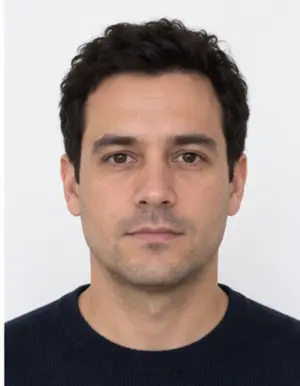
Most problems with an India passport photo come from the framing rather than from the size. Look straight into the lens with your head level, not tilted or turned. The whole face has to be inside the square, chin and hairline included, with a little space above the head. Both eyes should be open and clearly visible, and hair should not fall over the eyebrows.
A face that is too small, because the camera was too far away, or too large, because the chin or the crown is cut off, is the most frequent framing mistake we see in photos for India. Our tool places the head at the right height in the passport photo automatically, so you only need to leave enough space around your head and shoulders when you take the photo.
Background, light and clothing
The background of a passport photo for an Indian passport must be plain white: no pattern, no furniture, no shadow behind the head. Any light wall at home will do, because our background step replaces it with an even white and removes the grey shadow line that often appears along the shoulders in a home passport photo.
Light the face from the front. Daylight from a window in front of you is ideal; a ceiling lamp right above the head leaves dark patches under the eyes, and a flash leaves glare on the skin. Keep a neutral expression with the mouth closed.
Wear ordinary clothes in a colour that contrasts with the white background; a white shirt may blend into it. Remove caps and sunglasses. A head covering worn for religious reasons is normally accepted when the whole face remains visible. Glasses are best taken off, since lenses can reflect light and hide the eyes in the passport photo.
-
 Accepted
-
 Accepted
-
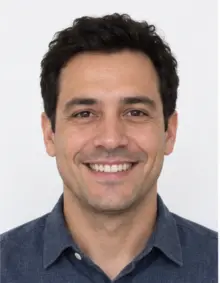 Smiling
-
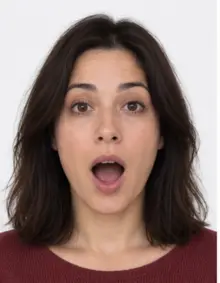 Mouth open
-
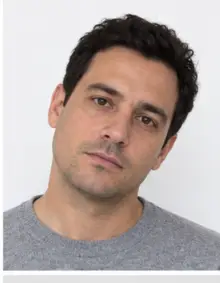 Head tilted
-
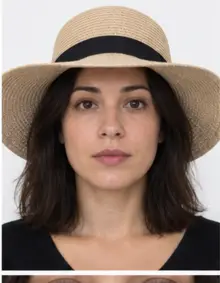 Fashion hat
-
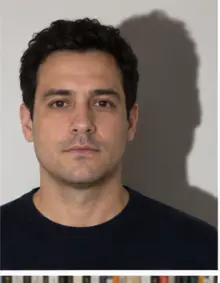 Shadow behind
-
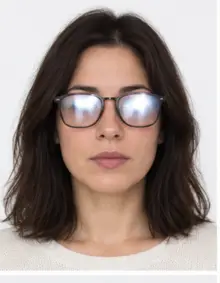 Glare on glasses
-
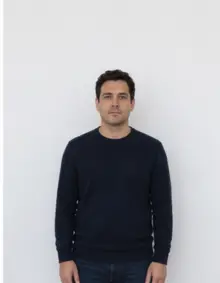 Too far away
-
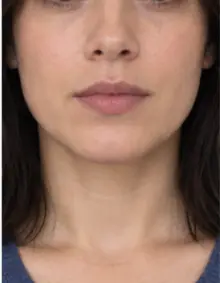 Head cut off
-
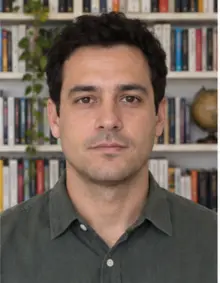 Busy background
-
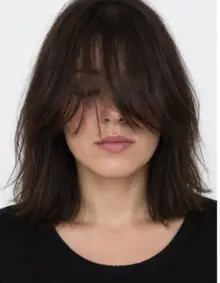 Hair over eyes
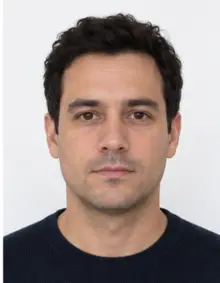
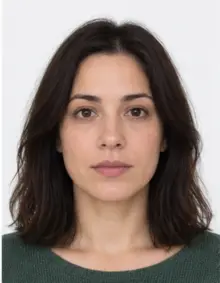
The people in these examples are AI-generated.
How to make an Indian passport photo online with our tool
- Take a photo. Stand in front of a light wall and ask someone to hold the phone at eye level about a metre and a half away. A timer and a stand work too.
- Upload it. Select India passport in the form above and add the photo from your phone. JPG, PNG and HEIC files are accepted.
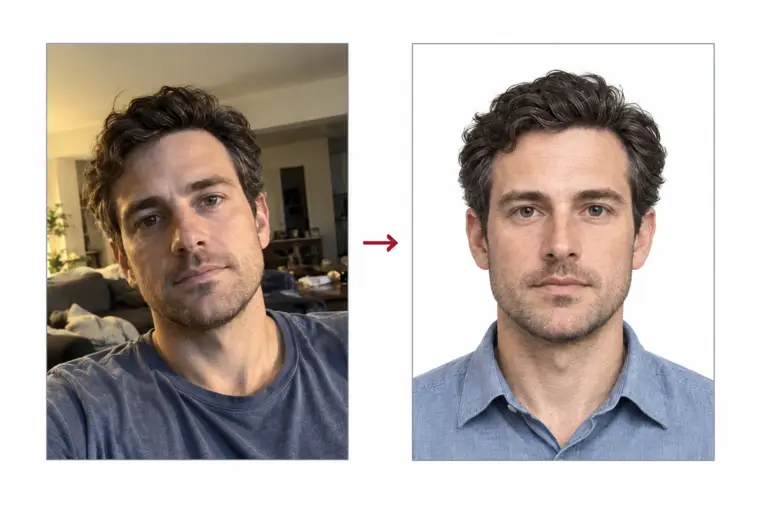
- Let us process it. We crop the photo to the 2 × 2 inch India passport photo size, set the white background and run the compliance check on the head size, the eye line and the expression.
- Download it. The digital Indian passport photo is free to download. You can also order a print sheet with several copies of the passport photo.
If the check reports a closed eye, a turned head or a blurred face, cropping cannot fix it, so take a new photo and upload it again. The whole online process takes a minute, and you do not need a studio, a photo editor or a computer.
Where you submit the Indian passport photo
Applications for an Indian passport start online on the Passport Seva website, passportindia.gov.in. You register, complete the passport form, pay the fee online and choose an appointment slot at a Passport Seva Kendra (PSK) or a Regional Passport Office. Applicants inside India are photographed at the PSK during the appointment, so for a standard Indian passport application in the country the photo is usually taken there rather than brought from home.
Indian citizens who live abroad apply for a passport through an Indian embassy or consulate, often via a service centre that the mission works with. These offices usually ask for 2 × 2 inch passport photos, printed or uploaded with the online form. This is where a ready Indian passport photo saves time. Read the list of documents your mission publishes, including how many prints it wants and whether it accepts a digital passport photo.
-
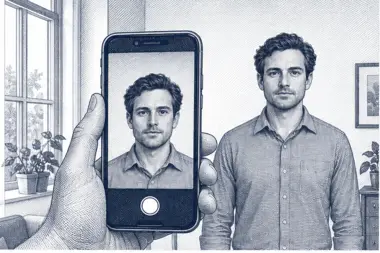 1. Take the picture
At home, against a plain wall, in daylight.
1. Take the picture
At home, against a plain wall, in daylight.
-
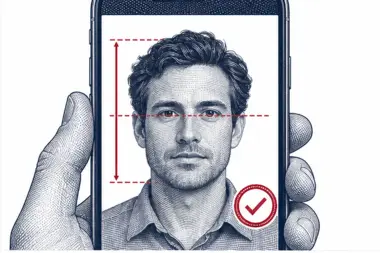 2. We check and crop
Head height, eye line and background are measured.
2. We check and crop
Head height, eye line and background are measured.
-
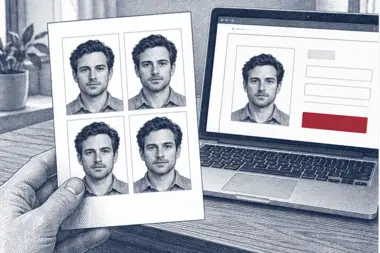 3. Download or print
A file for the upload form or a print sheet.
3. Download or print
A file for the upload form or a print sheet.
Applying for an Indian passport from abroad
Outside India, passport services are handled by the Indian embassy or consulate for your area. Many missions now take passport applications through an online version of Passport Seva: you fill in the passport application form online, print it and bring it with your documents to the mission or to the service centre it uses. The details differ from country to country. Some missions want passport photos glued to the printed form, some ask you to upload a passport photo online, and some want both. The fee, the processing time and the list of supporting papers also vary.
Before you print anything, open the passport page of your Indian mission and check three things: the photo size it states, how many passport photos it wants and whether it accepts an online upload. In most countries the answer is a 2 × 2 inch passport photo on white, which is the format we make, both as a free digital file and as a print sheet.
Why the passport office is strict about the photo
The photo you submit is printed on the data page of your new passport, and border officers compare it with your face every time you travel. An adult's Indian passport is usually valid for ten years, so the same passport photo identifies you at airports for a decade. A dark, blurred or edited photo makes that comparison harder, which is why passport offices refuse photos that break the rules instead of accepting them and hoping for the best.
This is also why our processing never reshapes the face. The free tool changes only the crop, the background and the file size; premium processing adds light and colour correction. Your passport photo still looks exactly like you, which is what the passport office and the officer at the border need.
Indian passport photo for a renewal or a reissue
A renewal of an Indian passport, a reissue after a change of name or address, and a new passport after the old one was lost or damaged are all new applications as far as the photo is concerned. The office wants a recent passport photo that shows how you look today, not the photo printed in your old Indian passport. If you renew at an embassy abroad, prepare fresh passport photos for the new Indian passport; the square size and the white background stay the same as for a first passport.
Digital passport photo for an online form
A photo straight from a phone camera weighs several megabytes and is almost never square, so an online form refuses it or squeezes it out of shape. The digital Indian passport photo we produce is already a 2 × 2 inch square in proportion and compressed below 200 KB, with the face kept sharp. Upload the passport photo exactly as you downloaded it: cropping it again or taking a screenshot changes the size and the quality of the passport photo.
Indian passport photo or "passport size photo"?
In India, "passport size photo" is an everyday name for a small portrait photo, and many local forms, college applications and ID cards ask for a 35 × 45 mm print under that name. That rectangle is not the 2 × 2 inch square used for the Indian passport photo described on this page. When a form says "passport size", read which dimensions it lists. If it names 2 × 2 inches or 51 × 51 mm, the India passport photo from our tool is the right one; if it names another size, pick that document in our list instead.
Photos taken in a studio, at home or with a selfie
The rules describe the result, not where the photo was taken. A studio photo, a photo taken at home by a friend and a selfie can all become a valid passport photo, provided the face is sharp, evenly lit and seen straight on. A selfie at arm's length tends to make the nose look larger and the ears smaller, so a photo taken by another person from a little further away usually looks more natural. If you already have a recent photo that meets these points, you can upload that photo instead of taking a new one.
Printing the passport photo
When the passport office asks for paper copies, choose the print sheet. It places several passport photos of the exact size on one standard sheet, so a photo shop or a home printer can print it at 300 DPI without scaling. After printing, measure one photo with a ruler: each side should be 51 mm. Cut along the lines and keep the printed photos flat and clean, in an envelope, so every passport photo stays free of creases and fingerprints. Do not glue or staple a print until the office tells you where it goes.
Common reasons an Indian passport photo is refused
- The photo is rectangular instead of a 2 × 2 inch square.
- The head is too small, too large or not centred.
- The background is grey, coloured or patterned, or shows a shadow.
- The photo is blurred, dark or overexposed.
- The applicant smiles widely, has the mouth open or the eyes closed.
- Glasses reflect light or hair covers the eyes.
- A beauty filter or retouching changed the face.
- The passport photo is old and no longer looks like the applicant.
- The digital passport photo is larger than 200 KB.
Our free check covers the size, the framing and the background of every passport photo we make for India. It cannot tell how old a photo is, so always use a recent one.
Examples of good and bad passport photos
Compare your photo with these typical passport photo cases before you upload it online. Each line describes one India passport photo and what usually happens to it.
- Good passport photo: square, head centred and about two thirds of the height, white background, even light. This is the passport photo our tool produces for an Indian passport.
- Bad, wrong shape: a 35 × 45 mm photo made for another country's passport.
- Bad, face too small: the camera was across the room, so the head fills less than half the square.
- Bad, shadow: a lamp to one side left a dark area on the wall behind the head.
- Bad, smile: teeth are visible and the face is not neutral.
- Bad, glare: a reflection in the glasses hides one eye.
- Bad, cropped: the top of the hair or the chin is cut by the edge of the photo.
- Bad, filter: a beauty app smoothed the skin, so the passport photo no longer matches the face.
Tips for taking your passport photo at home
- Stand about half a metre from the wall so your body does not cast a shadow on it.
- Face a window in daylight and switch off the flash.
- Hold the phone straight at eye level; a camera held low or high distorts the face.
- Leave space above the head and around the shoulders. We can crop the photo, but we cannot add missing hair or shoulders.
- Take a few photos in a row and upload the sharpest photo; a passport photo made from a sharp original prints better.
- Send the original photo file, not a copy forwarded through a messenger app, which compresses photos.
Passport photo for a child or a baby
Every applicant, including a newborn, needs a separate passport photo for their Indian passport. The same square size and white background apply to a child's passport. A baby does not have to look perfectly neutral, but the eyes should be open and no hand or toy may appear in the frame. Lay the baby on a white sheet and photograph the child from above; our background step evens out the folds of the sheet. For a toddler, sit the child on a parent's lap in front of a light wall and keep the parent out of the passport photo.
How our check reads an India passport photo
After the upload, the tool finds the face, measures the distance from the chin to the crown and the height of the eyes, and crops the square around them so the India passport photo matches the official proportions. It then swaps the background for white and looks for blur, glare, closed eyes and a tilted head. If the passport photo passes, you download it straight away. If it fails, the result names the rule it breaks, so you know what to change in the next photo. The check runs online in your browser session; nothing needs to be installed.
Checklist before you submit
- The passport photo is a 2 × 2 inch (51 × 51 mm) square.
- The head is roughly 1.29 inches tall and centred.
- The background is plain white without shadows.
- The photo is in colour, recent and sharp, with no filters.
- Your expression is neutral, eyes open, nothing covering the face.
- The digital file is under 200 KB, or the print is at 300 DPI.
If every point holds, your passport photo is ready for the Indian passport application.
Free passport photo or premium processing
The free passport photo for an Indian passport covers everything the rules measure: the 2 × 2 inch size, the head position, the white background and the file size. Download it, upload it online or print it, and you are done.
Premium processing is an optional paid extra. We correct uneven light and colour, and a member of our team reviews the passport photo against the Indian rules before you receive it. If the reviewer spots a problem that a better photo would solve, you can upload a new one at no extra cost.
| Feature | Free photo | Premium photo |
|---|---|---|
| 2 × 2 inch India passport photo size | Yes | Yes |
| White background | Yes | Yes |
| Compliance check | Yes | Yes |
| Light and colour correction | No | Yes |
| Manual review by our team | No | Yes |
Other Indian documents
A photo made for an Indian passport is not automatically right for other Indian documents. The police clearance certificate uses a rectangular digital photo, and visitors who need an India visa follow the visa photo rules instead. Pick the exact document in our list so the photo size and the background match what the office expects.
Frequently asked questions
What size is an Indian passport photo?
A square of 2 × 2 inches (51 × 51 mm). The head is roughly 1.29 inches tall and the eyes sit roughly 1.18 inches up from the lower edge.
Can I make an Indian passport photo with my phone?
Yes. Take the photo in daylight against a light wall, upload it, and we crop it to size and make the background white.
Is the Indian passport photo free?
Yes, the digital passport photo is free to download. Premium processing with a manual review is optional and paid.
What file size does a digital Indian passport photo need?
Keep it under 200 KB. Our download already fits that limit.
Do I need to bring a passport photo to the Passport Seva Kendra?
In India the PSK normally takes your photo during the appointment. Applicants abroad usually need 2 × 2 inch passport photos for the embassy or consulate.
Are glasses allowed in an Indian passport photo?
It is safer to remove them, because reflections or frames over the eyes can get the passport photo rejected.
Can I smile in an Indian passport photo?
No. Keep a neutral face with the mouth closed and both eyes open.
Can I reuse the photo from my old Indian passport?
No. A renewal or reissue needs a recent passport photo, so take a new one and upload it here.
Can I get a passport photo online for free?
Yes. Upload your photo, let the tool crop it to the 2 × 2 inch size and download the digital passport photo for free.
Will the photo work for an online passport form?
Yes, if the form asks for a 2 × 2 inch passport photo. The file is under 200 KB, so it fits most online upload limits for an Indian passport application.