India Visa Photo Online
Foreign travellers who apply for an India visa, whether the e-Visa or a regular visa, upload a square colour photo with a full, centred face on a plain light background. Send us a photo from your phone and we turn it into an India visa photo: cropped to the square, set on white, measured for head size and saved as a JPEG that the India visa portal takes.
| Size | 2 × 2 in |
|---|---|
| Head height | 1.29 in |
| Background | white |
| Resolution | 300 dpi |
| File size | up to 290 KB |
| Use | digital upload and print |
India visa photo size and the basic rules
The India visa photo is square. In print it measures 2 × 2 inches, or 51 × 51 mm, and as a file its width in pixels has to match its height. A tall rectangle straight from a phone camera is the most common reason the upload stops, because the India visa portal compares the two sides before anyone looks at your face.
Inside that square, the head takes up a fixed share. The official India visa instructions put the head between 1 inch and 1⅜ inches (25 to 35 mm), from the bottom of the chin to the top of the hair. Our India visa photo template sets the head at about 1.29 inches, with the eye line roughly 1.18 inches up from the lower edge of the square, well within the official range.
- Shape and size: square, 2 × 2 in (51 × 51 mm)
- Head: 25 to 35 mm, chin to top of hair; full head visible
- File: JPEG; we save it under 290 KB
- Background: plain white or light, no shadows, no border
- Face: full face, front view, eyes open, colour photo
e-Visa photo or regular Indian visa photo
India runs two online routes for foreigners, and both sit on indianvisaonline.gov.in. The e-Visa covers categories such as e-Tourist, e-Business, e-Medical, e-Medical Attendant and e-Conference. Its page asks for a JPEG between 10 KB and 1 MB, square, with no spectacles. The regular India visa application, which you fill in online and then complete at an Indian mission or its visa centre, asks for a JPEG between 10 KB and 300 KB. Its image instructions also mention a pixel range of 350 × 350 up to 1000 × 1000.
The face rules are the same on both routes, so one India visa photo works for either. Our file stays below 290 KB, which passes the stricter regular visa limit and the e-Visa limit at the same time. You do not have to pick a different photo size for the e-Visa.
Framing the face
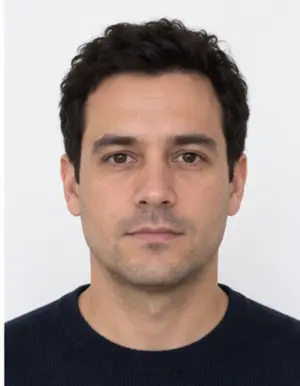
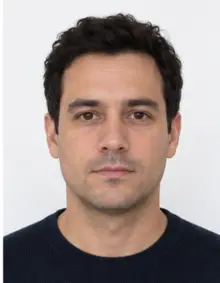
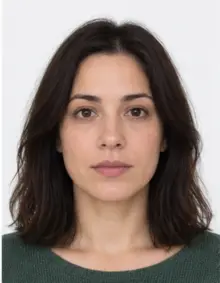
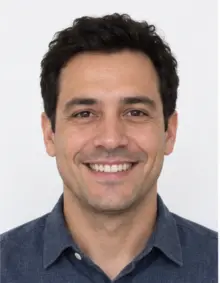
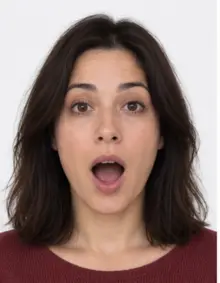
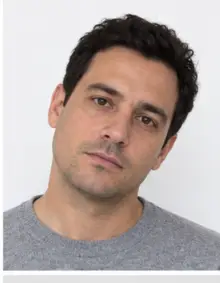
Look straight at the lens with your head level, eyes open and mouth closed. The whole head belongs in the frame, hair and chin included, with a little space above. Keep the face in the middle of the square, not pushed to one side. A smile with teeth, a tilted chin or hair over the eyes can all get an India visa photo sent back.
The e-Visa page says the photo should be taken without spectacles, so take your glasses off for every India visa photo, even on the regular route. That also removes the glare that hides the eyes.
-
 Accepted
-
 Accepted
-
 Smiling
-
 Mouth open
-
 Head tilted
-
 Fashion hat
-
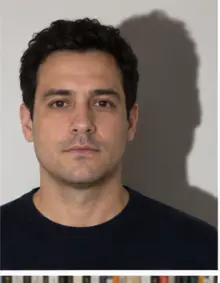 Shadow behind
-
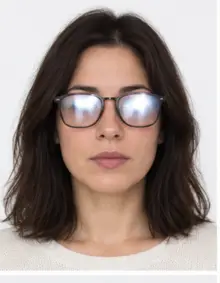 Glare on glasses
-
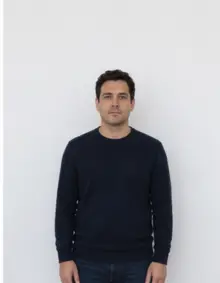 Too far away
-
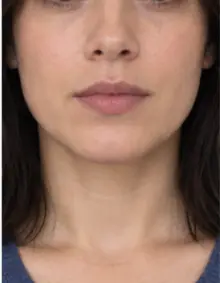 Head cut off
-
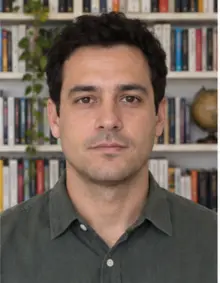 Busy background
-
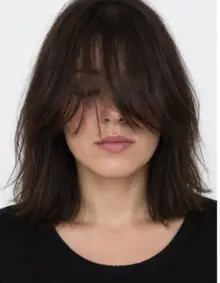 Hair over eyes
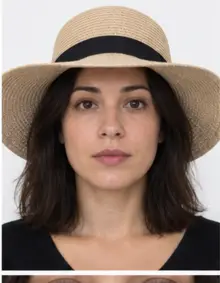
The people in these examples are AI-generated.
Background, light and clothing
The background must be plain white or light-coloured, with no shadow behind the head and none on the face. You can stand in front of any wall at home: our tool replaces the background with even white and cleans the edge around hair and shoulders. Turn towards a window so daylight lights both cheeks evenly.
Wear ordinary clothes in a darker colour so the shoulders do not merge into the white. Leave out hats and large jewellery. A head covering worn for religious reasons is fine when the full face, from forehead to chin, stays visible.
How to make an India visa photo with our tool
- Take the photo. Ask a friend to shoot from about a metre and a half away at eye level, or use the phone timer. A close selfie stretches the nose and shrinks the ears.
- Upload it. Pick India visa in the form above and add the JPG, PNG, HEIC, PDF or other image file from your phone.
- See the check. We crop to the 2 × 2 inch square, set the white background and measure the head, then show what passed and what needs a new photo.
- Download. The digital India visa photo is free. It is a JPEG under 290 KB, ready for the e-Visa form or the regular India visa application online.
If the check flags something we cannot fix, such as closed eyes or a turned head, take a new photo and upload it again.
-
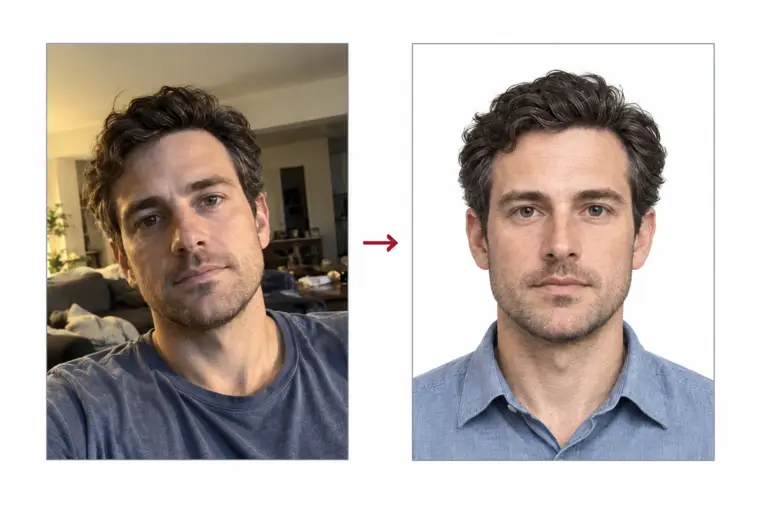
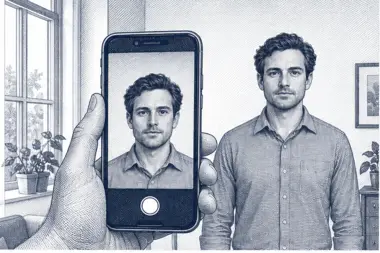 1. Take the picture
At home, against a plain wall, in daylight.
1. Take the picture
At home, against a plain wall, in daylight.
-
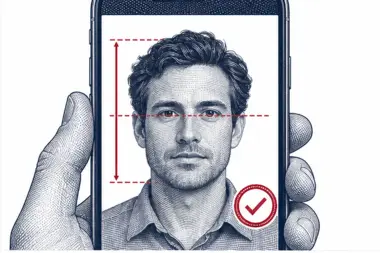 2. We check and crop
Head height, eye line and background are measured.
2. We check and crop
Head height, eye line and background are measured.
-
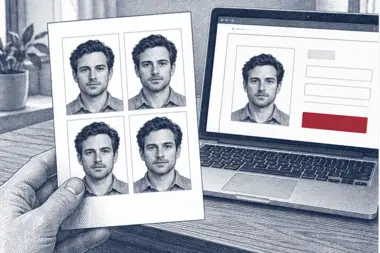 3. Download or print
A file for the upload form or a print sheet.
3. Download or print
A file for the upload form or a print sheet.
Where to upload the photo
Both routes start at indianvisaonline.gov.in. On the e-Visa form you upload the India visa photo together with a scan of the passport page that shows your details; that scan is a PDF between 10 KB and 300 KB. On the regular India visa form the photo is uploaded online too, and the mission or visa centre that serves your country tells you what else to bring, which may include a printed copy.
Upload the photo file we give you as it is. Do not take a screenshot of it or send it through a messenger app first, because both change the pixel size and the compression of the India visa photo.
Printed India visa photo
Some Indian missions still want a paper India visa photo with the application. The printed photo uses the same 2 × 2 inch square, so the file you download prints at the correct size at 300 DPI. Choose a print sheet after the check if you need paper copies; they come from the same upload as the digital India visa photo.
Common reasons an India visa photo is refused
The e-Visa page warns that an application may be rejected when the photo is unclear or does not meet the specification. These are the problems we see most often:
- The image is a rectangle, not a square.
- The file is a PNG or HEIC, or it is heavier than the portal allows.
- The head is too small, too large, cut off or off-centre.
- The background is coloured, patterned or shaded.
- The applicant wears glasses, or light reflects off the lenses.
- The photo is blurred, dark or edited with a filter.
- The photo has a border or a frame around it.
Our check covers the shape, the file, the head and the background of each India visa photo. It cannot tell how old a photo is, so use one taken for this trip.
Examples: India visa photos that pass and fail
- Passes: square crop, face centred, head about two thirds of the height, white background, even daylight. This is the India visa photo our tool aims for.
- Fails, rectangle: an uncropped phone photo in portrait shape is refused at the upload.
- Fails, small head: the applicant stood too far back and the face fills under half the square.
- Fails, glasses: spectacles are not allowed on the e-Visa photo.
- Fails, shadow: a ceiling lamp left a dark patch under the chin and on the wall.
- Fails, border: a white frame added by a photo app counts as a border.
Tips for a good visa photo at home
- Stand half a metre in front of a light, plain wall to keep shadows off the background.
- Use daylight from a window and switch off the flash.
- Hold the phone straight at eye level.
- Leave room around the head and shoulders; we can crop, but we cannot add missing hair.
- Take a few photos and upload the sharpest one.
Children applying for an India visa
Every traveller needs their own India visa photo, babies included. The same square, background and face rules apply. Lay a baby on a white sheet and shoot from above, with no hand or toy in the photo; our background step smooths out the folds of the sheet.
Why the India visa application is strict about the photo
Your India visa photo is the image an officer compares with your face on arrival in India. On the e-Visa route there is no meeting at a consulate before the trip, so the uploaded photo carries more weight than on many other travel documents. A clear photo with the right size, a full face and an even background makes that comparison easy. A dark, blurred or retouched photo makes it harder, and that is why the Indian portal sets firm visa photo rules instead of leaving the photo to chance.
For the same reason, never use a beauty filter on a visa photo. Our tool changes only the crop, the photo size and the background; it does not reshape the face. Premium correction adjusts light and colour only, so the photo still looks like you.
Preparing the photo yourself
You can prepare the India visa photo in an editor if you prefer. Crop the photo to an exact square, keep the head between 25 and 35 mm on a 51 mm side, replace the background with white and export a JPEG. Then check the file size: under 300 KB for the regular India visa form, under 1 MB for the e-Visa form. Many phone apps add a border or save the photo as HEIC, and both get the photo refused. Our free online tool does the same steps in one go and shows the result of each check, so you see that the visa photo meets the rules before you download it.
If the India visa portal has already rejected your photo
Read the message on the India visa form first. A note about the file usually means the photo is too heavy, not a JPEG or not square. A note about the image itself usually points to the face, the light or the background. Start again from the original photo on your phone, not from the file that failed, upload it here and let the check fix the photo size and background. If the problem is the face, such as closed eyes or glasses, take a new photo. A new visa photo takes a minute, so a rejection on the India visa form is easy to fix.
One photo for every India visa type
The photo rules on the Indian portal do not change with the purpose of the trip. A tourist, business, medical or conference India visa uses the same visa photo, and so does the e-Visa for each of those purposes. What changes is the list of supporting documents, such as an invitation letter or a hospital letter, not the photo. If you apply for an India visa again later, make a new photo so it shows how you look today.
What our check looks at in your visa photo
After the upload, the tool finds the face in your photo, measures the head from chin to crown and places it in the 2 × 2 inch square. It then checks that both eyes are open, that the head is level and that the photo is sharp enough to print. The background check looks for shadows and uneven colour and replaces them with white. Last, the photo is saved as a JPEG at the right size and weight for the Indian portal. You see each result next to your visa photo, so you know why a photo passed or what to change in the next photo.
The check is automatic and free. It is built from the published Indian rules, but it is not an Indian government service, and the final decision on any visa photo is made by the Indian authorities.
A visa photo from a studio, a booth or your phone
A photo studio or a photo booth can make a visa photo, but many of them print the rectangular passport photo size used in Europe or the US, not the square Indian format. Ask for a square 2 × 2 inch photo before you pay, and ask for the digital photo too, because the Indian portal needs a file online. A phone photo is just as good when the light is even, and it costs nothing to try again. Most applicants for an Indian e-Visa take the photo at home and use a free online tool to get the size and background right.
Whatever the source, the visa photo must be recent, in colour and free of edits. An old photo from a previous trip to India may no longer look like you, even if it has the right size.
Checklist before you submit
- The India visa photo is a square JPEG, 2 × 2 inches in print.
- The file is under 300 KB for the regular India visa (our file is under 290 KB) and under 1 MB for the e-Visa.
- The background is plain white with no shadows and no border.
- The full head is centred, eyes open, mouth closed, no glasses.
- You are uploading the downloaded photo file, not a screenshot of the photo.
Free India visa photo or premium processing
The free India visa photo already covers what the portal checks: the square shape, the file type and weight, the white background and the head position. Download it and upload it online.
Premium processing is optional and paid. We correct uneven light and colour, and a member of our team reviews the India visa photo against the Indian rules before you get it. If the reviewer finds a problem that only a new photo can solve, you upload another one at no extra cost.
| Feature | Free | Premium |
|---|---|---|
| 2 × 2 inch India visa photo size | Yes | Yes |
| White background | Yes | Yes |
| JPEG under 290 KB | Yes | Yes |
| Light and colour correction | No | Yes |
| Manual review | No | Yes |
Before your trip to India
Apply online well before you travel to India, and keep a copy of the visa photo you uploaded. If an Indian mission or visa centre asks for a new visa photo, you can answer the same day: upload the original phone photo here again and download a fresh file. Indian rules can change, so read the instructions on the official Indian portal when you start, and follow them if they differ from this page. Travellers from many countries can use the Indian e-Visa, while others need a regular India visa from an Indian embassy or consulate; the visa photo is the same for both, so one upload covers your India plans.
Other Indian documents
The India visa photo is for foreign nationals travelling to India. Indian citizens need a different page: the Indian passport and the Indian police clearance certificate each have their own photo rules, and we make those photos too. Choose the right document in our list of photo requirements before you upload.
Frequently asked questions
What size is an India visa photo?
A square of 2 × 2 inches (51 × 51 mm). As a file, its width and height in pixels must be the same.
Is the e-Visa photo different from the regular India visa photo?
The face and background rules match. The e-Visa takes a JPEG up to 1 MB, the regular visa up to 300 KB. Our file is under 290 KB, so it suits both.
Can I wear glasses?
No. The e-Visa page asks for a photo without spectacles, so remove them for any India visa photo.
Is the India visa photo free?
Yes, the digital India visa photo and the check are free. Premium processing with a manual review is optional.
Can I take the photo with my phone?
Yes. A phone photo in daylight is enough; we crop it to the square and set the white background.
Why was my India visa photo rejected online?
Usually because the image is not square, the file is too heavy or not a JPEG, or the background is not plain.