Japan Passport Photo Online
Every Japanese passport application needs one passport photo of 35 × 45 mm that follows the rules set by the Japanese foreign ministry. Upload a photo from your phone and we crop it to the official passport photo size, place a plain light background behind you and measure your face online, so you know the passport photo fits the standard before you take it to the counter in Japan or at a Japanese consulate abroad.
| Size | 35 × 45 mm |
|---|---|
| Head height | 34 mm |
| Background | light gray |
| Resolution | 600 dpi |
| Use | digital upload and print |
Japanese passport photo size and basic rules
The passport photo for Japan is an upright rectangle, 35 mm wide and 45 mm tall, printed without a white frame. In inches that is roughly 1.38 × 1.77. It is a different shape from the square 2 × 2 inch passport photo used in the United States, and a US passport photo cut down with scissors will not have the right proportions for Japan.
Japan's Ministry of Foreign Affairs (MOFA) also fixes the size of the face inside the passport photo. From the chin to the top of the head the face should measure 34 mm, with 2 mm of tolerance either way, and the gap between the top of the head and the upper edge of the passport photo should be about 4 mm, again give or take 2 mm. Our passport photo file is prepared at 600 DPI, so it stays sharp when printed at this small size.
- Photo size: 35 mm wide × 45 mm high, printed borderless
- Face height in the passport photo: 34 mm ± 2 mm, chin to top of head
- Space above the head: 4 mm ± 2 mm
- Background: plain and light, without pattern or shadow
- Passport photo taken within the last six months
- Resolution of our passport photo file: 600 DPI
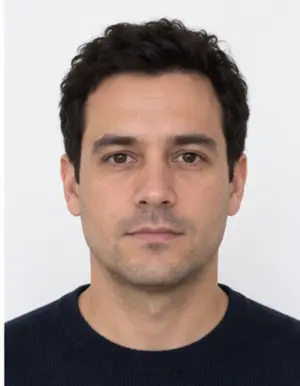
How the face should sit in the passport photo
Most problems with a Japanese passport photo come from the framing rather than from the photo size. Look straight at the camera with your shoulders square, the head upright and the face in the middle of the passport photo. The whole head has to be inside the photo, from the chin to the top of the hair, so a crop that cuts the hairline or leaves the face floating in empty space will not pass.
Japanese officials check that hair stays away from the eyes and eyebrows. The expression should be calm, with the mouth closed and both eyes open. A big smile, raised eyebrows or a head tilted to one side all change the measured face height, and they are typical reasons for passport staff in Japan to ask for another passport photo.
Background, light and what to wear
MOFA asks for a plain background with no pattern, objects or shadow. White and very light grey are the usual choices for a passport photo in Japan, and our tool uses a light tone close to white. You can stand in front of any wall at home: the background is replaced and the shadow line around your shoulders is cleaned up when the passport photo is processed online, wherever in Japan or abroad you are.
In Japan, as elsewhere, soft light from the front gives the best passport photo. Face a window during the day and switch off strong lamps overhead, which leave dark areas under the eyes and the nose. Wear ordinary clothes that are darker than the background, so your shoulders do not merge with it. Hats and caps are not allowed by Japanese rules in a Japanese passport photo; a head covering worn for religious or medical reasons is accepted when the face is fully visible from the chin to the forehead.
-
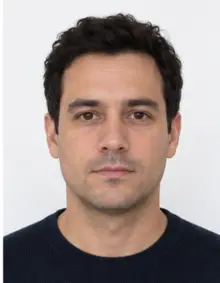 Accepted
-
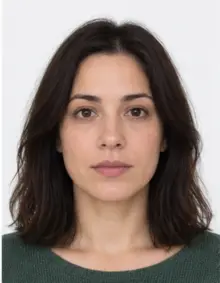 Accepted
-
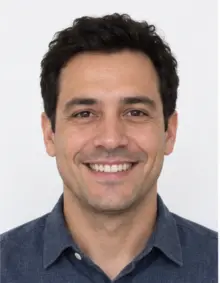 Smiling
-
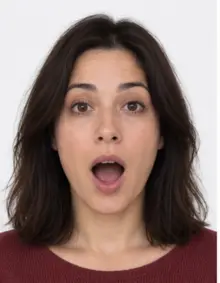 Mouth open
-
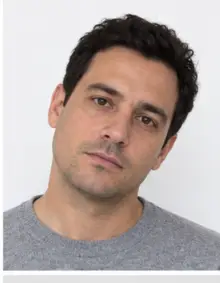 Head tilted
-
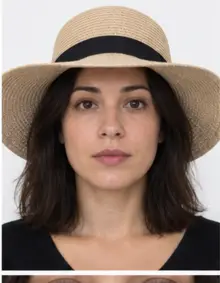 Fashion hat
-
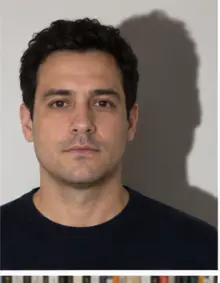 Shadow behind
-
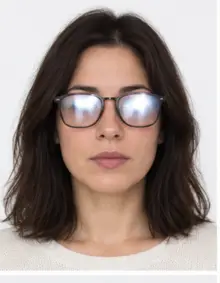 Glare on glasses
-
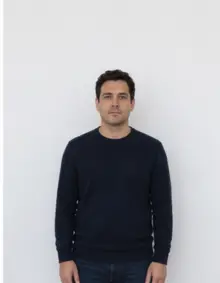 Too far away
-
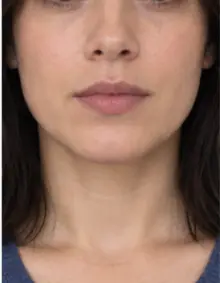 Head cut off
-
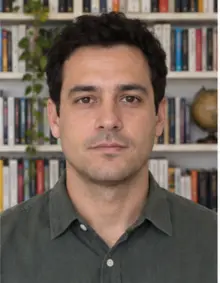 Busy background
-
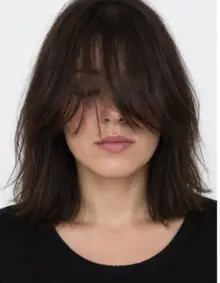 Hair over eyes
The people in these examples are AI-generated.
Glasses, filters and how recent the photo must be
Glasses are not banned in Japan, but tinted lenses, glare on the glass and thick frames over the eyes all cause trouble. The simplest way to avoid a retake is to remove your glasses for the passport photo. Coloured contact lenses that change the look of the eyes should come out as well.
Do not use beauty modes, filters or face-shaping apps, which are common on phones sold in Japan. The passport photo is compared with your face at border control, and a retouched passport photo can be refused even if the photo size is correct. The photo must also be recent: MOFA asks for a passport photo taken within the last six months.
How to make a Japan passport photo with our tool
- Take the passport photo. Ask a friend or family member to hold the phone at eye level about 1.5 metres from you, or prop the phone up and use the timer. Leave space around your head and shoulders.
- Upload it. Choose Japan Passport in the form above and upload the JPG, PNG, HEIC, PDF or other image file straight from your phone. The whole process runs online in the browser.
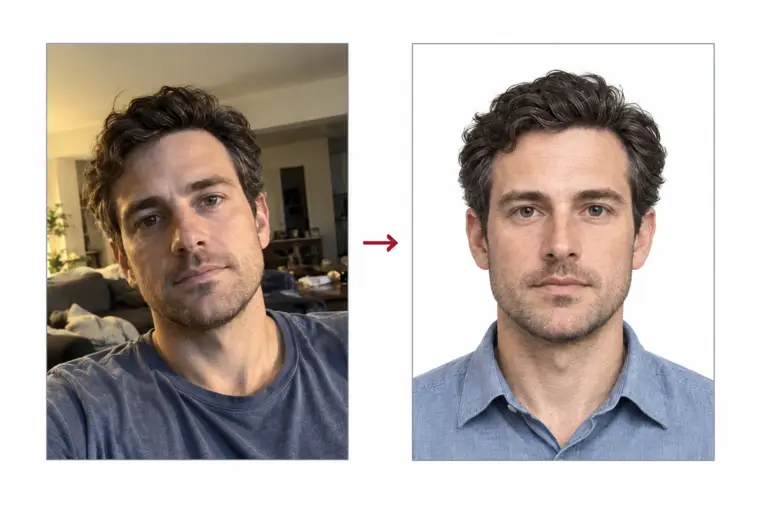
- Check the result. We crop the photo to the 35 × 45 mm passport photo size, set the light background and check the face position. You see the finished passport photo and any warnings before you download it.
- Download or print. The digital passport photo is free. If you need paper copies, choose a print sheet with several passport photos laid out at the correct size.
If the online check flags something it cannot correct, such as closed eyes or a turned head, take a new photo and upload it again. A second passport photo for Japan takes about a minute.
-
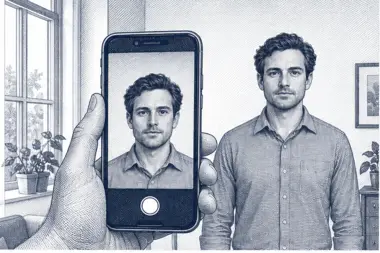 1. Take the picture
At home, against a plain wall, in daylight.
1. Take the picture
At home, against a plain wall, in daylight.
-
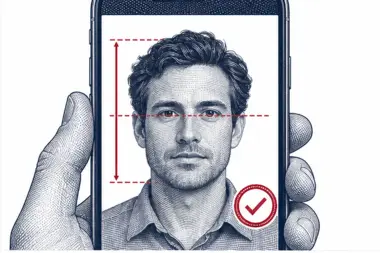 2. We check and crop
Head height, eye line and background are measured.
2. We check and crop
Head height, eye line and background are measured.
-
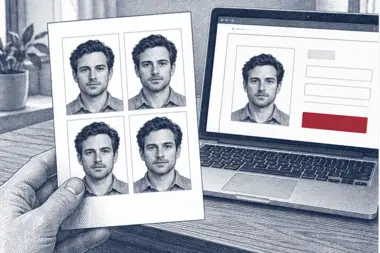 3. Download or print
A file for the upload form or a print sheet.
3. Download or print
A file for the upload form or a print sheet.
Where to submit the passport photo
In Japan, passport applications are handled by the passport offices of each prefecture, and some cities and towns accept them too. Japanese citizens who live abroad apply at the Japanese embassy or consulate that covers their area; the Japanese consulate in Los Angeles, for example, publishes its passport requirements on la.us.emb-japan.go.jp. At the counter you hand in the printed passport photo together with the application form and your other documents.
MOFA also offers an online passport application through Mynaportal, the government portal linked to the My Number Card. In that case the passport photo is uploaded as a file rather than handed in on paper. Read the file rules shown on the portal before you upload online, because the online system checks the digital passport photo on its own terms.
Printed passport photo or digital file?
One online upload gives you both. For a paper application you print the passport photo at 35 × 45 mm; for an online application you attach the digital file. When you print at home, select the actual size and turn off any "fit to page" option, otherwise the printer scales the image and the passport photo size on paper changes. Measure the printed passport photo with a ruler before you cut it out: 35 mm across and 45 mm down.
Keep the original file. If a passport office asks for a second print, you can print the same passport photo again without a new photo session, as long as it is still less than six months old.
Passport photo online, in a studio or in a booth
In Japan you will find photo booths at stations and supermarkets, and photo studios in most towns. A Japanese booth is fast, but it gives little control over the head size, and a studio needs a visit and costs more. Japanese citizens abroad face another problem: local studios usually know only their own national passport photo size and may hand over a square print that Japan does not accept.
Making the passport photo online avoids both issues. You take the photo at home, our tool sets the Japanese passport photo size and checks the face, and you decide whether to print it yourself, at a shop, or with our print sheet. If the result is not right, you try again online for free.
Common reasons a passport photo is refused in Japan
- The print is not 35 × 45 mm, or the passport photo has a white border.
- The face is shorter than 32 mm or taller than 36 mm.
- The head is cut off at the top or sits too low in the photo.
- The background has a pattern, an object or a shadow.
- The passport photo is blurred, too dark or too bright.
- The person is smiling, has closed eyes or is looking away.
- Glasses reflect light or hide the eyes.
- The photo was retouched with filters.
- The passport photo is older than six months.
Our online check covers the passport photo size, the face height, the head position and the background. It cannot tell when the photo was taken, so always start from a new photo for each passport application.
Examples: good and bad passport photos
- Good passport photo: centred face, 34 mm from chin to crown, light plain background, even light and a neutral face. This is the passport photo our tool aims for.
- Bad, wrong shape: a 2 × 2 inch square passport photo brought from another country.
- Bad, face too small: the camera was too far away, so the head takes up only half of the photo.
- Bad, shadow: a lamp behind the camera threw a dark outline on the wall.
- Bad, smile: the teeth show and the cheeks are raised.
- Bad, glare: the lenses reflect a window and the eyes are hard to see.
- Bad, border: the print has a white frame around the passport photo.
- Bad, old photo: a photo from two years ago with a different haircut.
Tips for taking the photo at home
You do not need a studio for a good Japanese passport photo. A phone camera in daylight is enough if you follow a few simple steps.
- Stand about half a metre in front of a light, plain wall.
- Face a window in daylight and avoid the flash, which causes glare and hard shadows.
- Hold the phone straight at eye level, not from below or above.
- Turn off beauty mode and portrait effects in the camera app.
- Take several photos and upload the sharpest one as your passport photo.
- Send the original photo file, not a copy compressed by a messenger app.
Passport photos of babies and children
Every Japanese citizen needs a separate passport, newborns included, and each application needs its own passport photo. Japan applies the same rules on size, background and framing as for adults. Put a baby on its back on a light sheet and shoot the passport photo from directly overhead, making sure no hand, toy or pillow is in the frame. Our background step removes the folds of the sheet, and you can upload several photos and keep the best passport photo.
Japan passport photo checklist
- The passport photo is 35 × 45 mm, without a border.
- The face measures between 32 and 36 mm from chin to top of head.
- There are 2 to 6 mm of space above the head.
- The background is plain and light, with no shadow.
- The expression is neutral, the eyes are open and the face is straight.
- The photo was taken in the last six months and is not retouched.
When every line is ticked, your passport photo is ready for the passport office or the online application.
Free passport photo or premium processing
The free passport photo made online already has the right size, crop and background for Japan. Download it and print it, or attach it to an online application.
Premium processing is optional. We correct uneven light and colour, and a member of our team reviews the passport photo against the Japanese rules. If the reviewer finds a problem that only a new photo can fix, you can upload a new photo at no extra cost.
| Feature | Free passport photo | Premium passport photo |
|---|---|---|
| 35 × 45 mm passport photo size | Yes | Yes |
| Light plain background | Yes | Yes |
| Automatic online check | Yes | Yes |
| Light and colour correction | No | Yes |
| Manual review by our team | No | Yes |
Passport photo for Japanese citizens living abroad
Japanese nationals outside Japan apply at an embassy or consulate of Japan, and the passport photo they hand in follows exactly the same 35 × 45 mm size as a passport photo taken in Tokyo or Osaka. The Japanese consulate does not adapt the photo size to the country you live in. That catches many people out, because photo shops in the United States, Canada or Australia usually print their own local passport photo size by default.
If you live outside Japan, make the passport photo online here, print it on photo paper at a local shop and check it with a ruler before your consulate appointment. Bring a spare passport photo in case Japanese consular staff ask for another copy. The free digital file stays on your device, so you can print a new passport photo later without taking another photo.
Passport photo size in millimetres, inches and pixels
Japan defines the passport photo size in millimetres: 35 × 45. In inches the size is about 1.38 × 1.77, which is why it never matches a 2 × 2 inch print. At 600 DPI, the resolution of our file, the same passport photo measures about 827 × 1063 pixels, enough detail for a sharp print. If you print at home, keep the size at 100% so that the passport photo leaves the printer at 35 × 45 mm. An online application through Mynaportal may ask for a different pixel size, so follow the instructions on the portal for the digital upload.
Japanese passport types and the photo
Japan issues a 10-year passport and a 5-year passport. Adults aged 18 and over can choose either one, while applicants under 18 receive the 5-year passport. The passport photo rules do not change between the two: the photo size, the face height and the background are the same for every age and every type of passport.
Other photos for Japan
This page covers the passport of Japanese citizens. Foreign travellers who need a visa for Japan should use the Japan visa photo page, and residents applying for the My Number Card have separate photo rules. Japanese authorities set a separate standard for each of these documents. Each document in Japan has its own photo size, so choose the right one in our list of photo requirements.
Frequently asked questions
What size is a Japan passport photo?
35 mm wide by 45 mm tall, without a border, with the face 34 mm ± 2 mm from chin to top of head.
Can I take a passport photo for Japan with my phone?
Yes. Use daylight and a plain wall, and our tool crops the photo and sets the background online.
Is the passport photo free?
Yes. Making, checking and downloading the digital passport photo online costs nothing. Premium processing with a manual review is optional and paid.
Can I wear glasses in a Japanese passport photo?
They are not banned, but glare and tinted lenses cause refusals, so removing them is the safer choice.
Is a 2 × 2 inch passport photo accepted in Japan?
No. Japan uses a 35 × 45 mm passport photo, which has a different shape from the 2 × 2 inch format.
How old can the passport photo be?
MOFA asks for a passport photo taken within the last six months.
Can I apply for a passport online in Japan?
MOFA accepts online applications through Mynaportal. The passport photo is uploaded as a file, so follow the file rules shown on the portal.
How long does it take to get the passport photo?
A few seconds after the online upload. You can download the free passport photo straight away.