Singapore ID Card Photo
Every NRIC that ICA issues carries a photo of the holder, and the Immigration and Checkpoints Authority asks for a fresh one each time you register or re-register your card. Upload a photo from your phone and we turn it into a Singapore ID photo: cropped to the right proportions, set against plain white and checked for head position before you save the photo.
| Size | 35 × 45 mm |
|---|---|
| Head height | 74 % |
| Background | white |
| Resolution | 290 dpi |
| File size | up to 60 KB |
| Use | digital upload and print |
Singapore ID card photo size and rules
A printed Singapore ID card photo measures 35 mm across and 45 mm from top to bottom, the usual passport-sized frame. When you apply through the ICA e-Service you upload a digital photo instead, and the ICA photo guidelines give its dimensions as 400 × 514 pixels, which keeps the same shape as the print. The head, measured from the chin to the crown of the hair, should cover roughly 74% of the photo height, with a margin of about 9% left between the hair and the upper edge.
- Print: 35 × 45 mm, on matte or semi-matte paper
- Upload: 400 × 514 px, JPG, PNG or HEIC
- Head: about 74% of the height, centred
- Background: plain white
- Age of the photo: taken within the last three months
A note on photo file weight: the table above quotes 60 KB, but the current ICA guidelines accept uploads of up to 8 MB. Our Singapore ID photo download is a compact JPEG, so it fits either limit.
Framing the face
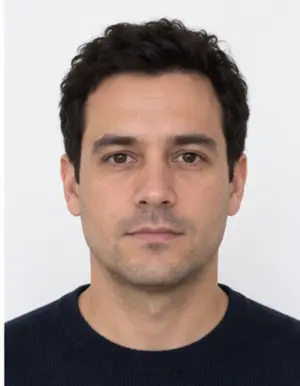
Look straight at the lens with your shoulders square to the camera. The whole head belongs inside the frame, chin and hairline included, and nothing should hide the eyes or eyebrows. Keep the mouth closed and the expression relaxed rather than smiling. If you normally wear glasses, taking them off is the safer choice, because reflections on the lenses are a frequent cause of a retake.
Background, light and clothing
The backdrop of a Singapore IC photo is plain white, without patterns, furniture or a shadow behind the shoulders. You can stand in front of any light wall at home: the tool swaps whatever is behind you for a clean white field. Soft daylight from a window in front of you lights both sides of the face evenly; an overhead lamp tends to put dark patches under the eyes.
Dress in a top with some colour so it does not blend into the white. Leave caps, sunglasses and earphones out of the photo.
-
 Accepted
-
 Accepted
-
 Smiling
-
 Mouth open
-
 Head tilted
-
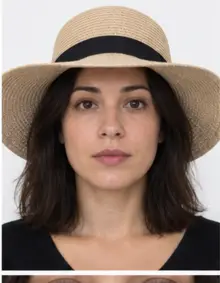 Fashion hat
-
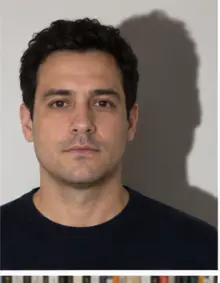 Shadow behind
-
 Glare on glasses
-
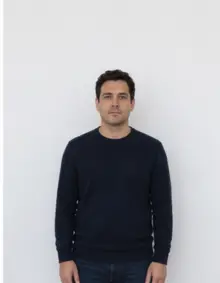 Too far away
-
 Head cut off
-
 Busy background
-
 Hair over eyes
The people in these examples are AI-generated.
How to make a Singapore ID photo with our tool
- Take the photo. ICA advises against selfies, so ask a friend to shoot from about a metre and a half away, holding the phone at the height of your eyes.
- Upload it above. Pick Singapore ID card in the list and send the JPG, PNG, HEIC, PDF or other image file straight from your phone.
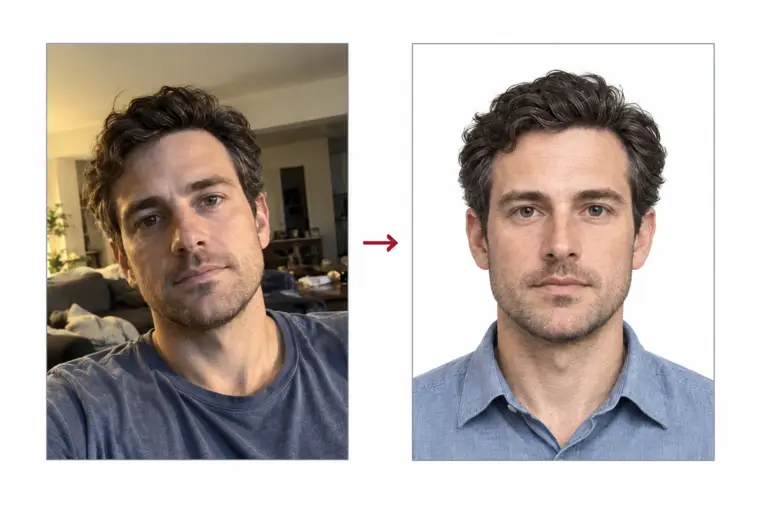
- Let us process it. The photo is cropped and resized to the Singapore ID card format, the background turns white, and a compliance check measures the head and looks for blur.
- Download. The digital Singapore ID photo costs nothing. A print sheet with several 35 × 45 mm copies is also available if you need paper prints.
The tool only changes the crop, the scale and the background. ICA forbids altering facial features, and we never do.
Where to submit your Singapore ID card photo
Citizens and permanent residents register their first NRIC at 15, before the 16th birthday, through the ICA Apply Online e-Service. The card is then re-registered at 30 and again at 55, unless a replacement was issued in the previous ten years. In each case you log in with Singpass and upload a recent colour Singapore ID photo taken within the last three months. The fee is S$10 for citizens and S$50 for permanent residents, and ICA says re-registration is normally processed within seven working days. A photo that does not meet the guidelines delays the application, which is why the check matters.
-
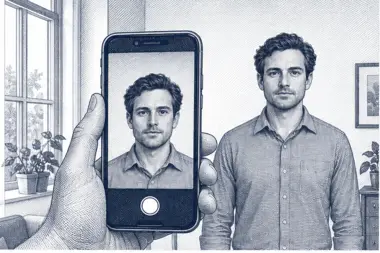 1. Take the picture
At home, against a plain wall, in daylight.
1. Take the picture
At home, against a plain wall, in daylight.
-
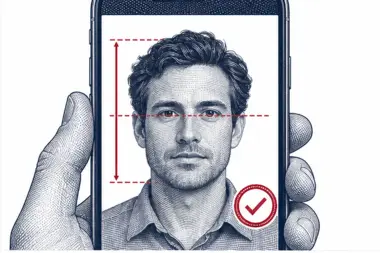 2. We check and crop
Head height, eye line and background are measured.
2. We check and crop
Head height, eye line and background are measured.
-
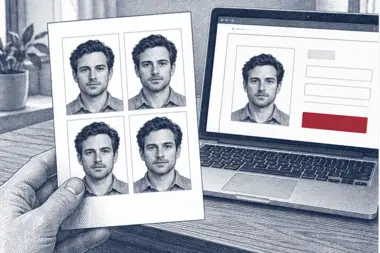 3. Download or print
A file for the upload form or a print sheet.
3. Download or print
A file for the upload form or a print sheet.
Common reasons ICA asks for a new photo
- The photo is older than three months or no longer looks like you.
- The face is too small, off centre or cut off at the top.
- The background is grey, patterned or shows a shadow.
- The photo is blurred, too dark or washed out.
- Glare on glasses or hair across the eyes.
- Beauty filters or any retouching of the face.
- A glossy print instead of matte or semi-matte paper.
Singapore IC photo examples
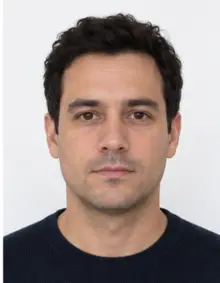
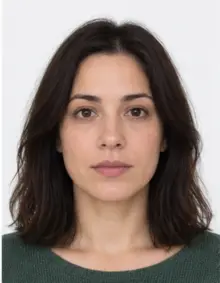
- Accepted: centred face, head close to three quarters of the height, even light, white background. This is the Singapore IC photo our tool produces.
- Retake, too far away: the face fills less than half of the photo.
- Retake, shadow: a dark outline on the wall behind one shoulder.
- Retake, smile: teeth showing and eyes narrowed.
- Retake, filter: smoothed skin from a camera beauty mode.
Tips for a good source photo
- Use the original photo from the camera, not one forwarded through a chat app that compresses it.
- Switch the flash off and face a window instead.
- Leave room around the head and shoulders; we can crop, but we cannot add what is missing.
- Take a few photos and upload the sharpest photo.
Checklist before you submit
- The Singapore ID card photo is in colour and less than three months old.
- The digital photo size is 400 × 514 px; a print is 35 × 45 mm on matte paper.
- The background is white with no shadow.
- Your face is straight, centred and neutral, eyes open.
- The face has not been edited.
Digital photo or printed photo
Most applicants now send the Singapore ID photo online through the e-Service, so the digital photo is the one that counts. The online form expects the 400 × 514 pixel size, and our photo already has it. If a counter or another office asks for a paper photo, use the print sheet: it holds several Singapore ID card photos at the 35 × 45 mm size, ready to cut out. ICA asks for matte or semi-matte photo paper, because a glossy photo reflects light and can be refused.
Both versions come from one upload. You take the photo once, download the digital Singapore IC photo for the online application and keep the print sheet for any office that still wants a hard copy.
Why ICA is strict about the ID card photo
The ICA photo guidelines say the requirements follow ISO and ICAO standards, the same rules used for travel documents around the world. The photo on your Singapore ID card is used to confirm who you are, so it has to show your face exactly as it looks today. That is why ICA bans any editing that changes facial features, and why a photo older than three months is not accepted. Resizing a photo is allowed; retouching it is not.
Our tool follows the same line. It adjusts the photo size, the crop and the background of your Singapore ID photo and leaves the face untouched, so the ID card photo you download is still a true likeness.
Singapore ID card photo for permanent residents
Permanent residents use the same photo rules as citizens: one colour Singapore ID card photo, 400 × 514 pixels for the online upload, plain white background, taken in the last three months. Along with the photo, ICA asks permanent residents for the personal particulars page of their current passport. A passport photo from another country often has a different size or background colour, so make a fresh Singapore IC photo here rather than reusing an old one.
Photo of a teenager registering at 15
For many Singaporean families the first Singapore ID card photo is the one taken for the registration at 15. Students at government or government-aided schools get a notification about two weeks before the school biometrics day and register online before that date; other Singaporean teenagers get the notice on their 15th birthday. The photo rules are the same as for adults, so a school photo or a cropped holiday photo is rarely suitable. A plain photo taken at home against a wall, then processed here, gives a Singapore ID photo of the right size in a minute.
Photo tips for taking it in Singapore
- Singapore daylight is bright: stand in shade or near a window, not in direct sun, so the photo has no hard shadows.
- Air-conditioned rooms with ceiling lights often give a yellow tint; daylight gives a more natural photo.
- Check the photo on a large screen before you upload it to the Singapore e-Service.
- Keep the downloaded Singapore IC photo; you can reuse it within three months if ICA asks you to resubmit.
Free download or premium processing
The free Singapore ID photo covers the essentials: correct size, white background and an automatic check. If you would like extra reassurance, premium processing is a paid option. It corrects light and colour, and a member of our team reviews the photo by hand. If the reviewer spots a problem that only a new photo can fix, you can upload another one at no extra cost.
| Feature | Free | Premium |
|---|---|---|
| Singapore ID card size and crop | Yes | Yes |
| White background | Yes | Yes |
| Light and colour correction | No | Yes |
| Manual review | No | Yes |
Related Singapore documents
A Singapore passport, a visa for Singapore and other official documents set their own photo rules, so a file made for one of them is not automatically right for another. Choose the matching document in our list of photo requirements.
Frequently asked questions
Which photo size does a Singapore ID card need?
A print is 35 × 45 mm. For the ICA e-Service the digital Singapore ID photo is 400 × 514 pixels.
How recent must the photo be?
ICA asks for a colour photo taken within the last three months.
Can I use my phone?
Yes. Have someone else take it in daylight, then upload it here and we handle the crop and background.
Is it free?
Making and downloading the digital Singapore IC photo is free. Premium processing with manual review is optional.
When do I need a new Singapore ID card photo?
At registration at age 15, at re-registration at 30 and 55, and whenever you replace the card.