US Visa Photo
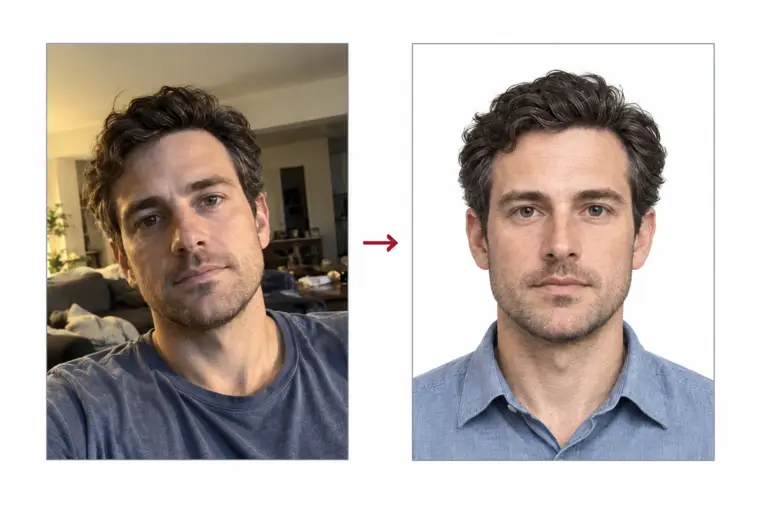
Every US visa application, from a B1/B2 visitor visa to an immigrant visa, needs a photo that follows one standard set by the US Department of State. Upload a picture taken on your phone and we turn it into a US visa photo: square, 2×2 inches at 300 DPI, with a white background and the head placed inside the official ranges. You can upload the file to the DS-160 or print it for the interview.
| Size | 2 × 2 in |
|---|---|
| Head height | 1.29 in |
| Background | white |
| Resolution | 300 dpi |
| File size | up to 240 KB |
| Use | digital upload and print |
US visa photo size and basic rules
A US visa photo is square. On paper it measures 2 × 2 inches, which is 51 × 51 mm. As a digital file it must have the same width and height in pixels, at least 600 × 600 and no more than 1200 × 1200. The file type is JPEG, the colour depth is 24 bits in sRGB, and the file may weigh up to 240 KB. These numbers are the same for every category of US visa, so a single US visa photo works for a tourist trip, a student programme or an immigrant case.
Our tool saves the US visa photo at 600 × 600 pixels, which is exactly a 2 × 2 inch print at 300 DPI. That size keeps the file small enough for the 240 KB limit without heavy compression, and it gives a sharp print if your consulate asks for paper copies.
- Print size: 2 × 2 in (51 × 51 mm), square
- Digital size: from 600 × 600 to 1200 × 1200 px, height equal to width
- File: JPEG, 24-bit colour, 240 KB or less
- Head height: 1 to 1⅜ in (25–35 mm); our crop uses roughly 1.29 in
- Eyes: 1⅛ to 1⅜ in (28–35 mm) up from the lower edge; our crop uses roughly 1.18 in
- Background: white or off-white, plain
- Age: taken in the last six months
- Glasses: not allowed
Head size, eye line and framing
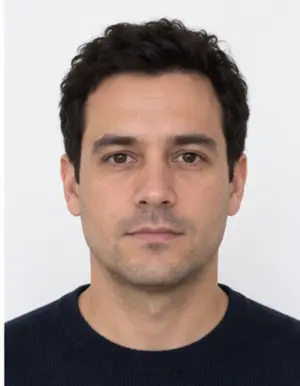
The State Department publishes a photo composition template, and most refused pictures break it in one way: the head is the wrong size. On a 2 × 2 inch print the head, measured from the chin up to the crown of the hair, must be between 1 and 1⅜ inches. The eyes must sit between 1⅛ and 1⅜ inches above the lower edge. Hair counts as part of the head, so a tall hairstyle can push a face that looks fine into the "too big" zone.
For a digital file the same template is expressed as a share of the image height. The head fills 50 to 69 percent of the height, and the eyes are 56 to 69 percent of the way up the frame. For a 600 × 600 pixel image this gives a head of roughly 300 to 414 pixels. These ratios do not change at 1200 × 1200 pixels; only the pixel numbers double.
The face must be centred, seen straight on, with the head neither tilted nor turned. Both eyes are open and the mouth is closed. Our crop sets the head to roughly 1.29 inches tall and lifts the eye line roughly 1.18 inches off the lower edge, close to the middle of both allowed ranges, so a small error in your original picture does not push the final US visa photo outside the limits.
Background, light and clothing
The background of a US visa photo must be plain white or off-white, with no pattern, no objects and no shadow of the head behind it. You do not need a white wall at home: our tool cuts out the person and puts a clean white background behind the face. What it cannot fix is a face lit from one side, so light still matters.
Sit or stand facing a window in daylight. The light then falls evenly across both cheeks, without dark patches under the eyes or the nose. A ceiling lamp straight above the head, a window behind you or direct sun all create shadows that a reviewer may notice. Colour is required; a monochrome picture is refused.
Wear the clothes you wear on a normal day. Uniforms are not accepted, except religious clothing worn daily. A dark or coloured top looks better than white, which can blend into the background. Keep hair away from the eyes and the outline of the face.
-
 Accepted
-
 Accepted
-
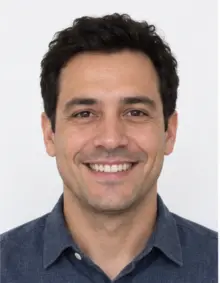 Smiling
-
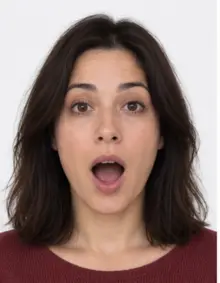 Mouth open
-
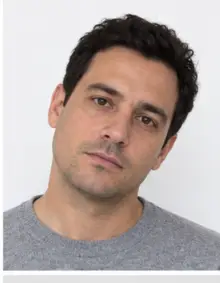 Head tilted
-
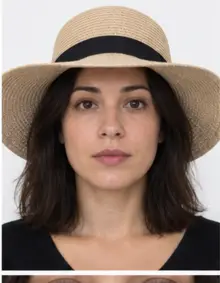 Fashion hat
-
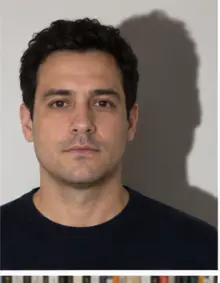 Shadow behind
-
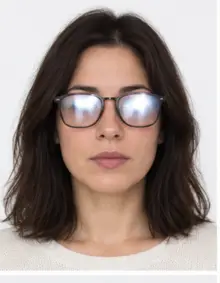 Glare on glasses
-
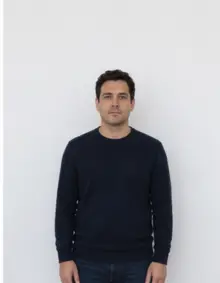 Too far away
-
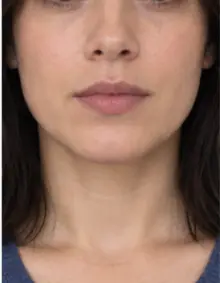 Head cut off
-
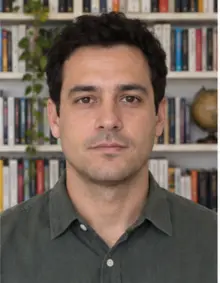 Busy background
-
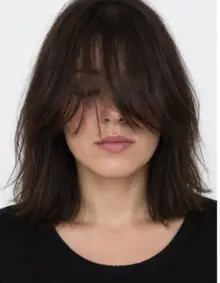 Hair over eyes
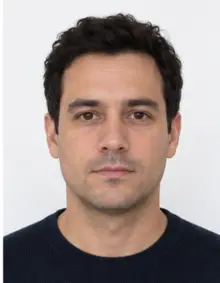
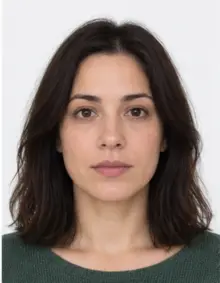
The people in these examples are AI-generated.
Glasses, head coverings and headphones
No glasses may appear in a US visa photo. The State Department dropped glasses from accepted photos on November 1, 2016, and that rule still applies. The only exception is medical: if you cannot remove your glasses for a medical reason, you may keep them on, as long as the frames do not hide the eyes and there is no glare. In that case a signed medical statement goes with the visa application.
Hats and head coverings are refused unless you wear them every day for religious reasons. A religious head covering is fine when the whole face is visible, chin to forehead, and it does not throw a shadow on the face. Headphones, earbuds and wireless hands-free devices must come off. A hearing device that you normally wear may stay in the picture.
Our check warns you if it sees glasses or headphones in the image, so you can retake the picture before you download the US visa photo.
How to make a US visa photo online with our tool
- Take the picture. Ask a friend to hold the phone about 1.5 metres away, level with your eyes, while you face a window. If you are alone, prop the phone up and use the self-timer instead of an arm's-length selfie, which makes the nose look bigger.
- Upload it. Choose US visa in the form above and upload the JPG, PNG, HEIC, PDF or other image file from your phone or computer. Nothing needs to be installed.
- Let the tool work. We crop the image to a square 2 × 2 inch frame, scale the head into the official range, replace the background with white and run the compliance check.
- Read the result. The check shows what passed and what needs attention, such as closed eyes, glasses or a tilted head. If something cannot be fixed automatically, take a new picture and upload it again.
- Download. The digital US visa photo is free to download as a JPEG under 240 KB, ready for the online form. A print sheet is available if you also need paper copies.
The whole process takes a few minutes, most of it spent taking the picture itself. The file you download is a US visa photo that already meets the size and file limits, so you do not need to resize it again.
-
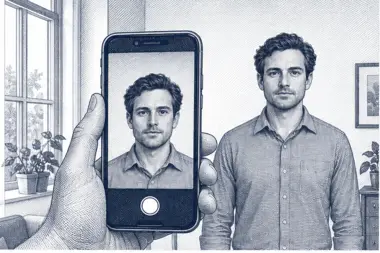 1. Take the picture
At home, against a plain wall, in daylight.
1. Take the picture
At home, against a plain wall, in daylight.
-
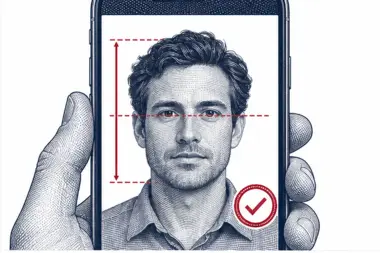 2. We check and crop
Head height, eye line and background are measured.
2. We check and crop
Head height, eye line and background are measured.
-
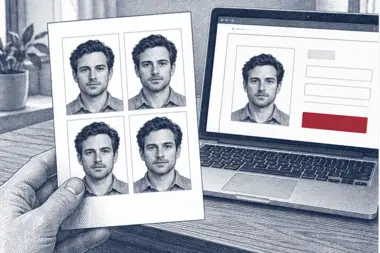 3. Download or print
A file for the upload form or a print sheet.
3. Download or print
A file for the upload form or a print sheet.
Uploading the photo to the DS-160
Nonimmigrant applicants fill in the DS-160, the online application used for visitor, student, exchange and temporary work visas. The photo is uploaded inside the form, and the DS-160 cannot be submitted without it. Have the file ready before you start, because the form session times out if it sits idle for too long.
When the upload fails, the cause is almost always the file rather than your face: a non-square image, fewer than 600 pixels on a side, more than 240 KB, or a PNG or HEIC file renamed as .jpg. Renaming a file does not convert it; the image must be re-exported in JPEG format. The file from our tool avoids all four problems.
The State Department site also offers a photo tool that crops a picture to 600 × 600 pixels. It does not judge the light, the background, the expression or the head size, and running our finished file through it can change the crop. Upload the US visa photo you downloaded here directly with your application.
Do not compress the file again before the upload. The digital image rules limit compression to a ratio of 20:1, and a file squeezed too hard shows blocks around the face. Keep the original JPEG; if you need a print later, print the same image.
Printed photos for the consular interview
Most nonimmigrant applicants never hand in a printed picture: the DS-160 upload is enough. Some US embassies and consulates still want a single printed US visa photo on the day of the interview, and the rules differ from post to post. Read the instructions on the website of the embassy or consulate where you have your appointment.
Immigrant visa applicants follow a different path. They fill in the DS-260 and bring two identical printed photos, each 2 × 2 inches, to the interview. The prints must be in colour on photo paper, cut square, without a white frame around the picture. Plain office paper is not accepted.
To print, order our print sheet or ask a shop to print the file at its real size, 2 × 2 inches at 300 DPI, with any "fit to page" option switched off. Then put a ruler against the head: chin to crown should read 25 to 35 mm. A print shop outside the United States may default to its local passport format, so check the size before you leave the counter.
Common reasons a US visa photo is refused
A consular officer decides whether a photo is acceptable, and the decision is at the discretion of the embassy or consulate. A refused picture usually means a request for a new one, which can delay the case. These are the problems that come up most often:
- Glasses on the face, without a medical reason and a signed statement.
- The head is too small, too big or cut at the top of the hair.
- The eyes are outside the 1⅛ to 1⅜ inch band from the bottom.
- A grey, coloured or patterned background, or a shadow behind the head.
- Uneven light, a dark side of the face or glare on the skin.
- A smile with open mouth, closed eyes or a turned head.
- A hat or head covering that is not worn daily for religious reasons.
- Headphones or a wireless earpiece.
- A uniform instead of everyday clothes.
- Beauty filters or edits that change the face.
- A picture taken more than six months ago, or one that no longer looks like you.
- A copy of a driver's licence photo, a magazine photo, a vending machine photo or a full-length snapshot.
Our check covers the size, the framing, the background, the light and visible glasses or headphones. It cannot tell when the picture was taken, so use a recent one for every application.
Examples: which US visa photos pass and which fail
Comparing your picture with typical cases is a quick way to spot a problem before you upload it. Each example below describes one US visa photo and the result it usually gets.
- Passes: square image, head about two thirds of the height, eyes open, mouth closed, even daylight, white background, no glasses. This is the US visa photo our tool aims to produce.
- Fails, head too small: the applicant stood several metres from the camera, so the head takes up less than half of the frame.
- Fails, head too large: the phone was held too close and the chin touches the bottom edge.
- Fails, glasses: thin frames with no glare still break the rule for a US visa photo.
- Fails, shadow: a lamp to one side left half of the face darker than the other.
- Fails, smile: teeth are visible and the eyes are narrowed.
- Fails, wrong file: a 4:3 phone picture uploaded without cropping is not square.
- Fails, filter: skin smoothing removed freckles and changed the shape of the jaw.
- Fails, cap: a baseball cap worn for style, not for religious reasons.
Tips for taking a US visa photo at home
A phone camera is sharp enough for a US visa photo. The result depends far more on light, distance and pose than on the camera itself.
- Stand half a metre in front of a light, plain wall or door, so that no shadow of your shoulders lands on it.
- Face a window. Daylight from the front is softer than any lamp in the room.
- Switch off the flash, portrait mode and beauty mode. Each of them changes the face or the background.
- Hold the phone straight at eye level. A camera tilted up or down changes the apparent head size.
- Leave space above the hair and around the shoulders. We crop the picture, but we cannot add what is not in it.
- Wipe the lens. A fingerprint on the camera makes the whole image look soft.
- Take five or six shots and upload the sharpest one with the most neutral face.
- Send the original file, not a copy forwarded through a messenger app, which compresses images.
Inches, millimetres and pixels
US rules mix three units, which confuses many applicants. Paper size is given in inches, 2 × 2, with 51 × 51 mm as the metric figure. The upload is defined in pixels, 600 to 1200 on each side. Resolution connects them: at 300 DPI, two inches hold exactly 600 pixels. That is why scanning a 2 × 2 inch print at 300 DPI gives the minimum file size the DS-160 accepts, and why our 600 × 600 file prints at the right size.
If you scan an existing print instead of using a new picture, scan it at 300 DPI and do not crop the result. Remember that the print must still be less than six months old and must not have been edited.
One photo standard for every US visa category
The purpose of your trip does not change the photo. A B1/B2 visitor visa, an F or M student visa, a J exchange visa, an H or L work visa and an immigrant visa all follow the same State Department photo rules and the same size. What changes is the form and the way you hand the picture in.
- DS-160 (nonimmigrant visas): digital upload in the online form; some posts also want one print at the interview.
- DS-260 (immigrant visas): two identical 2 × 2 inch prints brought to the interview.
- Visa Waiver Program trips: travellers from participating countries who visit for a short stay do not apply for a visa, so they do not need a US visa photo for that trip.
Because the standard is shared, one good source picture covers every case. Make the digital file first, keep it, and print the same image when the interview requires paper.
Photos of children and babies
Every applicant needs a separate US visa photo, including babies and children travelling with their parents. A family picture or a photo cropped from a group shot is not accepted. The rules are the same as for adults: plain background, face visible, eyes open where possible, and no other person in the frame.
For a baby, lay the child on its back on a white sheet and take the picture from straight above. Make sure no hand, toy or dummy is in the image. Our background check smooths out the folds of the sheet. Older children can stand in front of a wall like an adult; ask them to keep a calm face rather than a big smile.
When to take the photo, and can you reuse it?
Your photo has to be no older than six months and must look like you do now. A photo from an earlier US visa application is usually too old. If your appearance has changed, for example after shaving a beard, a large change in weight or a very different haircut, take a new picture even if the old one is recent.
A good moment to make the photo is shortly before you open the DS-160 or DS-260 form. If several months pass before the interview and your post asks for a print, check how old the picture is against the six month limit and retake it when it has expired. Retaking costs a few minutes; a refused picture at the window costs a second visit.
What the consulate does with your US visa photo
The picture is not decoration on a form. A consular officer uses the US visa photo to confirm that the person in the application is the person at the interview window, and the same image ends up in the visa record. If the visa is issued, the photo printed on the visa foil in your passport comes from that record. Border officers in the United States then compare your face with it when you arrive.
That chain explains why the rules care so much about a plain background, a straight pose and a face without glasses or filters. Each rule removes something that makes the comparison harder. A US visa photo that is sharp, evenly lit and correctly framed passes the online upload, the interview and the arrival check without anyone having to look twice.
File format, colour and compression
Many phones store pictures as HEIC by default, and the DS-160 accepts JPEG only. Our tool takes the HEIC file as it is and gives back a JPEG, so you do not need a converter. If you prepare a visa photo yourself, export it from a photo editor in JPEG format with the sRGB colour profile. Greyscale and CMYK files are refused.
To meet the 240 KB limit, lower the JPEG quality a little rather than shrinking the image below 600 pixels. A 600 × 600 photo at good quality usually weighs well under the limit, so heavy compression is rarely needed. If you see blocks, rings or smeared skin around the face, the photo has been compressed too hard and the US visa photo may be refused even though its size in pixels is correct.
Keep the file name simple, without spaces or special characters, so the online form reads it without trouble.
Step by step: from the first picture to the US visa interview
- Check whether you need a visa. Travellers from Visa Waiver Program countries can often come to the United States for a short stay without a visa. Everyone else applies for a US visa at an embassy or consulate.
- Pick the right form. Nonimmigrant visas use the DS-160; immigrant visas use the DS-260.
- Make the US visa photo. Take a recent picture, upload it here, and download the checked file.
- Fill in the online application. Attach the photo at the DS-160 photo step and keep the confirmation page.
- Book the interview. Appointment systems and waiting times depend on the country and the post, so follow what your US embassy or consulate publishes.
- Prepare prints if your post wants them. Immigrant visa applicants bring two identical prints; some nonimmigrant posts ask for one.
- Attend the interview. Bring your passport, the DS-160 confirmation and any prints together.
Making the visa photo early removes one task from the last days before the interview, and the same file can be printed later if the post asks for paper.
At the US embassy or consulate
The national photo standard is the same everywhere, but each US embassy or consulate runs its own interview day. Some posts collect a printed visa photo from nonimmigrant applicants; others never ask for one. Some describe the print they want in more detail, for example a photo without a border. The State Department does not keep one central list of these local requests, so the website of your post is the place to check.
If an officer at the window says the picture does not meet the rules, the usual outcome is a request for a new photo. Keep the source picture and the account on our site: uploading the same picture again takes a minute, and a fresh picture taken against a wall at home is ready almost as fast.
Where to get a US visa photo: home, shop or studio
- At home with our tool: you take the picture yourself, the crop and background are automatic, and the check flags any problem with the US visa photo before you apply. The digital file is ready for the online form in minutes.
- Pharmacy or print shop: quick and in person, but the result depends on whether the staff know the current American rules, such as the ban on glasses. Many shops hand over prints only, without the digital file the DS-160 needs.
- Photo studio: good light and an experienced photographer, at a higher price and with an appointment. Ask for the digital file as well as the prints.
- Photo booth: the State Department does not accept vending machine photos for a US visa.
Whatever you choose, the visa photo must meet the same size, background and expression rules. Many applicants make the digital file at home first and take it to a shop only to print it.
How to check an existing visa photo yourself
If you already have a picture from a studio, look it over before you use it for a US visa application.
- Date: was it taken in the last six months, and does it still look like you?
- Shape and size: open the file details. Width and height must match and lie between 600 and 1200 pixels.
- Weight and type: a JPEG no heavier than 240 KB. A PNG, HEIC or PDF file will not upload.
- Head on a print: with a ruler, chin to crown should be 25 to 35 mm.
- Eyes on a print: 28 to 35 mm up from the lower edge.
- Face: no glasses, no headphones, neutral expression, eyes open, nothing over the eyebrows.
- Background: white or off-white, no shadow, no texture.
If one point fails, take a new visa photo rather than editing the old one. Retouching that alters how you look is forbidden, and cropping a print by hand rarely lands the head in the right range.
Photo size mistakes to avoid
Most problems with the size of a US visa photo come from tools that were not made for it. A phone gallery that crops to a square does not scale the head, so the face may fill the whole frame or only a third of it. Printing software with "fit to page" turned on stretches the 2 × 2 inch image to whatever paper is in the printer. An app that resizes a photo to 600 × 600 pixels may also squeeze a rectangular picture into a square, which makes the face look narrow.
Our tool sets the photo size, the head size and the eye line together, from the original picture, so none of these errors appear in the file you download. If you print it, set the print size to 2 × 2 inches and check it with a ruler.
Visa photos for students and exchange visitors
Students and exchange visitors use the same DS-160 as tourists, so the visa photo rules do not change for them. The photo uploaded with the application is the one the officer sees during the visa interview. If you apply for an F, M or J visa, prepare the US visa photo along with the other documents your school or programme asks for, and keep the file: a dependant applying with you needs a separate visa photo of their own.
Students often apply in the months before term, when posts are busy. Having a checked photo ready means the DS-160 can be finished in one sitting.
Why the United States is strict about visa photos
A visa is a promise that the person holding it is the person the consulate interviewed. American border officers check that promise against the photo. A picture in which the head is small, the face is half in shadow or the eyes are hidden by glasses makes the match less certain, and that is why the United States refuses such photos even when everything else in the visa application is in order.
The same idea explains the six month limit and the ban on filters. An old or retouched picture shows a face that no longer matches the traveller. Our processing changes only the crop, the photo size and the background; it never reshapes the face. Premium processing adjusts light and colour only.
What our compliance check looks at
- Frame: a square image with the head and eye line inside the State Department ranges.
- Background: white, with no objects, texture or shadows left behind the head.
- Pose: a straight, centred head, eyes open, mouth closed.
- Accessories: a warning when glasses, a cap or headphones are visible.
- Light: an evenly lit face without strong shadows or blur.
- File: a JPEG of at least 600 × 600 pixels under 240 KB, plus a print sheet option at 300 DPI.
When a point fails, the result says what to change, so you can retake the picture straight away instead of hearing about the problem at the visa interview. The final word on any US visa photo belongs to the consular officer, but a photo that passes every point removes the usual reasons for a refusal.
Myths about the US visa photo
- "Glasses are fine without glare." That was true before November 2016. Today a US visa photo with glasses is refused unless there is a medical reason and a signed statement.
- "A passport photo from my country will do." Many countries use a rectangular 35 × 45 mm format. A US visa photo is square, so a photo in another format does not fit the American standard.
- "Each visa type has its own photo." Visitor, student, work and immigrant visas all share one standard. Only the form changes.
- "The State Department photo tool checks everything." It crops a picture to a square. It does not check light, background or expression.
- "A bigger file is better." Above 240 KB the DS-160 refuses the file, however sharp it is.
- "A light smile is allowed." The safest US visa photo shows a neutral face with the mouth closed.
US visa types and the photo they need
The United States issues dozens of visa classes, and applicants often ask whether their visa needs a special picture. It does not. Every visa class below uses the same US visa photo; only the application form differs.
- B1/B2 visitor visa for tourism, family visits, medical treatment or business meetings: DS-160 upload.
- F-1 and M-1 student visas for academic and vocational study: DS-160 upload.
- J-1 exchange visitor visa for researchers, au pairs, interns and other exchange programmes: DS-160 upload.
- H-1B, L-1 and O-1 work visas for temporary employment: DS-160 upload.
- K-1 fiancé(e) visa: DS-160 upload, with the rest of the case handled as the post instructs.
- C1/D transit and crew visas: DS-160 upload.
- Immigrant visas based on family or employment: DS-260 and two printed photos at the visa interview.
If a family member, a colleague or a fellow student applies for a different visa class, the same visa photo advice applies to them too.
Visa interview day: what to bring
The visa interview is short, and arriving with everything in one folder makes it easier. Most posts ask for the passport you will travel with, the DS-160 confirmation page with its barcode, the appointment confirmation and the supporting documents for your visa class. If your post wants a printed visa photo, put it in a small envelope so it stays clean and flat.
Officers compare the person in front of them with the visa photo in the application. Come to the interview looking roughly as you do in the picture: a new beard or a very different hairstyle is not a reason to cancel the visa appointment, but it is a good reason to take a new picture before the online application is submitted.
Each US embassy or consulate lists its own rules for bags, phones and documents on interview day, so read them a few days before the visa appointment.
Renewing a US visa: do you need a new photo?
A visa renewal is a new application, so it needs a new DS-160 and a new US visa photo that is less than six months old. The picture from your previous visa is almost always too old, even if you still look the same. Some applicants who renew a visa of the same class may qualify to apply without an interview, depending on the current rules of the post; the photo is still uploaded with the online form in that case.
If you renew a visa from abroad, follow the visa instructions of the American post where you will apply. The photo standard is the same in every country, so the file from our tool is accepted wherever you file the visa application.
Photo problems and visa decisions
A photo that does not meet the rules is a practical problem, not a judgement about your visa case. When a consular officer finds a problem with the picture, the usual result is a request for a new photo, which can delay the visa. The decision to issue or refuse the visa itself depends on your eligibility for the visa class, not on the picture.
Even so, a delay can matter if you have a fixed travel date, a course start or a job offer waiting in the United States. Getting the visa photo right the first time is the simplest way to keep the visa process on schedule.
US visa photos for a whole family
When a family applies for US visas together, each person files a separate DS-160 and needs a separate visa photo. Take the pictures one after another against the same wall, in the same window light, so the results look alike. Upload each picture on its own; our tool checks every face against the US visa photo rules separately.
Parents can fill in the online application for their children, but the visa photo must show only the child. If a child is too small to sit up, use the white sheet method described above. Keep the files with clear names, such as the first name of each family member, so the right visa photo goes into the right application.
Applying for a US visa outside your home country
Many people apply for a US visa at a post in the country where they live, study or work rather than where they hold citizenship. Each American post sets its own policy on who it accepts, so check with the post before you book. The photo is not part of that question: a US visa photo made to the State Department standard is valid at any post in the world.
If you are travelling and apply far from home, make the visa photo before you leave and keep the file on your phone. You can print it near the post if the visa interview requires paper copies.
US visa photo dos and don'ts
| Do | Don't |
|---|---|
| Face the camera straight on | Turn or tilt your head |
| Keep a neutral face, mouth closed | Smile widely or frown |
| Take off glasses and headphones | Wear sunglasses, earbuds or a cap |
| Use daylight from the front | Use the flash or a single ceiling lamp |
| Wear everyday clothes | Wear a uniform |
| Use a picture from the last six months | Reuse the photo from an old visa |
| Upload the original JPEG | Upload a screenshot or a filtered picture |
Hair, beard and make-up in a US visa photo
The American rules ask for a picture that shows you as you normally look, so there is no need to change your style for a visa photo. A beard or moustache you wear every day is fine. Long hair may fall over the shoulders, but it should not cover the eyes, the eyebrows or large parts of the face. Tie it back if it tends to fall forward.
Everyday make-up is acceptable. Heavy contouring, coloured contact lenses or anything that changes the shape or colour of the face works against the purpose of the US visa photo, which is to let an officer recognise you. Remove large earrings or hair accessories that catch the light or hide the outline of the head.
A five-minute light setup at home
You do not need studio lamps for a good visa photo. Pick a time of day when the room is bright but the sun does not shine straight in. Stand facing the window, about one metre away from it, with a plain wall behind you. If one side of the face is still darker, hold a white sheet of paper or a pillowcase just out of frame on that side; it reflects light back and softens the shadow.
Switch off coloured lamps in the room, because mixed light can give the skin a yellow or blue tint. Take a test picture, look at it on the phone at full size, and adjust before you take the final US visa photo.
After the visa is issued: travelling to the United States
Once the visa is approved, the consulate places a visa foil in your passport, and the photo on that foil comes from the picture in your application. When you land in the United States, an officer of US Customs and Border Protection inspects your passport and visa and decides whether to admit you. A visa allows you to travel to a US port of entry and ask for admission; it is not a guarantee of entry.
A clear US visa photo makes that border step easier, because the officer can match your face with the visa record at a glance. Keep the original file of your US visa photo after the trip: if you apply for another American visa later, it shows the framing that worked, even though you will need a new picture.
US visa photo vs US passport photo
Both American documents use a square 2 × 2 inch picture with a white background, and many of the rules look the same. They belong to different applications, though: the US passport is for US citizens, and US citizens do not apply for a US visa. The visa photo goes to the State Department visa system through the DS-160 or the DS-260; the passport photo goes with a passport application. If you are a US citizen, choose the US passport in our list of documents instead of this page.
Applicants with dual nationality sometimes ask whether a US visa is needed at all. A US citizen should enter the United States on a US passport, so in that case there is no visa and no visa photo.
Visa documents to prepare alongside the photo
The photo is only one part of a visa file. While you prepare it, gather the other papers your visa class needs, so the visa application can be finished in one go.
- A passport that is valid for travel, with a blank page for the visa.
- The DS-160 or DS-260 confirmation page.
- The receipt for the visa application fee and your appointment letter.
- For F and M student visas, the Form I-20 issued by your school.
- For J exchange visitor visas, the Form DS-2019 from your programme sponsor.
- For petition-based work visas, the approval notice for the petition.
- Any extra documents your US embassy or consulate lists for your visa class.
The lists differ by visa class and by post, so treat this as a starting point and confirm the details on the official website of the American post that handles your visa.
Retaking a refused visa photo
If an officer or the DS-160 upload rejects your picture, do not try to repair the old file in an editor. Find out what the problem was, fix it at the source and take a new picture. A shadow means a better light position; glasses mean taking them off; a small head means standing closer to the camera. Upload the new picture here, and the check shows whether the visa photo now meets every rule.
If the request came from a consulate after the interview, send or bring the new visa photo in the way the post describes in its letter. Following those instructions exactly keeps your visa case moving.
Photos for older applicants and wheelchair users
Nothing in the US visa photo rules requires you to stand. An older parent visiting family in the United States, or an applicant who uses a wheelchair, can sit on a chair or stay in the wheelchair in front of a plain wall. Keep the back straight and the head level, and make sure the headrest or the top of the chair does not show behind the head. Our crop removes most of the chair, and the background step hides what remains.
If the applicant wears a hearing aid every day, it can stay in the picture. Glasses still have to come off unless there is a medical reason, in which case a signed statement goes with the visa application.
Keeping your visa photo file safe
Save the JPEG you download in a folder with your other visa papers, and keep a copy in cloud storage or email. You may need it again if the DS-160 session expires, if you have to start a new application, or if your post asks for a print a few weeks later. Do not open and re-save the file in a photo app; each new save can change the file size and compression of the visa photo.
Checklist before you submit your US visa photo
- The file is a square JPEG from 600 × 600 to 1200 × 1200 pixels.
- The file weighs 240 KB or less and was not compressed again after download.
- A print, if needed, is 2 × 2 inches on photo paper, in colour, without a border.
- The head measures 1 to 1⅜ inches, and the eyes sit 1⅛ to 1⅜ inches from the bottom.
- The background is white or off-white, with no shadows.
- You are not wearing glasses, headphones or a non-religious hat.
- Your expression is neutral, both eyes are open and the mouth is closed.
- The picture is less than six months old and has no filters.
When every line is ticked, the US visa photo is ready for the DS-160 upload or the interview.
Free US visa photo or premium processing
The free US visa photo covers what the online form checks: the square size in pixels, the file weight, the white background and the position of the head. Download it, upload it with your application, and you are done.
Premium processing is an optional paid service for applicants who want more certainty. We correct uneven light and colour, and a member of our team reviews the US visa photo against the State Department rules before you receive it. If the reviewer finds a problem that only a new picture can solve, you can upload another one at no extra cost.
| Feature | Free photo | Premium photo |
|---|---|---|
| 2 × 2 inch, 600 × 600 px crop | Yes | Yes |
| White background | Yes | Yes |
| JPEG under 240 KB | Yes | Yes |
| Automatic compliance check | Yes | Yes |
| Light and colour correction | No | Yes |
| Manual review by our team | No | Yes |
Other American photo requirements
The US passport also uses a 2 × 2 inch photo, and the Diversity Visa lottery entry uses a square digital image. The rules look alike, but each application has its own details and its own page in our list of documents. If you are applying for a passport or entering the lottery, choose that document instead of the US visa photo, so the check runs against the right requirements.
Frequently asked questions
How big is a US visa photo?
On paper, a US visa photo measures 2 × 2 inches, or 51 × 51 mm. The digital version is a square JPEG between 600 × 600 and 1200 × 1200 pixels, no heavier than 240 KB.
Can I wear glasses in a US visa photo?
No. Glasses have not been allowed since November 1, 2016, unless you cannot remove them for medical reasons and include a signed medical statement.
Can I take a US visa photo with my phone?
Yes. A phone picture taken in daylight works well. We crop it to the right size and set a white background.
Is the US visa photo free?
Making and downloading the digital US visa photo is free. Premium processing with light correction and a manual review is optional.
Why does the DS-160 reject my photo?
Usually because the file is not square, is smaller than 600 pixels, is over 240 KB or is not a real JPEG.
Do I need a printed photo for the interview?
Immigrant visa applicants bring two 2 × 2 inch prints. For nonimmigrant visas the upload is usually enough, but some posts ask for one print.
Can I smile in the photo?
Keep a neutral expression with your mouth closed and both eyes open. A wide smile is a common reason for a refusal.
How old can the photo be?
It must be taken within the last six months and show how you look today.
Is the B1/B2 visa photo different from other visa photos?
No. All US visa categories share the same photo size and rules; only the form and the delivery change.
What background does a US visa photo need?
Plain white or off-white, with no pattern and no shadow behind the head. Our tool replaces the original background with white.
Can I use the same photo for the DS-160 and the interview?
Yes, and it is the best choice. Print the same file you uploaded online so the print matches your application.
Can I wear a hijab or turban in the photo?
Yes, if you wear it daily for religious reasons, the whole face is visible and there is no shadow on it.
Does my baby need a US visa photo?
Yes. Every applicant, including infants, needs a separate photo with no other person in the frame.
What size should I print a US visa photo?
Print it at exactly 2 × 2 inches (51 × 51 mm) on glossy or matte photo paper, without scaling and without a border.
Do I need a new photo to renew my US visa?
Yes. A visa renewal is a new DS-160, and the visa photo must be less than six months old.
Is the K-1 visa photo different?
No. The K-1 visa and every other US visa class use the same photo standard.
Can a bad photo get my visa refused?
A photo problem usually leads to a request for a new picture and a possible delay. The visa decision itself depends on your eligibility.
Can I have a beard in my US visa photo?
Yes. A beard you wear every day is fine. If you shave it off before the visa interview, take a new US visa photo first.
Does a US visa photo guarantee entry to the United States?
No. The photo is part of the visa application. Admission to the United States is decided by a border officer at the port of entry.
Which US visa forms need a photo?
The DS-160 for nonimmigrant visas needs a digital US visa photo. The DS-260 for immigrant visas needs two printed photos at the visa interview.
Can I take my US visa photo in the United States and apply abroad?
Yes. The American photo standard is the same at every US embassy and consulate, so where you take the picture does not matter.
Can the same photo be used for several visa applications?
Only within six months of the day it was taken, and only if you still look the same. After that, each new visa needs a new picture.