Vietnam Visa Photo
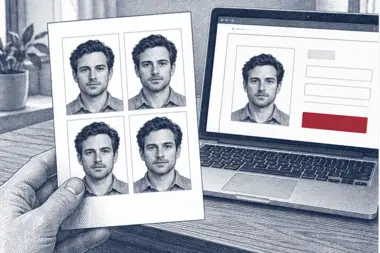
Most travellers now get their Vietnamese visa through the e-visa portal, and the application cannot be sent until it has a visa photo attached. Send us a photo from your phone: we cut it to the 4 × 6 cm Vietnam visa photo format, turn the background white and measure the head before you save the visa photo and attach it to the online form.
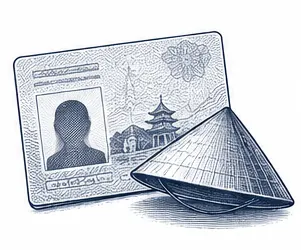
| Size | 40 × 60 mm |
|---|---|
| Head height | 40 mm |
| Background | white |
| Resolution | 300 dpi |
| File size | up to 1024 KB |
| Use | digital upload and print |
Vietnam visa photo size and the main rules
The standard Vietnam visa photo is 40 mm wide and 60 mm tall, which people often write as 4 × 6 cm. It is a tall rectangle, so it looks narrower than the square or nearly square passport photos some countries use. The head takes up most of the height: roughly 40 mm from the chin to the top of the hair, with about 6 mm of white above the hair. Everything below the chin shows the neck and the start of the shoulders.
Because the e-visa is handled online, what matters in practice is the digital visa photo. We save it at 300 DPI, which for this size works out at about 472 × 709 pixels, and keep the file under 1 MB (1024 KB) so the portal will take it. The same visa photo can be printed at its true size if you ever need a paper copy.
- Photo size: 40 × 60 mm, also written 4 × 6 cm, taller than wide
- Head height: about 40 mm, chin to top of the hair
- Gap above the hair: about 6 mm
- Background: plain white, without shadows or texture
- Resolution: 300 DPI; file size up to 1 MB
- Colour photo, recent, with no filters
The portal publishes its own photo instructions next to the form. Read them on the day you apply and compare them with your visa photo; if the portal lists a different size, pick it in our tool and the same upload is cut again.
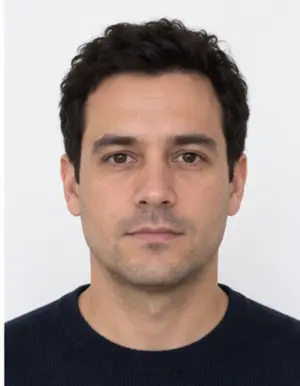
Framing the face in a 4 × 6 cm photo
Framing is where home-made photos go wrong most often. The face should sit in the middle of the frame, looking straight at the lens, with the head neither tilted nor turned. Both eyes must be open and clearly visible, and the whole face, from the hairline to the chin, has to fit inside the photo with a little room to spare at the top.
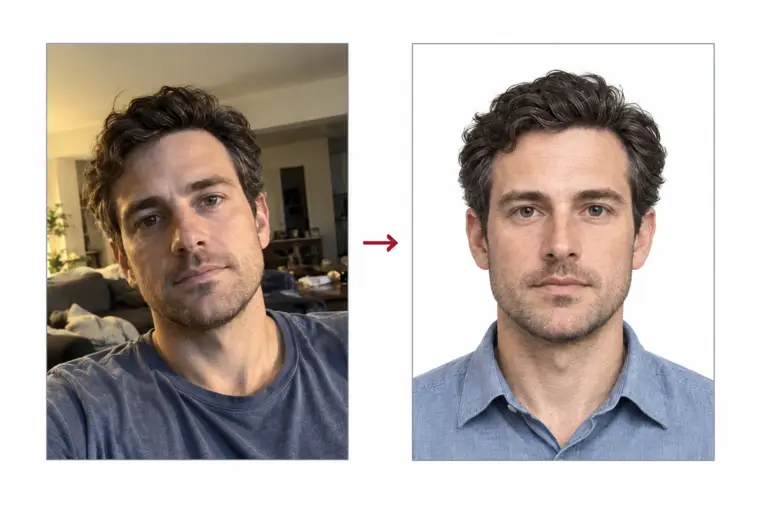
In a 40 × 60 mm frame the head fills about two thirds of the height. A distant shot from a holiday makes the face far too small; a close selfie makes it so large that the chin or the top of the hair is cut off. Our tool finds the face and sets the scale for you, so the proportions of your Vietnam visa photo come out right without a ruler or an editing app.
Keep your shoulders square to the camera and your chin level. Pull long hair back from the eyes and the edges of the face, so the outline of the head is easy to see.
Background, lighting and what to wear
The background of a Vietnam visa photo has to be white and even. You do not need a white wall at home: stand in front of any plain surface and our processing replaces it with clean white, including the faint shadow that often appears behind the shoulders. What we cannot repair is light that falls badly on the face itself, so that part is up to you.
Daylight from a window in front of you is the easiest source. It lights both cheeks equally and keeps the eyes bright. Strong sun from one side, a single ceiling lamp, or a lamp behind your head all leave dark areas that make the face harder to match with your passport photo. Switch off the flash as well; it bounces off skin and glasses and flattens the features.
Wear ordinary clothes in a darker or medium colour, so they stand apart from the white background. Avoid hats, caps, headphones and sunglasses. Head coverings worn for religious reasons are generally accepted when the face is fully visible, but check the instructions on the portal for the current wording. Keep a neutral face: mouth closed, no big smile, eyes on the lens.
-
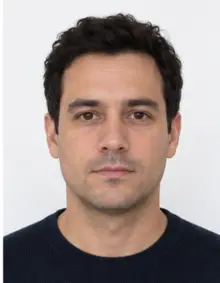 Accepted
-
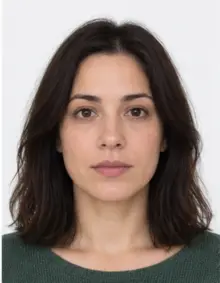 Accepted
-
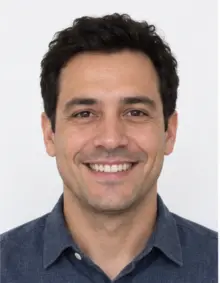 Smiling
-
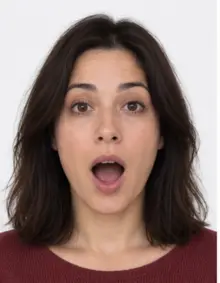 Mouth open
-
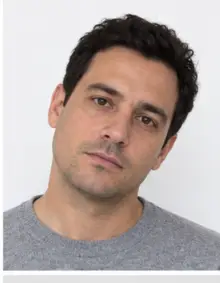 Head tilted
-
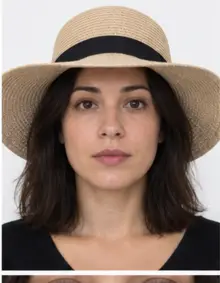 Fashion hat
-
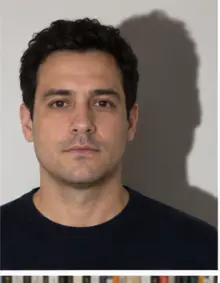 Shadow behind
-
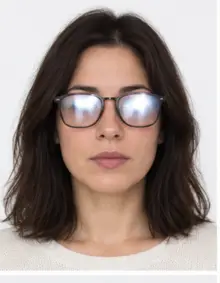 Glare on glasses
-
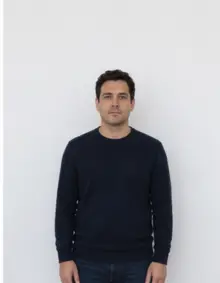 Too far away
-
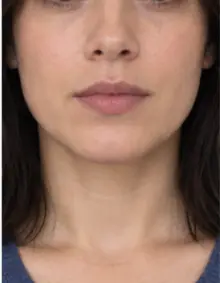 Head cut off
-
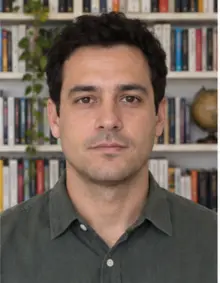 Busy background
-
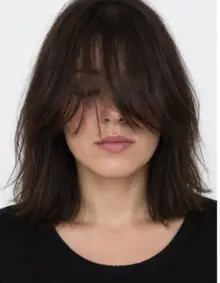 Hair over eyes
The people in these examples are AI-generated.
Glasses, filters and how recent the photo must be
The simplest choice is to take glasses off. Lenses catch reflections from windows and lamps, and thick frames can hide the eyes, which are the two usual problems with glasses in any visa photo. If you keep them on, make sure no glare covers your eyes.
Do not use beauty modes, portrait blur or filters on your phone. They smooth the skin, soften the hairline and change the shape of the face, and the visa photo has to look like you on the day you arrive in Vietnam. Use a photo taken recently, not an old one from your archive: a Vietnamese border officer compares the face in the e-visa with the person at the counter.
How to make a Vietnam visa photo with our tool
- Take the photo. Ask someone to hold the phone at eye level about one and a half metres away, or prop it on a shelf and use the timer. A photo taken at arm's length exaggerates the nose and the forehead.
- Upload it. Choose Vietnam Visa in our online document list and send the JPG, PNG, HEIC, PDF or other image file from your phone or computer. Everything runs online in the browser, with no app to install.
- Look at the result. We crop the photo online to 40 × 60 mm, swap the background for white and run the compliance check: head size and position, open eyes, neutral expression, sharpness and light. You see which points passed.
- Download or print. Save the digital Vietnam visa photo at no charge, or order a print sheet with several copies laid out at the correct size, ready to cut.
When the check finds something it cannot correct, such as closed eyes or a turned head, the result page tells you what to change. Take another photo and upload it again; there is no limit on attempts.
-
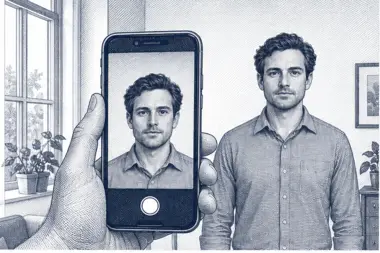 1. Take the picture
At home, against a plain wall, in daylight.
1. Take the picture
At home, against a plain wall, in daylight.
-
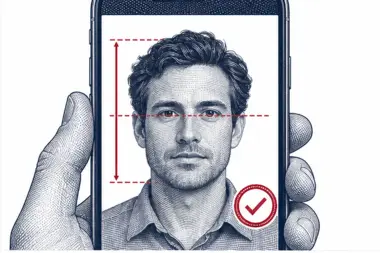 2. We check and crop
Head height, eye line and background are measured.
2. We check and crop
Head height, eye line and background are measured.
-
 3. Download or print
A file for the upload form or a print sheet.
3. Download or print
A file for the upload form or a print sheet.
Where to submit your Vietnam visa photo
Since 15 August 2023 the Vietnamese e-visa has been available to all nationalities, and it can be issued for up to 90 days with a single entry or multiple entries. You apply online, attach the Vietnam visa photo and a scan of your passport data page, pay the fee, and wait for the decision. According to the US State Department, a complete application is normally decided within three to five working days.
Use only the official online portal. On 11 November 2024 the service switched to the evisa.gov.vn and thithucdientu.gov.vn domains; the old address now shows a notice about the move. Many private sites look very similar and charge extra, so type the address yourself rather than following an advert.
Travellers who apply through a Vietnamese embassy or consulate instead of the e-visa portal may be asked for printed copies of the photo. In that case print the same visa photo at 300 DPI, or order a print sheet from us, and check the mission's own list of documents.
Digital file or printed photo
For the online e-visa you need a digital photo, not paper. A scan of an old print is a poor replacement: scanning adds blur, dust and colour shifts, and the head rarely ends up at the right scale. A fresh phone photo processed by our tool keeps its sharpness and arrives in the right size and proportions.
Save the downloaded photo somewhere easy to reach. If the portal asks you to correct the application, you can attach the same Vietnam visa photo without starting over. When you print at home, set the printer to actual size and turn off any fit-to-page option, or the 4 × 6 cm frame will shrink or stretch on paper.
Common reasons a Vietnam visa photo is rejected
- The head is too small, too large, or not centred in the frame.
- The background is grey, patterned, or shows a shadow.
- The photo is blurred, too dark or too bright.
- The head is tilted, turned, or partly hidden by hair or glasses.
- The expression is not neutral: a wide smile, an open mouth or closed eyes.
- A filter or beauty mode changed the face.
- The file is heavier than the portal allows, or a screenshot was uploaded instead of the original.
- The photo is an old one and no longer looks like the traveller.
Our check covers the size, the framing, the background and the visible quality of the photo. It cannot tell how old a photo is, so take a new one for each trip. The State Department also warns that small mismatches in an e-visa, such as a name typed differently from the passport, can lead to problems at the border, so check the text fields as carefully as the visa photo.
Examples of accepted and rejected visa photos
Comparing your photo with typical cases before you upload it online saves a second attempt. Photo problems are easy to spot once you know what to look for, and most of them come from the setup rather than the camera. Each line below describes one visa photo and the result it usually gets.
- Accepted: face centred, the head filling about 40 of the 60 mm of height, white background, soft light on both cheeks. This is the Vietnam visa photo our tool produces.
- Rejected, face too small: the traveller stood far from the camera and the head fills less than half of the photo.
- Rejected, shadow: a lamp on one side darkened half of the face.
- Rejected, tilt: the head leans towards one shoulder.
- Rejected, smile: teeth are showing; a visa photo needs a closed mouth.
- Rejected, glare: the window reflects in the glasses and hides the eyes.
- Rejected, filter: beauty mode removed skin texture and narrowed the face.
- Rejected, cut-off head: the top of the hair touches the edge of the frame.
Tips for taking the photo at home
A good source photo makes the result sharper. Any recent phone camera is enough for a photo you will process online; the setup counts for more than the model.
- Stand facing a window in the daytime, with no lamp switched on behind you.
- Keep a short gap between you and the wall so your shadow falls behind, not beside, you.
- Hold the camera at the height of your eyes and keep it straight.
- Leave space around the head and shoulders. We can crop to the right size, but we cannot add hair or shoulders that are missing from the photo.
- Clean the lens, turn off digital zoom, and take several shots so you can upload the sharpest one.
- Send the original photo, not a copy forwarded through a messenger that compresses images.
Photos for children and family trips
Every traveller to Vietnam who needs a visa files a separate application with a separate visa photo, children and babies included. The rules are the same as for adults. With a baby, lay them on a plain sheet and take the photo from above; our processing removes the folds and replaces the sheet with white. No hands or other people may appear in the frame.
For a family trip, photograph everyone by the same window in a row, so the light stays even. Name each downloaded photo after the traveller, so the right Vietnam visa photo goes into the right form.
Checklist before you upload the photo
- The visa photo measures 40 × 60 mm at 300 DPI, taller than it is wide.
- The head is about 40 mm tall and centred, with roughly 6 mm of white above the hair.
- The background is plain white from edge to edge, with no shadow.
- The photo file is under 1 MB and is the original download, not a screenshot.
- The photo is in colour, sharp and recent, with no filters.
- The expression is neutral and both eyes are open and visible.
- You compared the Vietnam visa photo with the instructions on the official online portal.
With every line ticked, the Vietnam visa photo is ready for the online application.
Before you start the online application
Have everything ready so the form can be finished in one sitting. You need a passport with six months or more of validity left on the day you enter Vietnam and has a blank page for the entry stamp, your visa photo as a checked file, a scan of the passport data page, the date you plan to arrive, and a decision on whether you want one entry or several. The photo rules are the same for both entry types.
Leave a few working days before the trip. Once the approval arrives, print the e-visa: the State Department advises that you show a printed copy together with your passport when you arrive in Vietnam. Some nationalities can enter Vietnam without a visa for a short stay; check the list on immigration.gov.vn before you prepare any documents.
Visa photo online, at a studio or in a booth
A studio can take a good photo, but it costs more, usually needs a trip or an appointment, and the staff may not know the 4 × 6 cm Vietnam format. A pharmacy kiosk or a booth is quick, yet it normally gives you a print rather than the digital photo the online portal wants. Making the visa photo online at home lets you try again until you are happy with the photo, and you see the size check before you download anything.
The Vietnam visa photo size in pixels and inches
Sizes in millimetres are hard to picture on a screen, so here is the same Vietnam visa photo size in other units. At 300 DPI a 40 × 60 mm photo is about 472 × 709 pixels. In inches it is about 1.57 × 2.36, which is narrower and taller than the 2 × 2 inch photo used for a US passport. The two formats are not interchangeable: a square photo cut down to 4 × 6 cm loses the space above the head or below the chin.
The ratio of the visa photo is 2 : 3. If an online form or a print shop asks for the size in another unit, these numbers describe the same file, and our download already has them built in, so you do not need to convert or resize the photo yourself.
Uploading the visa photo to the e-visa form
The e-visa form asks for two images: the visa photo and a scan of the passport page with your personal data. Make sure the visa photo goes into the photo field and the passport scan into the other one; mixing them up is an easy mistake when both files sit in the same folder. After the upload, the portal shows a preview. Look at it before you continue: the face should be sharp, upright and centred, and the background white.
If the online form refuses the visa photo, read the message it shows. A file that is too heavy, a format the portal does not take, or a face that is off-centre are the usual causes. Download the photo again from your result page rather than sending a screenshot, which changes the pixel size and adds a border. If the problem is the photo itself, such as shadows or blur, take a new one and process it online again; the size and crop of a Vietnam visa photo stay the same between attempts, so this takes a minute.
One visa photo for every e-visa purpose
The photo rules for the Vietnamese e-visa do not depend on why you travel. A tourist, a business visitor and someone visiting relatives all attach the same kind of visa photo in the same size; what differs is the information the online form asks for, not the photo. The same goes for the entry type: one entry or several, the visa photo is identical.
Travellers who visit Vietnam more than once can keep the photo. If you apply again online within a few months and still look the same, the visa photo can be attached once more. If your appearance has changed, with a new hairstyle, a beard or new glasses, make a fresh photo online so the face matches the one at the border.
Why the photo check matters for a Vietnam visa
The Vietnam visa photo you attach online becomes part of the e-visa you print and carry. A border officer in Vietnam compares the visa photo with your face and with your passport, so a dark, blurred or edited photo makes that comparison harder. A photo that fails the portal check can also hold up the application until you replace it, which costs days when you have a flight booked.
Our processing changes only the background, the crop and the size; it never reshapes the face. Premium correction adjusts light and colour and nothing else, so the visa photo still looks like you.
Free download or premium processing
The basic version gives you a correctly cropped Vietnam visa photo with a white background that has passed the automatic compliance check. For most applicants this is everything the online form needs.
Premium processing is an optional paid extra. We even out the light and colour, and a person on our team reviews the visa photo against the Vietnamese rules before you receive it. If the reviewer spots a problem that only a new photo can solve, you upload another one at no extra cost.
| Feature | Basic photo | Premium photo |
|---|---|---|
| 40 × 60 mm size | Yes | Yes |
| White background | Yes | Yes |
| Automatic compliance check | Yes | Yes |
| Light and colour correction | No | Yes |
| Manual review by our team | No | Yes |
Other Vietnamese document photos
A visa photo is not the same as the photo for a Vietnamese passport or an ID card. Those documents follow their own size and background rules, so a photo made for one is not automatically valid for another. If you are a Vietnamese citizen renewing a passport, choose the Vietnam passport in our list of photo requirements instead of the visa format.
Frequently asked questions
What size is a Vietnam visa photo?
We make the Vietnam visa photo 40 × 60 mm, or 4 × 6 cm, with a head of about 40 mm and a white background. Check the instructions on the official portal before you upload it.
Can a phone take a good Vietnam visa photo?
Yes. Stand facing a window, keep the phone at eye level and use a neutral expression. We crop the photo to the right size and make the background white.
Is the Vietnam visa photo free?
Making and downloading the digital photo costs nothing. Premium processing with a manual review is optional and paid.
What file size does the e-visa portal accept?
Our visa photo file stays under 1 MB at 300 DPI. The portal lists its own limits next to the form, so compare them before you upload.
Where do I apply for a Vietnam e-visa online?
Only through the official government portal. Since 11 November 2024 its addresses are evisa.gov.vn and thithucdientu.gov.vn.
Can I wear glasses in the photo?
Taking them off is the safest choice, because reflections and frames can hide the eyes. The portal states its current rule.
For how long can the Vietnam e-visa be issued?
Since 15 August 2023 it can be issued for a stay of up to 90 days, with a single entry or multiple entries.
Do I need to print the e-visa?
Yes. Bring a printed copy of the approved e-visa together with your passport when you enter Vietnam.
Can I reuse a passport photo for the Vietnamese visa?
Usually not. Passport photos from other countries have a different size and head scale, so it is quicker to make a new visa photo online.
How long does it take to get the photo?
Processing takes a few seconds after the upload, and you can download the visa photo straight away.